






A care manager opens three tabs before the first patient call of the day: one for electronic health records (EHRs), one for a referral portal, and one for a spreadsheet tracking prior authorizations. The patient is real, the time is limited, and the patient’s history is scattered across disparate systems.
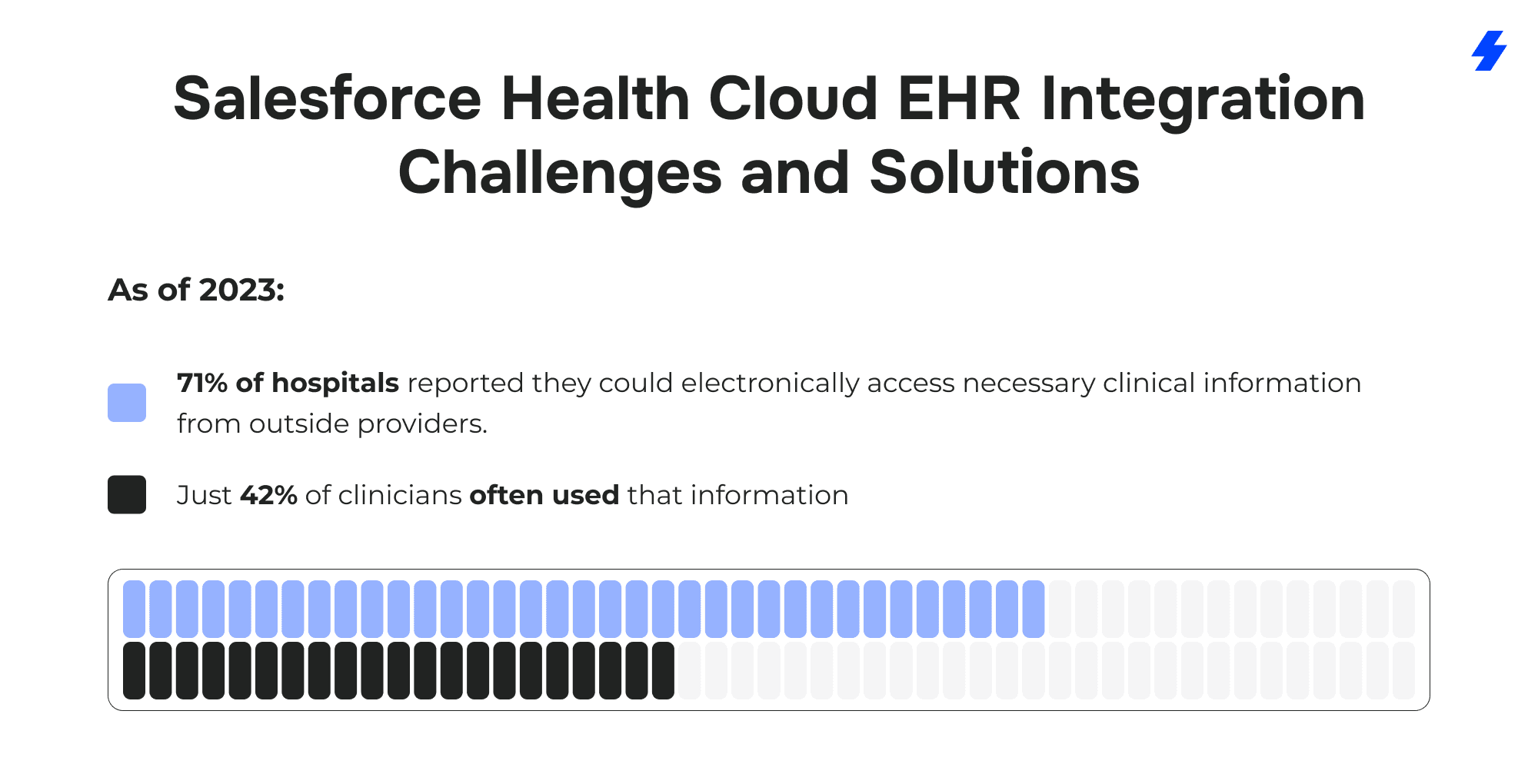
In the AMA’s 2024 survey, 93% of physicians said prior authorization delays patient care. The data problem shows up at the point of care as well: in 2023, 71% of hospitals reported that necessary clinical information from outside providers was available electronically, yet only 42% of clinicians often used it - an adoption gap that keeps patient information from translating into action.
This is where Salesforce Health Cloud earns its place. Health Cloud sits on the Salesforce platform as an engagement, workflow, and care coordination layer that helps healthcare professionals work from a comprehensive view of patient information.
The aim is practical: give care teams access to relevant clinical data alongside non clinical data: communications, barriers to access, social determinants, and service history, on a single platform, while electronic health record systems remain the system of record for clinical documentation.
When Salesforce Health Cloud integration is designed with clear goals and the right data boundaries, healthcare providers can spend less time reconciling patient records and more time acting on what matters: the patient’s medical history, current needs, and next steps in patient care.
What is Salesforce Health Cloud, and Why Integrate it With Electronic Health Records?
Salesforce Health Cloud is a Salesforce health application built on the Salesforce platform for the healthcare industry. Health Cloud brings patient engagement, workflow, and care coordination into one workspace so healthcare organizations can work from a unified view of patient information. It does not replace electronic health record systems. Electronic health records (EHRs) remain the system of record for clinical documentation, orders, and regulated clinical records. Salesforce Health Cloud integration sits next to ehr systems and focuses on the operational work that surrounds care delivery.
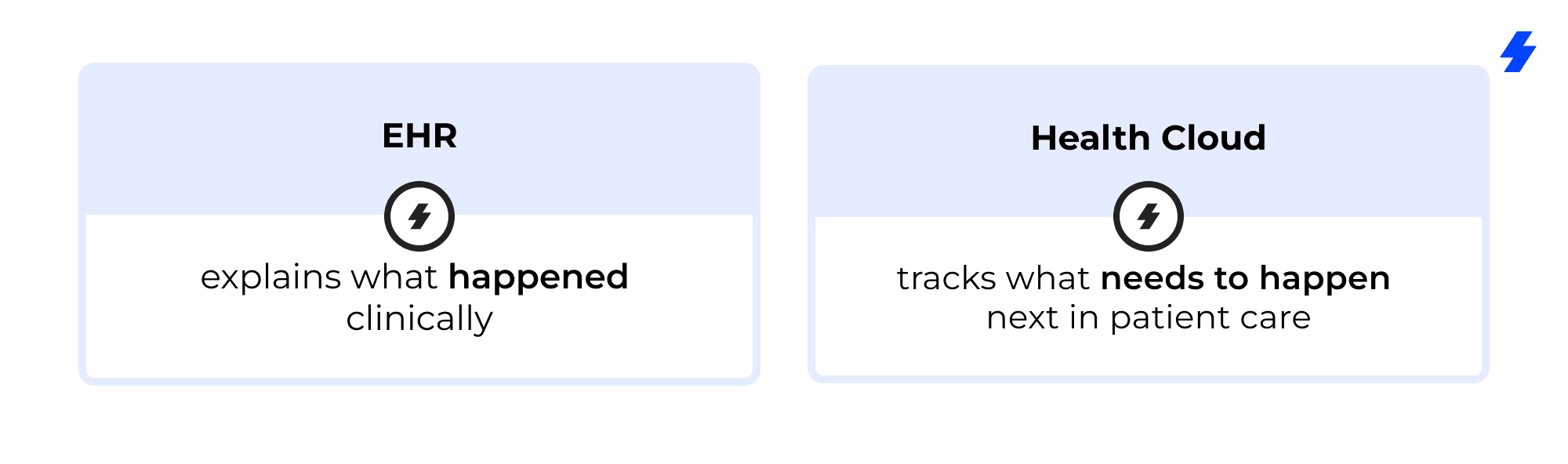
Where Health Cloud Fits vs. Where the EHR Fits
Electronic health records / EHR systems
- Captures clinical documentation and encounter narrative
- Stores authoritative clinical records and parts of the patient’s medical history
- Manages orders, results, and many clinical workflows depending on the build
Health Cloud (Salesforce Health Cloud)
- Organizes patient records for action: tasks, outreach, referrals, coordination steps
- Supports care teams with assignment, queues, and visibility across multiple providers
- Tracks work that often lives in different systems (call center, referral tools, home health, remote patient monitoring)
A simple mental model for healthcare providers: the EHR explains what happened clinically; Health Cloud tracks what needs to happen next in patient care.
What Changes When Patient Information is Accessible on a Single Platform
When patient information becomes available to healthcare professionals on a single platform, three practical things change:
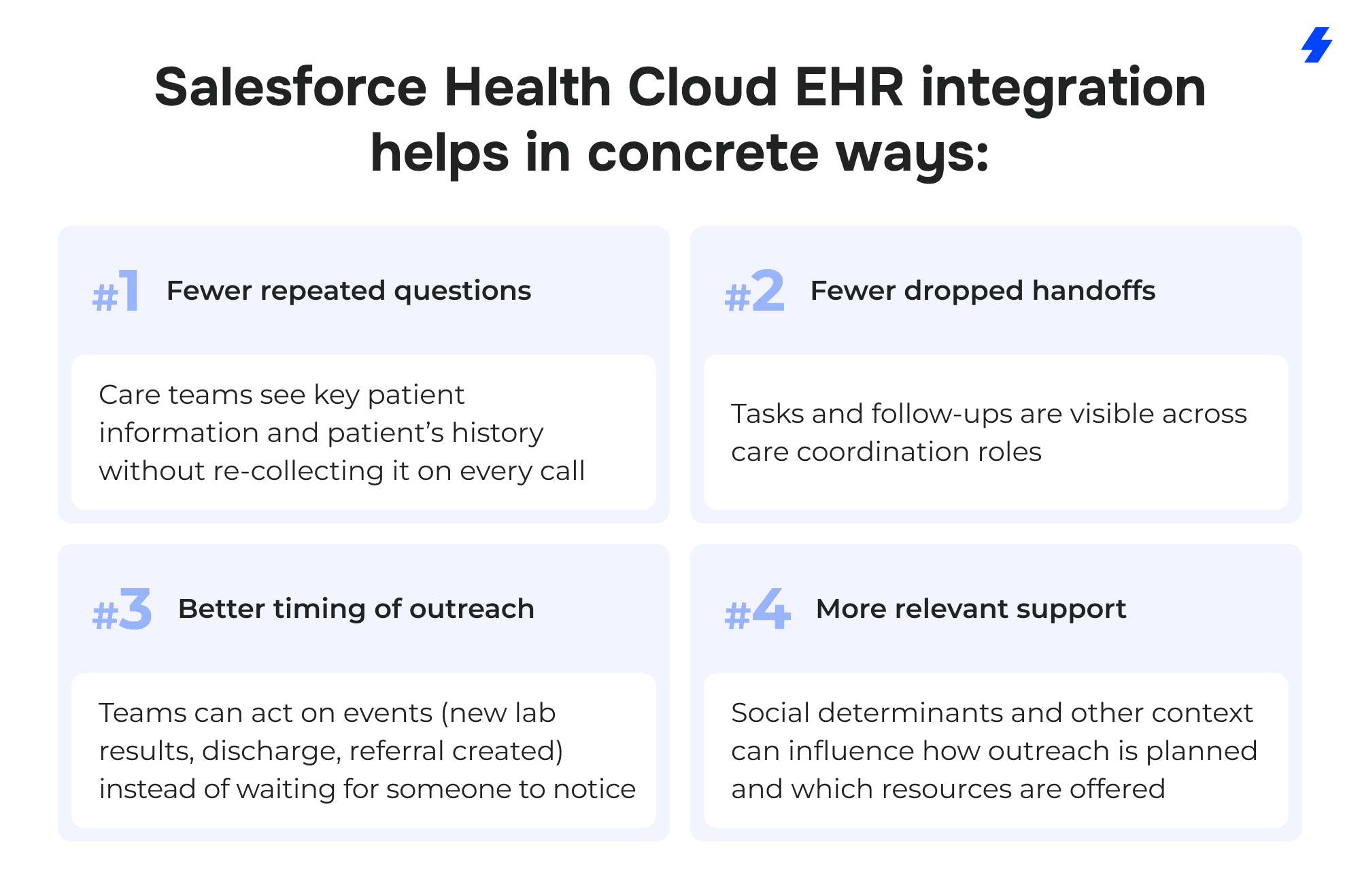
Less re-checking and re-keying
- Teams spend less time hunting for ehr data across screens and less time copying details into emails, spreadsheets, and messages.
- The “who has the latest?” problem shrinks because patient records are easier to compare across disparate systems.
Clear ownership for care coordination
- Work stops living in personal notes and inboxes.
- Tasks can be assigned to care teams with due dates and status, which matters when coordinating care across providers, home health, and services.
More context at the moment decisions are made
- Clinical data (diagnoses, medications, lab results) can sit next to non clinical data like communications history, access barriers, and social determinants.
- That context reduces avoidable back-and-forth during outreach and follow-up.
Story example (the kind of friction integration removes):
A nurse navigator sees two recent ED visits in electronic health records, but can’t tell why the patient keeps bouncing back. In Health Cloud, the navigator also sees missed appointment history, failed outreach attempts, and a transportation barrier recorded in nonclinical data. The next action becomes obvious: schedule follow-up, arrange transportation, and route a task to the right role, without guessing.
Why Healthcare Organizations Integrate Health Cloud with Electronic Health Records
Most healthcare organizations already run electronic health records (EHRs) plus a collection of different systems. The integration process is usually driven by operational needs, not curiosity.
Common reasons to integrate Salesforce Health Cloud with electronic health records:
- Build a holistic view of patient information across clinical data and non-clinical data
- Support interoperability across siloed systems used by multiple providers
- Reduce manual data entry into coordination tools and reduce duplicated patient records
- Improve visibility into the steps behind referrals and prior authorizations
- Create measurable workflows around care plans, treatment plans, and outreach tasks
How Integration Supports Patient Engagement and Improves Patient Satisfaction
Patient engagement improves when the organization’s actions feel consistent and predictable to patients.
Story example (patient satisfaction impact): A patient calls about a delayed prior authorization. Without Health Cloud integration, the call center can only promise a callback because the status lives in a separate tool. With Health Cloud and electronic health records connected, the agent can see the current stage, the responsible queue, and the next required document. The patient gets a clear update and a realistic next step, an interaction that tends to improve patient satisfaction because it removes uncertainty.
Integration Goals for Salesforce Health Cloud EHR Integration
Many Salesforce Health Cloud EHR integration projects stall for a predictable reason: the team starts with interfaces and mappings before agreeing on what “done” means. In healthcare organizations, that usually leads to a technically correct build that doesn’t change how providers and care teams work day to day.
A practical way to avoid that: define a small set of measurable outcomes tied to patient care and operations, then trace every integration decision back to those outcomes.
Start With a “Success Statement” That a Care Team Would Recognize
Instead of “integrate Salesforce Health Cloud,” write something you can measure:
- “Care coordinators can see the patient’s medical history highlights and current care plan context in Health Cloud without opening the EHR for every follow-up.”
- “Prior authorizations status is visible to the right queue, with timestamps, so escalations are based on facts.”
- “Duplicate patient records drop month over month because identity matching rules are enforced at intake.”
These statements force clarity about patient information, ownership, and what belongs in electronic health records versus Health Cloud.
Measurable Integration Goals to Set Upfront
Pick 3–5 goals that reflect what the healthcare industry actually struggles with during the integration process. Here are targets that map cleanly to Salesforce Health Cloud integration work:
Unified view / holistic view of patient records and patient’s medical history
- Measure: % of target users who can complete a defined workflow using the Health Cloud view without hunting across disparate systems.
- Evidence: time-on-task testing with healthcare professionals.
Reduce manual data entry to support “streamline workflows”
- Measure: number of fields typed manually per case (baseline vs post-launch) for specific workflows like referrals, outreach, and care coordination.
- Evidence: screen recordings, task analytics, or sampled case audits.
Shorten time to coordinate prior authorizations
- Measure: median cycle time from “authorization needed” to “ready for scheduling,” plus number of handoffs
- Evidence: queue timestamps, status history, exception reasons.
Boost patient satisfaction and patient outcomes (operational lens)
- Patient satisfaction measure: reduction in “no status update” calls, fewer rescheduled visits due to coordination gaps, improved follow-up completion.
- Patient outcomes measure (non-medical framing): higher completion rate of follow-up steps in care plans and treatment plans (appointments attended, outreach completed, referrals closed-loop).
Lower costs via operational efficiency
- Measure: hours per week spent on reconciliation across siloed systems, number of rework loops, cost per completed coordination episode.
- Evidence: time studies, volume metrics, and rework counts.
Translate Goals Into Scope Boundaries
Goal-setting also protects patient data and reduces wasted build effort.
Examples of scope boundaries that come directly from goals:
- If the goal is a unified view for care teams, pull high-value clinical data (problem list summary, meds, allergies, recent lab results) rather than every clinical record.
- If the goal is operational efficiency, prioritize write-back only where it reduces double-work without creating source-of-truth conflicts.
- If the goal is patient satisfaction, integrate status and milestones that patients ask about (referrals, scheduling, prior authorizations), not obscure fields that rarely change decisions.
Mini Checklist
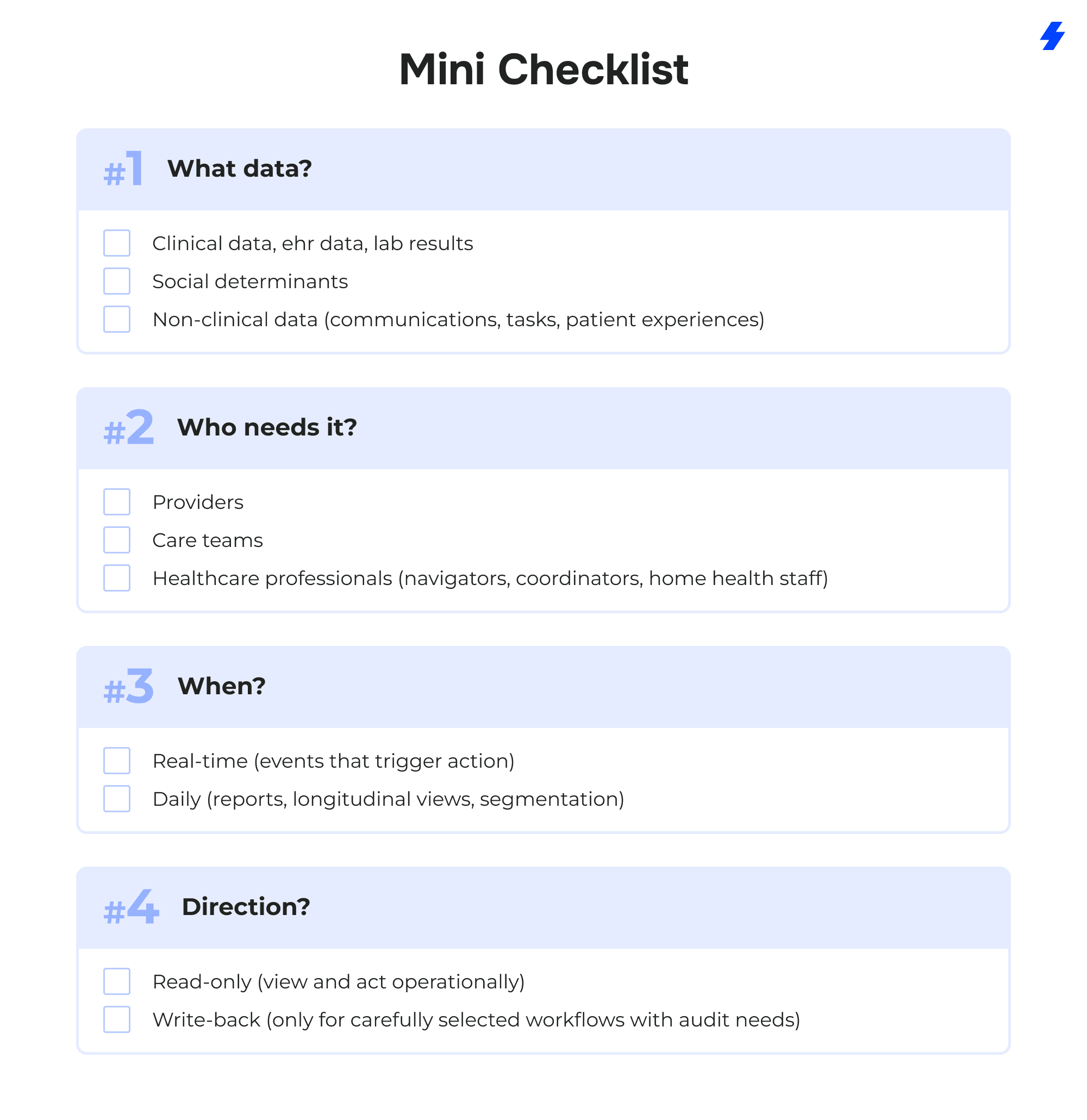
Integration Patterns Decision Matrix for Salesforce Health Cloud EHR Integration Solutions
Salesforce Health Cloud EHR integration work tends to go faster when the team names the pattern early. The pattern dictates how healthcare data moves from ehr systems into Health Cloud, what “fresh” means for patient information, and how much mapping and monitoring effort the integration process will demand across disparate systems and multiple providers.
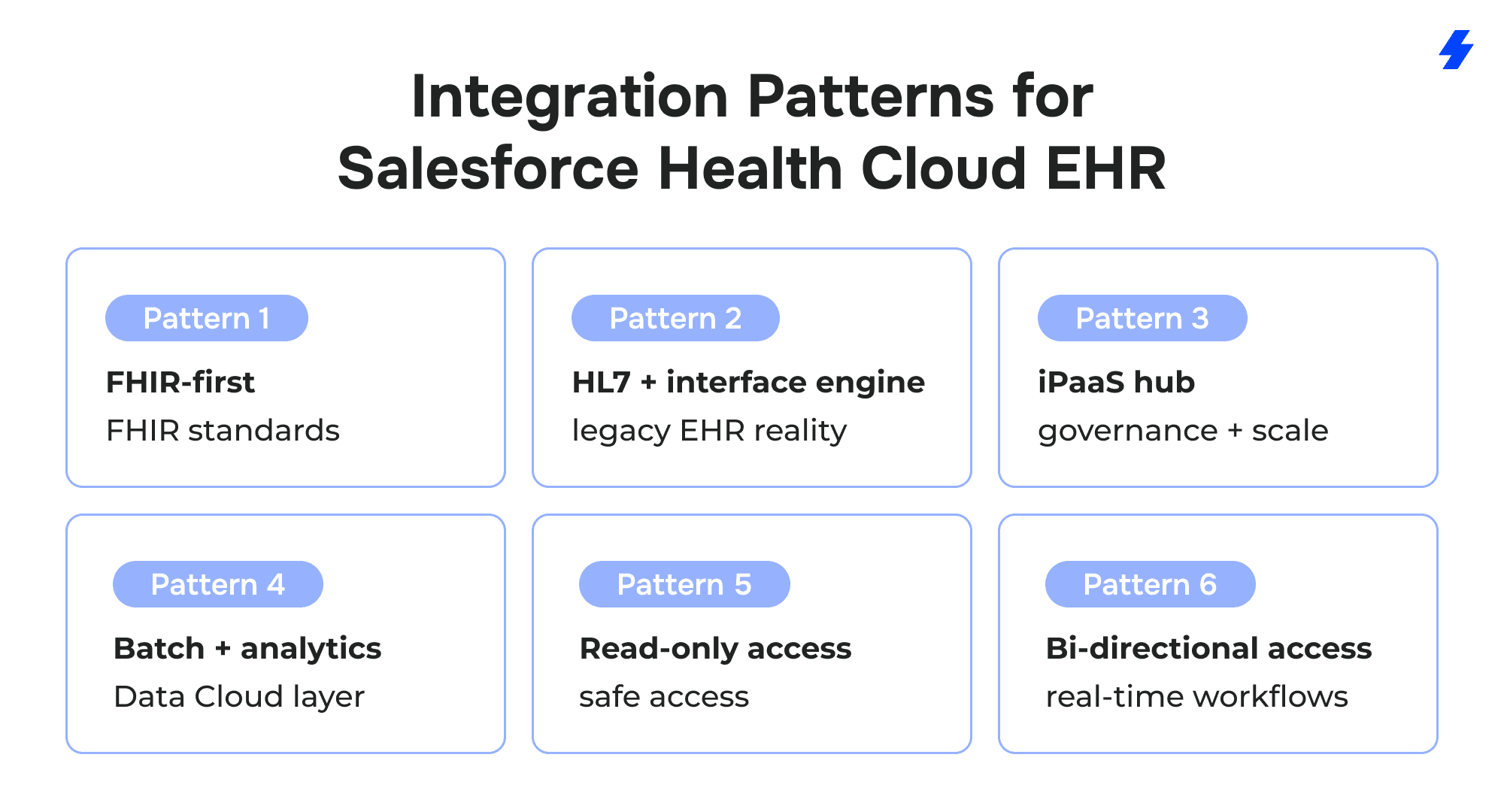
FHIR-First Pattern (FHIR Standards)
FHIR-first works when EHR systems expose modern APIs with practical coverage for the clinical data the workflow depends on: patient demographics, encounters, medications, allergies, and lab results. The build typically pulls selected EHR data into Health Cloud so care teams can act without switching screens for every step.
FHIR standards and related industry standards reduce mapping pain by giving you recognizable structures for common domains. That doesn’t eliminate mapping work, but it reduces the number of “local inventions” that arise when sources export data differently.
Example: a care coordinator opens a patient record in Health Cloud and needs the latest A1c lab results before starting outreach. With a FHIR-based pull, the Observation data can be retrieved predictably and displayed alongside tasks and prior authorizations work. Without FHIR, the same “A1c result” may arrive in different message variants depending on the facility, forcing custom logic that grows over time.
HL7/Interface-Engine Pattern (Legacy EHR Reality)
HL7 feeds and an interface engine remain the daily reality for many healthcare providers. This pattern fits organizations that already route ADT messages, orders, and results through established integration infrastructure. Health Cloud integration then consumes those feeds to update patient records, trigger care coordination tasks, and keep operational teams aligned.
HL7 is often strongest for event-driven workflows: “patient discharged,” “result posted,” “referral created.” Those events can create tasks for care teams, route work to queues, and update the operational status that a patient-facing team needs.
Example: a home health team starts outreach the same day a discharge event arrives. The EHR holds the discharge summary and clinical records. Health Cloud holds the outreach tasks, attempts, patient experiences, and handoffs across roles.
iPaaS Hub Pattern (Governance + Scale)
An iPaaS hub becomes attractive when Salesforce Health Cloud integration expands beyond the EHR. Scheduling, referral management, contact center systems, remote patient monitoring vendors, and home health platforms introduce new healthcare data flows and new failure modes. A hub pattern centralizes transformations, monitoring, retries, and alerting so integrations behave consistently across teams.
Point-to-point connections often multiply into a maintenance problem. Each new workflow introduces another custom mapping, another job, and another place where patient data can drift. A hub pattern reduces duplicate work by enforcing common contracts and shared logic.
Example: a network adds a second RPM vendor. With point-to-point, the team builds a second set of mappings and monitoring from scratch. With an iPaaS hub, the new vendor maps into the same canonical events that already feed Health Cloud workflows.
Batch + Analytics Pattern (Data Cloud Layer)
Batch + analytics is the right choice when the primary goal is analysis over time: segmentation for patient engagement, reporting across multiple providers, and AI-powered operational insights that rely on longitudinal history. Data Cloud serves as an optional layer that unifies identity signals, supports deduplication at scale, and prepares healthcare data for analytics without burdening operational systems with constant queries to electronic health records.
This pattern is especially useful when clinical data and non-clinical data need to be analyzed together: lab results, encounters, outreach attempts, appointment adherence, and social determinants signals. Health Cloud can then consume segments or prioritized worklists derived from Data Cloud outputs.
Example: a program team wants to identify patients who repeatedly miss follow-ups and also report transportation barriers. Data Cloud can combine appointment history, engagement data, and social determinants indicators into a segment that care teams can act on inside Health Cloud.
Read-Only vs Bi-Directional Write-Back
Read-only access is the default for many healthcare organizations because it protects clinical records and avoids confusion over the source of truth. Health Cloud can display selected clinical data and EHR data for context while operational work is underway: tasks, care coordination notes, care plans, and outreach.
Bi-directional write-back is reserved for narrow, governed cases where the EHR expects an update and the organization can meet audit requirements. Write-back introduces real risks: overwriting clinical records, unclear ownership, and hard-to-explain discrepancies during reviews.
Example: a team writes back a status field to the EHR to reduce phone calls about prior authorizations. The same team avoids writing back clinical assessments because the EHR remains the authoritative system for clinical documentation, and the audit burden would be disproportionate to the operational benefit.
Reference Architecture for Salesforce Health Cloud EHR Integration and Healthcare Data Flows
This reference architecture shows how healthcare organizations can connect ehr systems and other different systems to Salesforce Health Cloud while keeping patient data security boundaries clear. It’s designed for care teams who need a unified view for patient care, without turning Health Cloud into the system of record for clinical records.
Diagram description
Layout: left → right, with four vertical zones separated by boundary lines.
Zone 1 (Sources): “Clinical + Operational Systems”
Place these boxes on the far left:
- EHR Systems / Electronic Health Record Systems (label as system of record for clinical records)
- Lab System (lab results)
- Scheduling System (appointments)
- Prior Auth / Utilization Management (prior authorizations)
- Referral Management (referrals)
- Remote Patient Monitoring Platform (remote patient monitoring)
- Home Health System (home health visits, orders/status)
- Optional small box: Community Resource Directory (community resources)
Zone 2 (Integration & Interoperability): “Integration Layer”
Middle-left, a single larger box with smaller labels inside:
- API / FHIR Standards Connector
- HL7 / Interface Engine
- iPaaS / Integration Hub
- Under it, add “Routing • Transformations • Monitoring • Retries • Reconciliation”.
Zone 3 (Customer 360 & Workflow): “Salesforce Platform”
Middle-right, a large box labeled: Salesforce Platform
Inside it, two main components:
- Salesforce Health Cloud (care coordination + patient engagement + workflows)
- (Optional) Data Cloud layer (data cloud optional layer)
Add a bold vertical line on the left edge of this zone labeled: Patient data security boundaries
Under the label, include a short note: “RBAC • MFA/SSO • Encryption • Audit logging • Consent/Policy controls”.
Zone 4 (Consumers): “Downstream Apps & Experiences”
Far right, three boxes that connect from Health Cloud:
- Care Coordination Workspace (queues, tasks, care plans)
- Home Health Outreach (visit coordination, follow-ups)
- Remote Patient Monitoring Operations (alerts, triage tasks)
- Optional box below: Patient Communications Channels (SMS/email/portal/contact center)
Arrows (healthcare data flows):
- From EHR Systems → Integration Layer → Salesforce Health Cloud. Label the arrow: “Clinical data / EHR data (read-only by default)”.
- From Lab System → Integration Layer → Salesforce Health Cloud. Label: “Lab results (key signals for tasks)”.
- From Scheduling / Prior Auth / Referral → Integration Layer → Salesforce Health Cloud. Label: “Admin status + milestones”.
- From RPM Platform → Integration Layer → Salesforce Health Cloud. Label: “Device readings + alerts (operational triage)”.
- From Community Resource Directory → Integration Layer → Salesforce Health Cloud. Label: “Context: social determinants + community resources”.
- From Salesforce Health Cloud → Downstream Apps. Label: “Work routing + outreach + documentation tasks”.
- Optional dotted arrow from Salesforce Health Cloud ↔ EHR Systems. Label: “Write-back (only where governed)”.
Architecture Narrative (How the Pieces Work Together)
EHR Systems / Electronic Health Record Systems (system of record)
EHR systems remain authoritative for clinical records, orders, and encounter documentation. Salesforce Health Cloud integration pulls selected clinical data and EHR data for context so healthcare professionals can coordinate work without forcing the EHR to become the operational task manager.
Integration layer (where healthcare data flows are shaped)
The integration layer handles routing and transformations across disparate systems. It normalizes healthcare data into a consistent format before it reaches Health Cloud, supports monitoring and retries, and prevents cascading changes when an upstream system updates a field or event structure.
Salesforce Platform with Salesforce Health Cloud (workflow + coordination)
Salesforce Health Cloud holds the operational view: patient records presented for action, tasks for care teams, communications history, and care coordination status across multiple providers. It becomes the working surface for patient engagement and coordination workflows.
Data Cloud optional layer (analytics + segmentation + identity signals)
The Data Cloud optional layer supports longitudinal analysis, segmentation, and ai powered operational insights. It is useful when healthcare organizations want a unified view for reporting and targeting (for example, gaps-in-care outreach lists), without building analytics directly into every operational workflow.
Downstream apps (where teams do the work)
Downstream apps consume Health Cloud work outputs:
- Care coordination: queues, follow-ups, care plans, handoffs
- Home health outreach: visit planning, discharge follow-up, escalation paths
- Remote patient monitoring: alerts → triage → tasks → follow-up documentation
Data Domains (What Data Lives Where)
Clinical domain
- diagnoses
- medications
- lab results
- encounters
Used to provide context inside Health Cloud; clinical records remain in electronic health record systems.
Engagement domain
- communications
- tasks
- patient experiences
Used to track patient engagement and the operational steps that care teams own.
Admin domain
- prior authorizations
- referrals
- scheduling
Used to coordinate steps that frequently drive delays and patient dissatisfaction.
Context domain (non-clinical data)
- social determinants
- community resources
Used to capture barriers and supports that affect follow-through and patient outcomes.
Top Salesforce Health Cloud EHR Integration Challenges
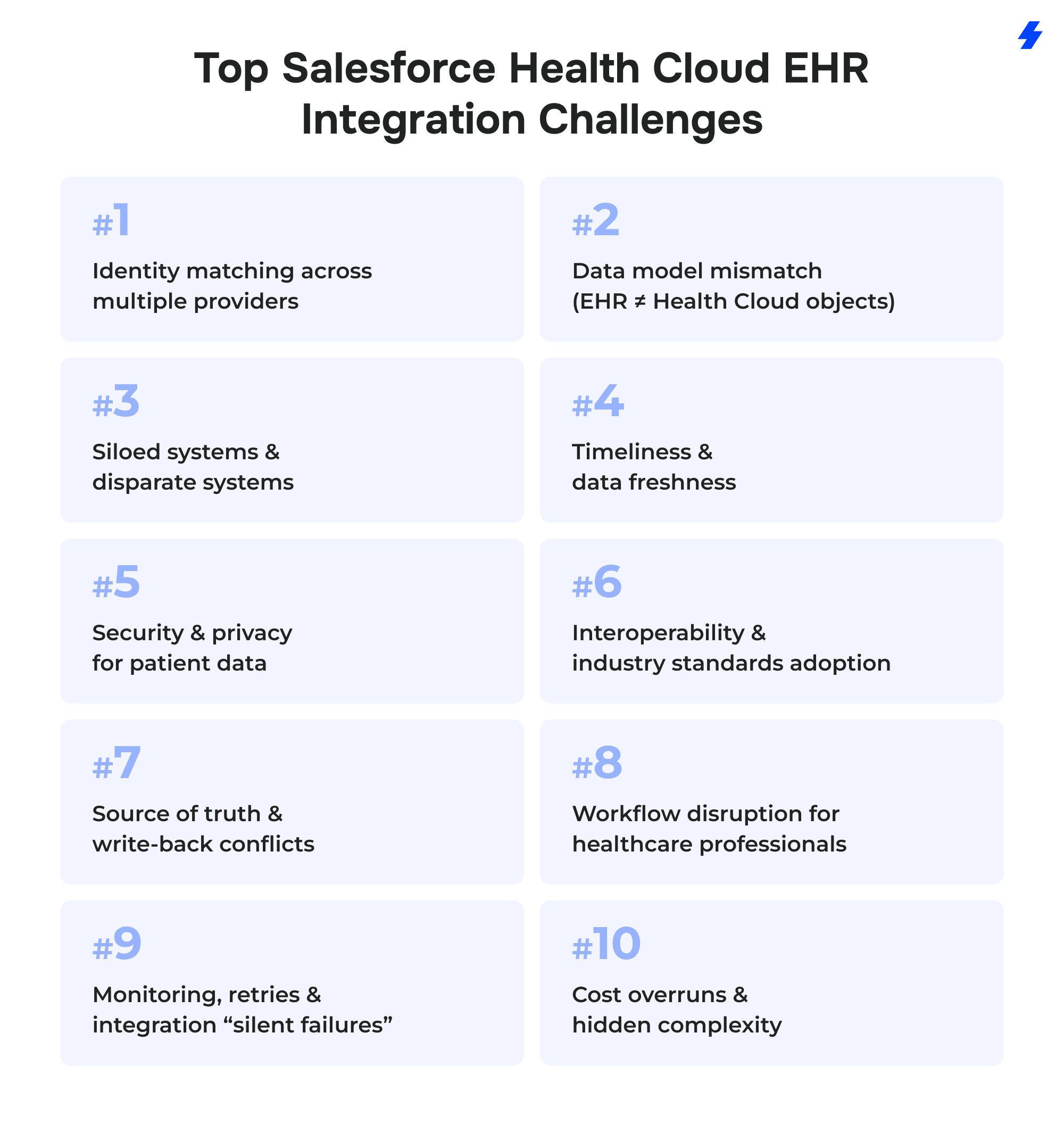
Challenge 1: Identity matching across multiple providers
Symptom
Care teams see duplicate patient records in Health Cloud. The patient’s history splits across profiles, and outreach goes to the wrong phone number.
Root cause
Electronic health record systems often create new records when demographics differ slightly (name formats, old addresses, missing MRNs). Disparate systems may carry different identifiers, and merges happen in one system but not in downstream systems.
Right solutions
- Define an enterprise identity strategy: MRN + facility identifiers + a cross-system master key.
- Implement matching rules (deterministic first, probabilistic where allowed) and publish them as governance policy.
- Create stewardship workflows: who approves merges, how conflicts are resolved, how changes propagate back.
- Track “golden record” ownership per domain of patient information.
Example
A patient is registered at two clinics under “Kateryna” and “Katherine.” Health Cloud links both to one person using a rule set (DOB + phone + address score), flags the match for steward review, and stores the final link as the reference for future ingests.
Challenge 2: Data model mismatch (EHR ≠ Health Cloud objects)
Symptom
Clinical data arrives, but it lands in inconsistent fields or custom objects. Healthcare professionals can’t find diagnoses, medications, or lab results where they expect them.
Root cause
EHR data is organized for documentation and billing workflows, while Salesforce Health Cloud is organized for engagement, care coordination, and operational work. Mapping clinical records into Health Cloud objects without a design layer leads to one-off decisions that don’t scale.
Right solutions
- Create a canonical model for key domains (Patient, Encounter summary, Medication summary, Observation/lab summary).
- Maintain mapping docs with field-level rules, code system assumptions, and examples.
- Build validation routines: schema checks, value set checks, and referential integrity (patient → encounter → results).
- Keep “display vs store” clear: some data can be rendered from source without long-term storage.
Example
Instead of storing every Observation, the build stores a lab summary (latest A1c, latest LDL, timestamps) for workflow decisions, while preserving links back to the EHR for full clinical records.
Challenge 3: Siloed systems and disparate systems
Symptom
Teams keep using spreadsheets and inboxes even after Salesforce Health Cloud integration goes live. Patient records look “complete,” but the workflow still fragments.
Root cause
Too many systems are integrated at once, without a clear first set of high-value use cases. Different systems also encode the same event differently (referral created vs referral accepted), causing confusion.
Right solutions
- Standardize event definitions and status vocabularies across systems.
- Prioritize a small set of workflows where Health Cloud becomes the operational home (referrals, prior authorizations tracking, discharge follow-up).
- Use a phased rollout by service line or facility, then expand across multiple providers.
Example Phase 1 focuses on referrals + scheduling handoffs for one specialty clinic. Phase 2 adds home health outreach. RPM integration waits until tasking and ownership are stable.
Challenge 4: Timeliness and data freshness
Symptom
A care coordinator sees outdated medications or yesterday’s lab results. Patient engagement outreach triggers at the wrong time.
Root cause
The integration process mixes real-time triggers with batch loads without labeling freshness. Some workflows require near-real-time updates; others are fine daily. Without explicit SLAs, teams assume “current” and lose trust.
Right solutions
- Define freshness per data domain: clinical data vs admin vs engagement.
- Use real-time for events that trigger action (admit/discharge, critical RPM alerts, referral status changes).
- Use batch for history, reporting, and segmentation.
- Place Data Cloud where longitudinal analytics and dedupe signals are needed, not where instant task routing is required.
Example
Discharge events update Health Cloud within minutes to start follow-up tasks. Data Cloud ingests weekly history for analytics and produces segments for outreach programs.
Challenge 5: Security & privacy for patient data
Symptom
Security reviews block go-live, or users get overly broad access “to make it work,” increasing risk for patient data.
Root cause
Patient data security boundaries aren’t designed into the architecture. Access rules are bolted on after objects and workflows exist, which creates exceptions and weak auditability.
Right solutions
- Role-based access control combined with record-level sharing rules and Care Team membership logic; separate access for clinical data views vs operational notes.
- MFA/SSO with strong session policies for healthcare professionals and vendors.
- Encryption for sensitive fields and tokenization where applicable, combined with role-based access control, audit controls, and safeguards aligned to HIPAA Security Rule requirements.
- Audit controls with policy-aligned retention and monitoring for anomalous access patterns, leveraging Salesforce Shield Event Monitoring and Field Audit Trail to support HIPAA-aligned compliance logging requirements.
Example
Home health outreach staff see task details and contact preferences but not sensitive clinical records; clinicians see clinical summaries. Every access to high-risk fields is logged and reviewable.
Challenge 6: Interoperability and industry standards adoption
Symptom
“Standards-based” integrations still require heavy transformations. Two facilities send the “same” lab result with different codes.
Root cause
Industry standards such as FHIR and HL7 define structured resource formats but do not guarantee full semantic alignment. Local configuration choices, code systems, optional elements, and vendor-specific implementation guides create variation across healthcare organizations and EHR systems. FHIR standardizes structure, but terminology alignment and implementation constraints remain necessary for true interoperability.
Right solutions
- Use standards where available, then normalize with a transformation layer.
- Enforce terminology normalization in the integration layer using LOINC/SNOMED/RxNorm mappings where relevant.
- Maintain versioned contracts and test data sets per source system.
Example
The integration accepts FHIR Observations from two EHRs, maps both to a common lab summary format, and flags unmapped codes for review instead of silently dropping them.
Challenge 7: Source of truth and write-back conflicts
Symptom
Teams argue about which system is “right.” Updates in Health Cloud don’t match electronic health records, and trust drops.
Root cause
Write-back is added without clear ownership, conflict handling, and audit requirements. Health Cloud begins to look like a system of record for clinical records, which creates governance and compliance problems.
Right solutions
- Declare source of truth per domain: clinical records in EHR; engagement and operational work in Health Cloud.
- Limit write-back to tightly defined use cases with reconciliation and audit trails.
- Add conflict rules: last-write-wins is rarely acceptable for patient data.
Example Health Cloud writes back an administrative status (“prior auth submitted/approved”) when the EHR supports it, but does not write back diagnoses or clinical assessments.
Challenge 8: Workflow disruption for healthcare professionals
Symptom
Adoption stalls. Providers and care teams say the system adds clicks and slows patient care.
Root cause
Health Cloud screens are designed around data availability, not around how healthcare professionals work. Users are asked to search, navigate, and interpret instead of being guided by queues and next actions.
Right solutions
- Role-based UI: different layouts for care coordinators, nurses, call center, home health.
- Minimize clicks with pre-filtered worklists and contextual panels.
- Training based on real scenarios (referral follow-up, missed appointment, RPM alert triage), not generic product tours.
Example A nurse opens a “Post-discharge follow-up” queue and sees only the fields needed to act: discharge date, risks, contact attempts, next task. Clinical summaries are visible but not center stage.
Challenge 9: Monitoring, retries, and integration “silent failures”
Symptom
A referral status stops updating. Nobody notices until a patient calls. The data is “missing,” but no alerts fired.
Root cause
Integration observability is incomplete. Errors are logged in one tool, retries happen elsewhere, and reconciliation is missing across healthcare data flows.
Right solutions
- End-to-end observability: correlation IDs from source → integration layer → Health Cloud.
- Retries with backoff and dead-letter queues; human-friendly failure queues for triage.
- Reconciliation jobs that compare counts and key statuses between systems.
- Alerting based on business impact (e.g., “no discharge events in 2 hours”), not only technical errors.
Example If ADT messages drop, the system alerts on “expected vs received” volume, not just on interface errors. A reconciliation report shows which patient records missed updates.
Challenge 10: Cost overruns and hidden complexity
Symptom
The project expands, timelines slip, and stakeholders lose confidence. The integration process becomes a permanent build.
Root cause
Scope grows from “integrate everything” and every stakeholder request becomes a requirement. Mapping and testing complexity increases with each additional data domain and each additional provider.
Right solutions
- Scope control tied to measurable goals; defer low-value domains.
- Phased releases with clear milestones and acceptance criteria.
- Budget for test data, validation, and change management—these consume real effort.
- Reuse integration assets (canonical model, mapping docs, automated validation) across multiple providers.
Example Phase 1 delivers a unified view for a single service line with referrals + prior authorizations + key clinical summaries. Phase 2 adds remote patient monitoring workflows. Phase 3 expands to additional facilities after identity matching and monitoring proves stable.
Clinical + Non-Clinical Data: Building a True Holistic View
A holistic view comes from combining clinical data from electronic health records with non-clinical data that explains what happens outside the encounter. EHR data can show diagnoses, medications, encounters, and lab results, but it often misses the constraints that shape follow-through. Bringing both into Health Cloud creates a comprehensive view of patient information that care teams can act on.
Why Social Determinants Matter to Patient Outcomes and Patient Experiences
Social determinants influence whether the patient can access care, adhere to plans, and stay engaged. When these signals are missing, outreach becomes generic and delays repeat. When they are visible, teams can focus on barriers that affect patient outcomes and patient experiences.
How to unify EHR data with outreach, access barriers, transportation, food insecurity signals
- From electronic health record systems: keep ehr data as summaries that support action (key diagnoses, medications, recent encounters, critical lab results).
- In Health Cloud: store outreach history, communication preferences, tasks, and care coordination status.
- Context layer: capture access barriers and social determinants (transportation, food insecurity) with links to community resources.
- Workflow linkage: connect barrier signals to routing rules and task creation so care teams see “what to do next,” not only “what happened.”
How does his help deliver personalized care and personalized care plans
A shared view of clinical and non-clinical data supports personalized care by making constraints explicit. Personalized care plans become easier to execute when operational steps (outreach, referrals, services) are built around the patient’s reality, not only the clinical plan.
Remote Patient Monitoring + Home Health Workflows
Remote patient monitoring and home health introduce fast-moving signals that often live outside electronic health records. For connected care, those signals need an operational landing zone where care coordination happens and responsibilities are visible.
RPM data isn’t always in electronic health records - where it should land and how it should trigger tasks
- Operational events in Health Cloud: alerts, device status, adherence signals, timestamps, and ownership fields.
- History and analytics (optional): store detailed readings in the RPM platform or a data cloud optional layer for reporting and ai powered prioritization.
- Task triggers: generate tasks based on thresholds, missed readings, or repeated alert patterns, aligned to capacity.
Care teams workflows: alerts → triage → follow-up → documentation
- Alerts enter the workflow.
- Triage assigns the right owner and priority.
- Follow-up records the outcome and next step.
- Documentation captures operational notes in Health Cloud and updates the EHR only where governance supports it.
Guardrails to avoid noise and improve patient satisfaction
- Filter duplicates and bundle repeated alerts.
- Route by role to protect clinician time.
- Define response expectations by alert category.
- Review alert-to-action rates and tune rules.
Data Cloud and AI-Powered Personalization
Data Cloud becomes useful when Salesforce Health Cloud integration needs more than a shared screen for patient records. It adds a layer that pulls signals from Health Cloud, electronic health records, and other systems to form a unified view suitable for segmentation and analysis, not only for day-to-day tasking.
Why Data Cloud Fits in the Architecture
- Cross-channel segmentation: builds audiences for outreach across email/SMS/call center/portal based on behavior and status, supporting patient engagement programs.
- Dedupe signals: correlates identity hints across sources (contact details, device identifiers, encounter history) to reduce fragmentation in patient records.
- Longitudinal analytics: supports trends over time, so healthcare organizations can measure what happened across episodes of care and coordination cycles.
Data Cloud doesn’t replace the EHR or Health Cloud workflows. It supports them by creating analytics-ready data products and segments that can be activated back in Health Cloud.
How “AI-Powered” Personalization Works
“AI-powered” is most valuable when it ranks work and suggests next actions based on operational signals.
- Prioritization: rank outreach lists by likelihood of needing follow-up (based on missed appointments, unresolved referrals, repeated failed contact).
- Next-best workflow: suggest the appropriate queue or outreach sequence based on past patient engagement responses.
- Capacity-aware routing: focus care teams on cases that are stuck, time-sensitive, or frequently escalated.
- The output should be explainable: which signals drove the suggestion and what action is recommended.
Use Cases That Connect to Patient Satisfaction
- Engagement journeys: trigger reminders, follow-ups, and education sequences based on events and response history to support patient engagement consistency.
- Gaps-in-care outreach: generate lists for coordinators based on missed follow-ups, overdue referrals, or incomplete administrative steps, then push those segments into Health Cloud work queues.
- Risk stratification support (non-medical): prioritize operational risk such as “high chance of no-show,” “high likelihood of unreachable,” or “authorization delay risk,” helping teams intervene earlier.
When Data Cloud outputs feed Health Cloud tasking, the result is a more targeted outreach approach and fewer random follow-ups - an effect that tends to improve patient satisfaction because communication becomes timely, relevant, and repeatable.
Implementation Roadmap for Salesforce Health Cloud EHR Integration in Healthcare Organizations
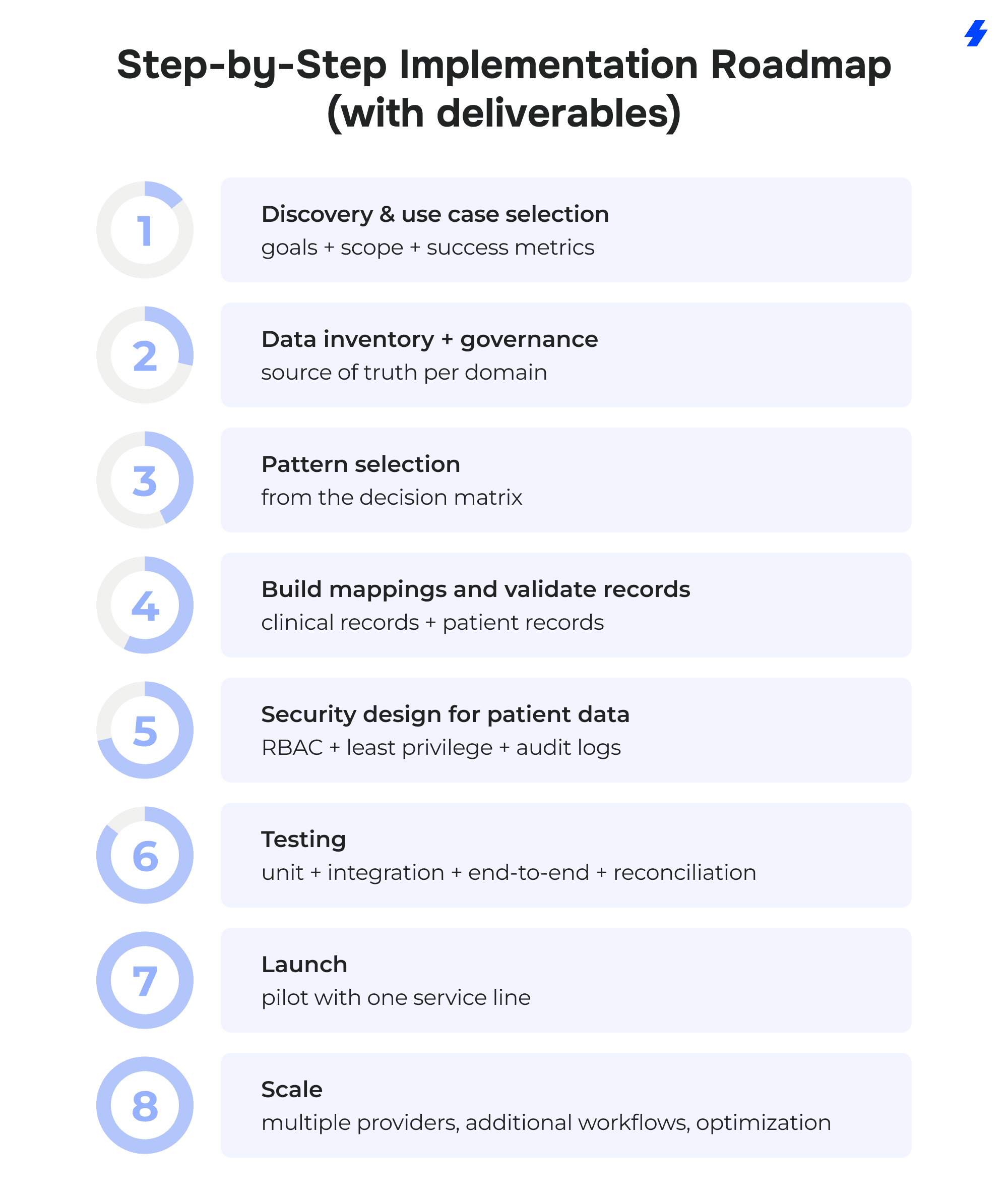
Phase 1: Discovery & use case selection
- Pick 2–3 workflows where Health Cloud will be the operational home (care coordination, referrals, prior authorizations visibility, discharge follow-up).
- Define success metrics tied to patient engagement and operational efficiency (cycle time, rework, task completion, call volume drivers).
- Identify stakeholders: providers, care teams, healthcare professionals in operations, security, and data owners.
Phase 2: Data inventory + governance (source of truth per domain)
- Inventory patient information sources across electronic health record systems and other systems.
- Define source of truth by domain: clinical records in EHR; engagement and tasks in Health Cloud; analytics segments in data cloud (if used).
- Set identity policy for patient records (matching rules, stewardship process, merge handling).
- Agree on data retention, audit, and change control.
Phase 3: Pattern selection (from the decision matrix)
- Select patterns per flow: FHIR-first for modern APIs, HL7/interface-engine for legacy feeds, iPaaS hub for scale, batch + analytics with data cloud where needed.
- Define freshness per domain (real-time vs daily) and label it explicitly.
- Decide read-only vs write-back and document where write-back is allowed.
Phase 4: Build mappings and validate clinical records + patient records
- Produce mapping docs and version them (fields, code systems, transformations, defaults).
- Build a canonical model for the minimum clinical data required in Health Cloud.
- Implement validation checks: schema, referential integrity, value sets, duplicate detection, and completeness thresholds.
Phase 5: Security design for patient data
- Define RBAC by role and care relationship; segment access to sensitive patient data fields.
- Implement MFA/SSO, encryption where required, and audit logging aligned to policy.
- Document patient data security boundaries across systems and integration paths.
Phase 6: Testing (unit + integration + end-to-end + reconciliation)
- Unit test mappings and transformations with known fixtures.
- Integration test each healthcare data flow (EHR → Health Cloud, plus downstream apps).
- End-to-end scenarios for selected use cases (referral lifecycle, prior authorizations status, discharge follow-up).
- Reconciliation tests: counts, status alignment, “expected vs received” events, and retry behavior.
Phase 7: Launch (pilot with one service line)
- Pilot with one service line and a controlled user group.
- Train using real workflows and role-based screens.
- Monitor adoption signals: queue usage, task completion, error rates, data freshness compliance.
Phase 8: Scale (multiple providers, additional workflows, optimization)
- Onboard additional providers with repeatable templates (identity, mappings, monitoring).
- Expand workflows (home health, remote patient monitoring, patient engagement journeys).
- Optimize: reduce noise, tune routing rules, refine data scope to what teams actually use.
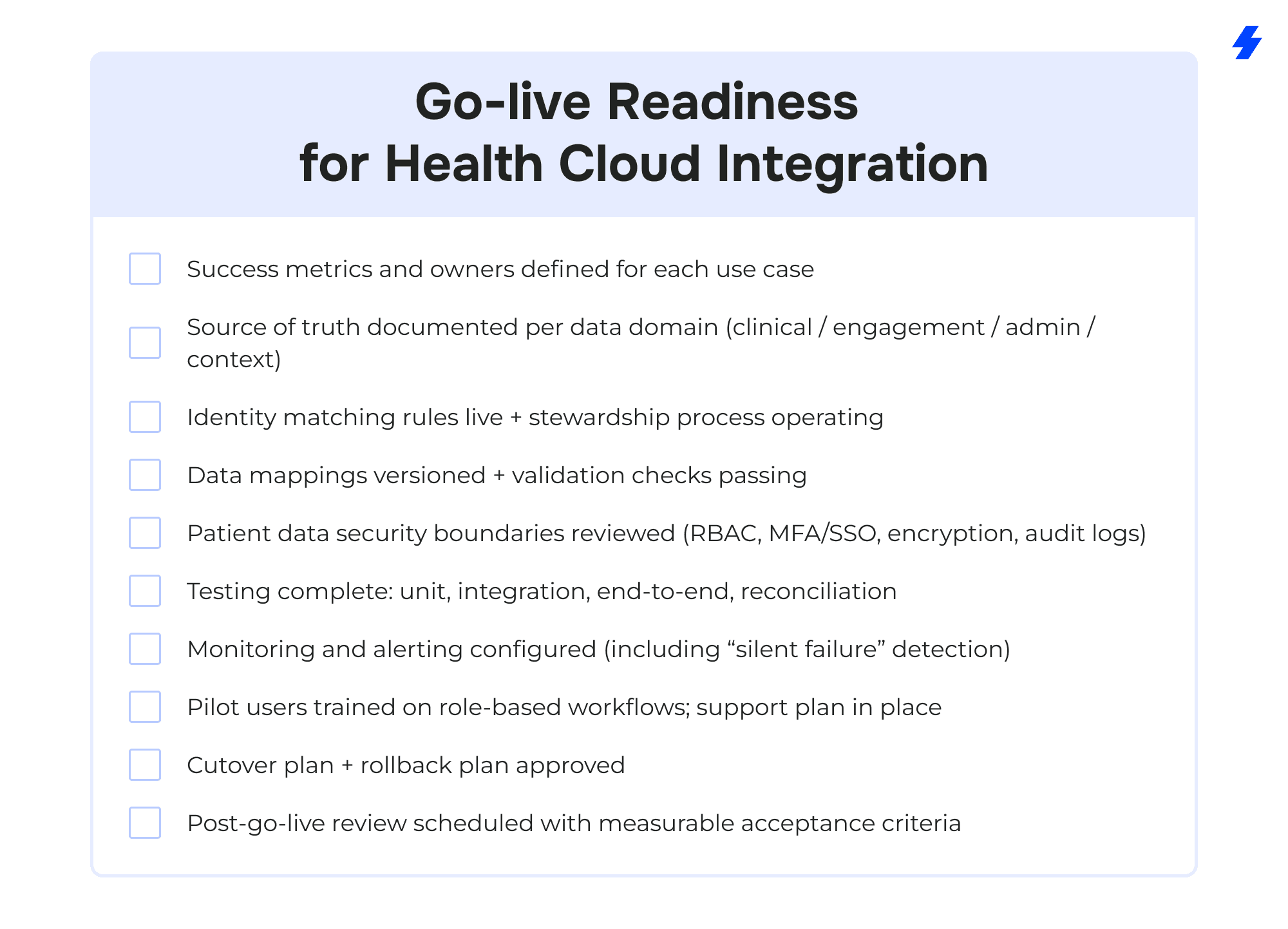
Go-live Readiness for Health Cloud Integration
Why Choose MagicFuse for Salesforce Health Cloud + EHR Integration
100% Certified Team
Our entire engineering team holds Salesforce certifications, ensuring expert-level knowledge and proven skills to deliver reliable, high-quality solutions.
250+ Salesforce Certifications
With over 250 certifications earned, including recent ones like Experience Cloud Consultant, Data Cloud Consultant, B2B Solution Architect, and more, we stay at the forefront of Salesforce innovations to meet your evolving needs.
Customer-Facing Engineering Team
We believe in full transparency. Our clients have direct access to our engineers and resources, with no hidden layers, enabling smooth communication and collaborative problem-solving.
Fast Recruitment & Strong Retention
We recruit top Salesforce experts quickly, averaging 6 weeks per hire, while maintaining strong employee retention of over 3 years to provide consistent expertise on your projects.
Outstanding Client Satisfaction
Our commitment to quality is reflected in an impressive Net Promoter Score of 92%, showing that clients trust and recommend our services.
Top AppExchange Rating
With a stellar 4.9-star rating on Salesforce AppExchange, we demonstrate consistent excellence and customer satisfaction in the Salesforce ecosystem.
If you’re planning Salesforce Health Cloud EHR integration, or trying to stabilize an existing Health Cloud integration, MagicFuse can help you define the right pattern (FHIR/HL7/iPaaS/Data Cloud), set patient data security boundaries, and build healthcare data flows that care teams can run with. Contact us to get started.
FAQs
- What is Salesforce Health Cloud EHR integration, and why do healthcare providers need it?
Salesforce Health Cloud EHR integration connects Salesforce Health Cloud with electronic health records and related systems so healthcare providers can work from a unified view of patient information. The EHR remains the system of record for clinical records, while Health Cloud is used for care coordination, patient engagement workflows, and operational tracking across care teams.
- How do you integrate Salesforce Health Cloud with electronic health record systems using their standards?
Teams usually integrate Salesforce Health Cloud with electronic health record systems using industry standards such as FHIR standards (API-based access) and HL7 via an interface engine, sometimes combined with an iPaaS hub. The choice depends on EHR capabilities, required healthcare data flows, freshness needs (real-time vs daily), and whether any write-back is allowed.
- What are the biggest risks to patient data during health cloud integration?
The biggest risks to patient data during Health Cloud integration typically come from overly broad access, unclear patient data security boundaries, and weak monitoring. Practical risk areas include misconfigured RBAC, missing MFA/SSO, insufficient encryption for sensitive fields, incomplete audit logs, and identity matching errors that attach clinical data to the wrong patient records.
- Can Health Cloud store clinical data and non-clinical data together for a holistic view?
Health Cloud can present a holistic view by combining selected clinical data (ehr data summaries such as diagnoses, medications, lab results, encounters) with non-clinical data (communications, tasks, patient experiences, social determinants). Many healthcare organizations keep full clinical records in electronic health records and bring only the clinical elements needed for coordination into Health Cloud, while storing engagement and context data natively in Health Cloud.
- How do you support interoperability when you have siloed systems and different systems across multiple providers?
To support interoperability across siloed systems and different systems, organizations standardize data contracts, adopt industry standards where feasible (FHIR/HL7), and normalize variations through a shared transformation layer. For multiple providers, interoperability also requires a consistent identity strategy, versioned mappings, and reconciliation so patient records and key statuses stay aligned across systems.
- What’s the best way to avoid workflow disruption for healthcare professionals?
Avoid disruption by designing role-based screens and work queues around real tasks, not around raw data. Keep clinical records in the EHR, show only the clinical data needed for action in Health Cloud, and use targeted training built on daily scenarios. Adoption improves when healthcare professionals can complete care coordination steps with fewer context switches and clear ownership.
- How long does the integration process usually take?
Timelines vary based on EHR readiness (FHIR vs HL7), number of systems, data quality, and the scope of write-back. A realistic plan is phase-based: discovery and use case selection, data inventory and governance, pattern selection, mapping and validation for patient records and clinical records, security design for patient data, testing (unit/integration/end-to-end/reconciliation), a pilot with one service line, then scale to multiple providers and additional workflows.
- Do we need Data Cloud for Salesforce Health Cloud integration?
Not always. Data Cloud is most useful when healthcare organizations need longitudinal analytics, segmentation for patient engagement, dedupe signals at scale, and ai powered operational prioritization. For many care coordination workflows, Health Cloud plus the integration layer is sufficient; Data Cloud becomes valuable when reporting and cross-channel activation are core goals.