






The first time most teams feel the cost of a disconnected ERP and Salesforce CRM isn’t in a meeting, it’s in a customer call.
A sales rep promises a ship date based on what they see in Salesforce. Ops later flags the order because the inventory was already allocated in the ERP. Finance follows up a week after delivery because the invoice status never made it back to the account record. Nobody did anything “wrong.” The systems simply told different versions of the truth, and people filled the gaps with Slack messages, spreadsheets, and manual data entry.
That’s what ERP integration with Salesforce is meant to fix: a dependable data flow where sales, operations, and finance work from the same operational truth. In practice, “seamless” means measurable latency, consistent identifiers, and predictable failure handling.
In this guide, we'll explain how Salesforce ERP integration works, which architecture patterns teams usually choose, and what technical decisions affect reliability over time. We'll also cover where pre-built connectors work well versus where event-driven or custom patterns are the more practical choice.
ERP Integration With Salesforce Overview
ERP integration with Salesforce is the set of integrations that move and/or expose data between your ERP system and Salesforce CRM. In simple terms, an ERP (enterprise resource planning) platform runs core operations, finance, billing, inventory, procurement, and supply chain, while a CRM (customer relationship management) system focuses on customer relationships: leads, opportunities, sales activity, and service interactions. Salesforce frames the difference the same way: ERP connects internal operational functions, while CRM manages customer-facing work.
When those systems don’t share data, teams compensate with exports, manual data entry, and “quick checks” in the ERP - exactly where errors and delays creep into order management, invoicing, and customer communication. The goal of ERP integration with Salesforce is to replace those workarounds with a reliable data flow that supports day-to-day decisions across sales and operations teams.
When you properly connect Salesforce to the ERP, sales and operations teams stop relying on exports and one-off checks, and the CRM becomes a trusted view of order status, inventory, and financial visibility rather than a separate record system.
“Seamless integration” is only meaningful if it’s measurable:
- Latency: how quickly a change in one system becomes usable in the other. Inventory availability and shipment status often require real-time or near-real-time updates; historical invoices rarely do.
- Consistency: both systems agree on identities and rules, account matching, product SKUs, price logic, currency, and tax fields, so users don’t see conflicting answers.
- Reliability: integrations don’t drop records during peak loads, recover from failures, and avoid duplicates or partial updates.
One-way sync vs two-way sync
- One-way sync works when one system is the clear source of truth and the other needs visibility. A common pattern is ERP → Salesforce for invoices, payment status, inventory, and fulfillment updates, so customer-facing teams can answer questions without jumping into the ERP.
- Two-way sync is used for shared master data where both sides create or update records—typically accounts, contacts, addresses, tax IDs, and credit terms. Two-way sync only works well when you define field ownership and conflict rules (covered later in “System of Record & Conflict Resolution”).
Real-time vs batch sync (and when each is appropriate)
- Real-time / near real-time fits data that drives immediate decisions: inventory checks, credit holds, shipping milestones, backorder changes, and return authorization updates. Even a short lag can lead to incorrect commitments or rework.
- Batch fits heavy or less time-sensitive datasets, such as historical invoices, large product/item catalogs, scheduled price updates, and daily extracts for financial reporting alignment. Batch reduces API pressure and makes recovery simpler when upstream systems are constrained.
Common Salesforce ERP Integration Use Cases
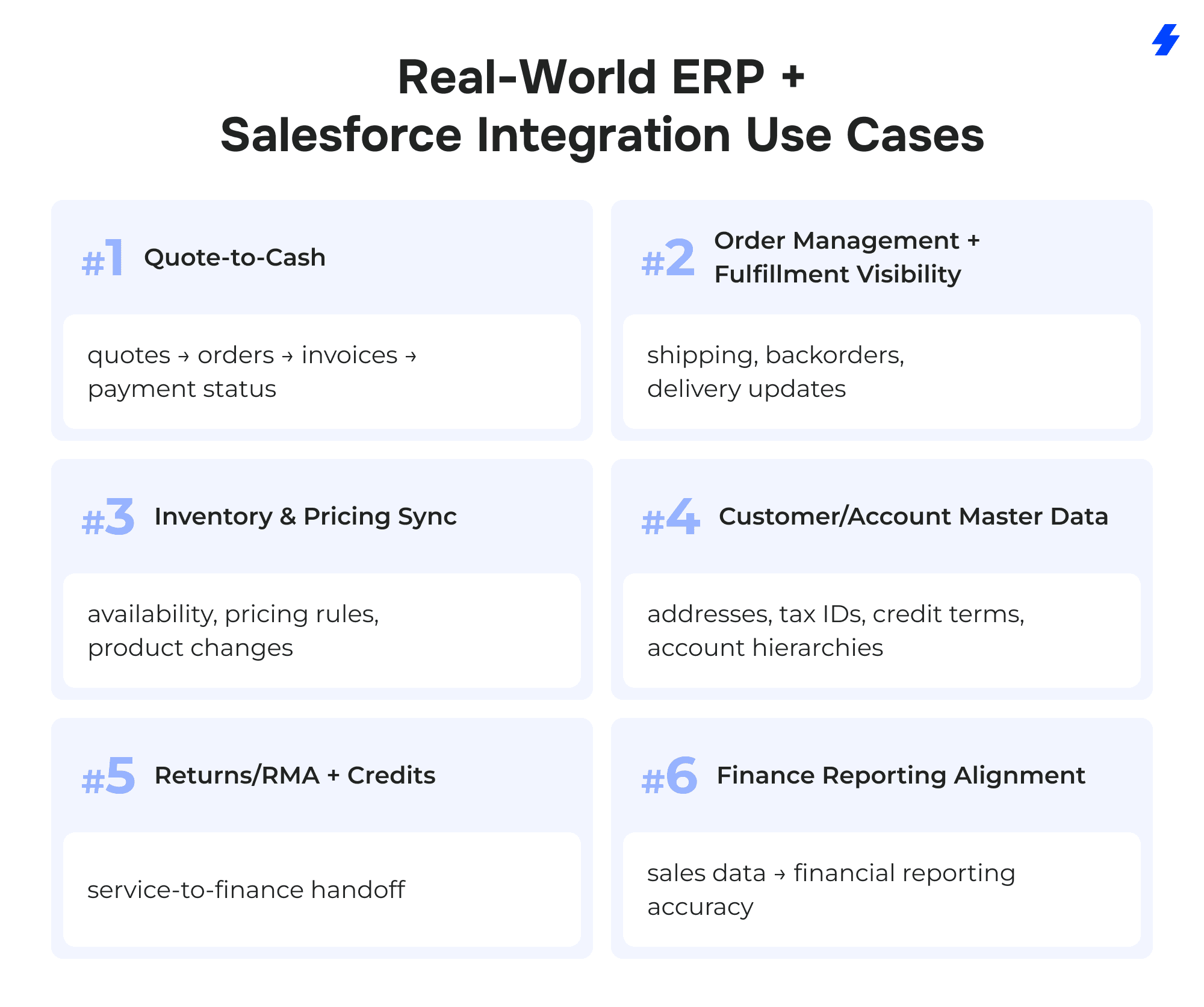
Quote-to-Cash (quotes → orders → invoices → payment status)
- Salesforce objects involved: Quote, Order, Opportunity, Account
- ERP entities involved: Sales Order, Invoice, Payment/Receivables
- Sync direction: SF→ERP (quotes/orders), ERP→SF (invoice + payment status)
- Latency target: near real-time for order/invoice status; batch can work for payment status in some orgs
Order Management + Fulfillment Visibility (shipping, backorders, delivery updates)
- Salesforce objects involved: Order, Account, Case (for “where is my order” inquiries)
- ERP entities involved: Order, Shipment/Delivery, Backorder
- Sync direction: ERP→SF (fulfillment/shipping/backorder updates), SF→ERP (order creation/changes if Salesforce is the order entry point)
- Latency target: near real-time (shipping, backorder, delivery status)
Inventory & Pricing Sync (availability, pricing rules, product changes)
- Salesforce objects involved: Product (Product2), Price Book / Price Book Entry
- ERP entities involved: Item/Product master, Inventory balance/availability, Pricing/price lists
- Sync direction: typically ERP→SF
- Latency target: real-time or near real-time for availability; batch for catalog and scheduled price updates
Customer/Account Master Data (addresses, tax IDs, credit terms, account hierarchies)
- Salesforce objects involved: Account, Contact
- ERP entities involved: Customer master, Bill-to/Ship-to addresses, Tax identifiers, Credit terms, Account hierarchy structures
- Sync direction: bidirectional (only if ownership rules are defined), otherwise one-way from the system of record
- Latency target: near real-time for changes that affect ordering/shipping; batch can work for non-urgent enrichments
Returns/RMA + Credits (service-to-finance handoff)
- Salesforce objects involved: Case, Order
- ERP entities involved: Return/RMA, Credit memo
- Sync direction: SF→ERP (return request/RMA initiation if started by service), ERP→SF (credit memo issued / status)
- Latency target: near real-time for status and customer-facing visibility; batch for finalized financial postings if needed
Finance Reporting Alignment (sales data → financial reporting accuracy)
- Salesforce objects involved: Opportunity, Order
- ERP entities involved: Revenue/GL posting (financial reporting outputs tied to orders/invoices)
- Sync direction: most often SF→ERP (commercial data that drives downstream finance processes), plus ERP→SF for invoice/payment outcomes when needed for visibility
- Latency target: batch (scheduled extracts/reconciliations), with near real-time only where operationally required
What Data Should You Sync? (Data Mapping Blueprint)
A Salesforce ERP integration succeeds or fails in the mapping layer. Not because teams “forget a field,” but because they never agree on identity, ownership, and format across systems. This blueprint is a practical way to decide what should move, what should stay put, and what needs translation so the data flow stays consistent.
Data mapping is also where you decide what belongs in Salesforce versus what should remain in the ERP platform and be referenced on demand. That balance affects storage, reporting, and long-term maintenance, especially if you’re integrating a cloud-based ERP or working around constraints in legacy ERP systems.
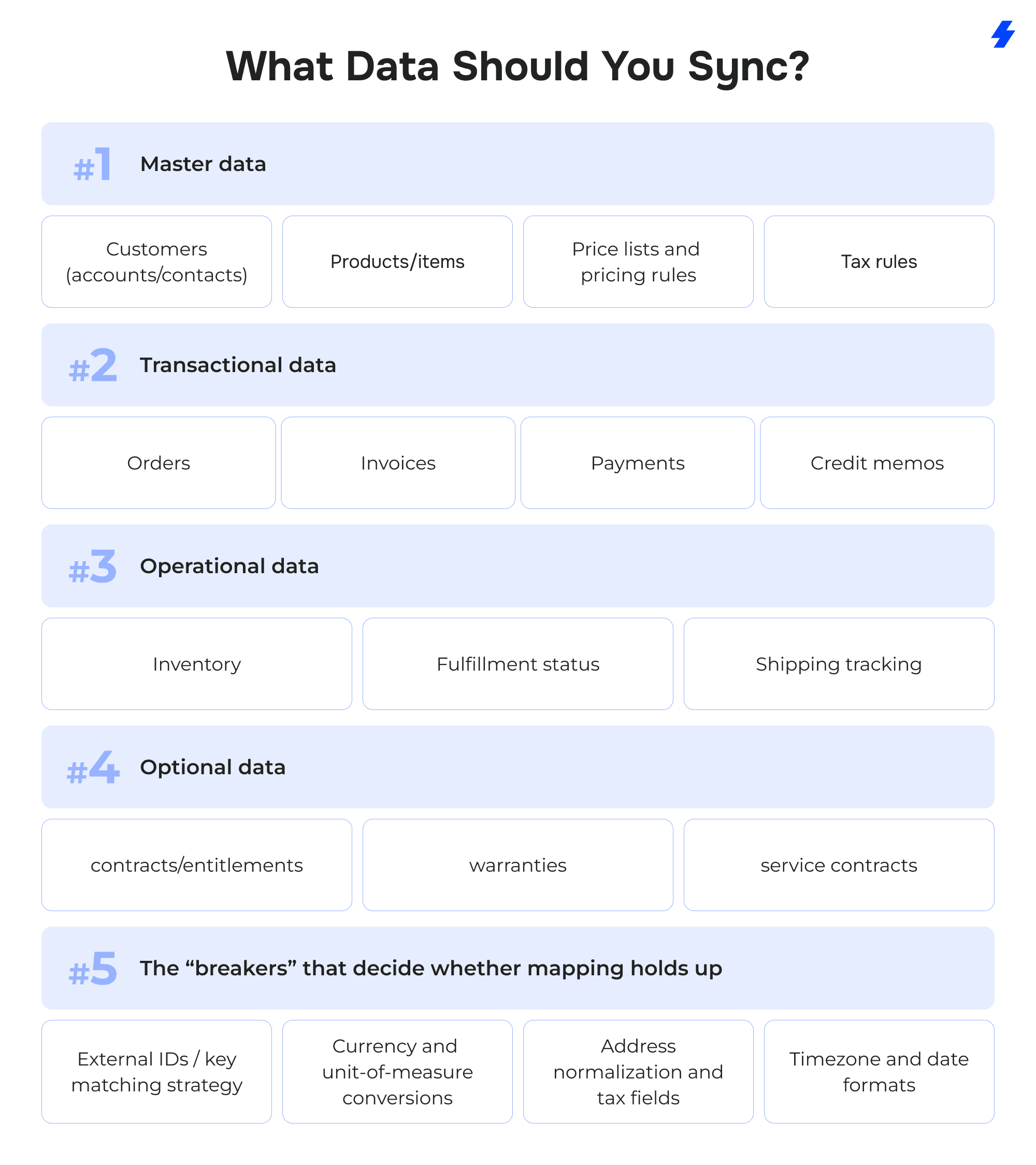
Master data: customers, products/items, price lists, tax rules
Customers (accounts/contacts). Decide which system creates the customer record, which system approves changes, and what fields are safe to update from each side. Addresses and tax identifiers look simple until you have multiple ship-to locations, subsidiaries, and different billing entities.
Products/items. Your product identity must match across Salesforce and the ERP—SKU, item code, or another stable key. If your ERP supports variants, kits, or configurable items, document how those appear in Salesforce (separate products, attributes, or a configuration reference).
Price lists and pricing rules. Some orgs sync list prices only; others need customer-specific pricing, discount logic, or contract pricing. The more “rules” you try to replicate in Salesforce, the more you need to test edge cases (rounding, tiers, effective dates, minimum quantities).
Tax rules. Even when Salesforce stores tax fields, calculation often lives in the ERP or a tax engine connected to it. Map tax jurisdiction fields, exemption indicators, and any required tax IDs so downstream invoices match what the business is legally required to produce.
Transactional data: orders, invoices, payments, credit memos
Orders. Map external order numbers, order lines, shipping terms, and status transitions. The key question is whether Salesforce is a true order entry point or mainly a place to view order progress after creation in the ERP.
Invoices. Most teams want invoice visibility in Salesforce for customer conversations. Don’t try to “mirror” every accounting field by default. Sync what sales and service actually use: invoice number, dates, totals, balance due, and a clear status.
Payments. Payment status often matters more than payment detail. If you do sync details, define how partial payments, refunds, and chargebacks will appear so a rep doesn’t misread the account’s standing.
Credit memos. Credits are where mismatched IDs and timing create the most confusion. Ensure the credit memo references the right invoice/order and has a consistent reason/status so service can communicate outcomes without interpreting finance codes.
Operational data: inventory, fulfillment status, shipping tracking
Inventory. Inventory is highly time-sensitive in many businesses, but not always. If reps only need “in stock / low / out,” don’t sync full warehouse-bin detail. If you sell across locations, decide whether Salesforce should display per-warehouse availability or an aggregated number.
Fulfillment status. Treat fulfillment as a timeline of meaningful states, not a pile of backend fields. Agree on what statuses Salesforce users will see (for example: confirmed, allocated, shipped, delivered) and which system publishes the truth.
Shipping tracking. If you sync tracking numbers, also sync the carrier and ship date so the tracking data is usable without manual lookups. If the ERP stores multiple packages per order, document whether Salesforce shows a summary or line-level shipments.
Optional data: contracts/entitlements, warranties, service contracts
Sync this only when it changes how teams work. If service agents need to confirm warranty eligibility or entitlement level during case handling, bring that into Salesforce. If it’s mainly a finance or compliance record that doesn’t affect day-to-day customer interaction, a read-only view can be enough.
The “breakers” that decide whether mapping holds up
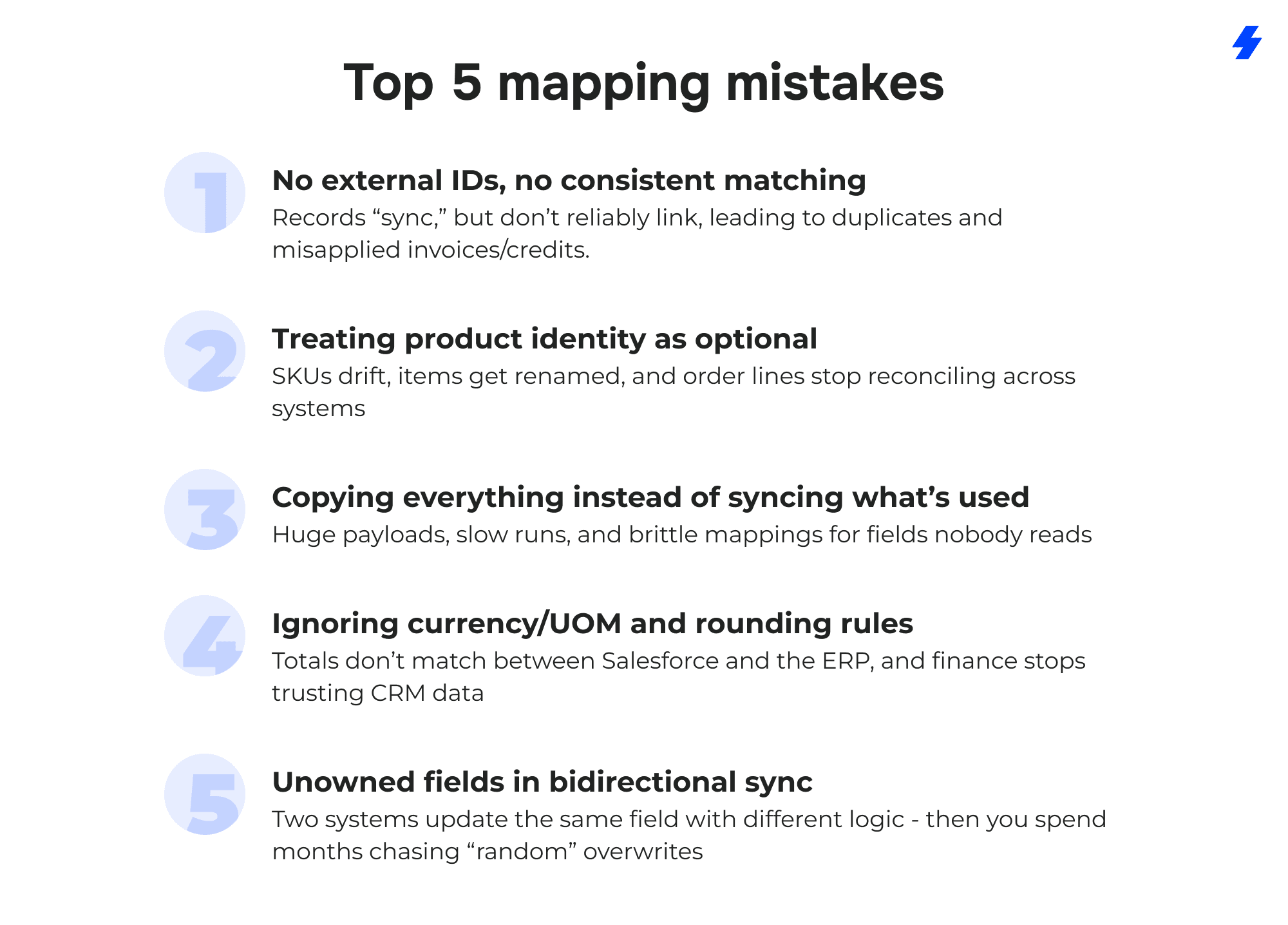
External IDs / key matching strategy. Pick a stable key for each core object (customer, product, order, invoice) and treat it as non-negotiable. If you don’t have a true external ID, create one. Matching by name, email, or “close enough” address is how duplicates and mislinked transactions happen.
Currency and unit-of-measure conversions. Multi-currency and UOM differences quietly ruin reporting. Decide where conversion happens (ERP, Salesforce, middleware) and define rounding rules. The goal is that “100” means the same thing in both systems—same currency, same unit, same precision.
Address normalization and tax fields. Addresses are messy: abbreviations, casing, missing fields, and different country formats. Normalize addresses (and store the normalized form consistently) so tax determination and shipping labels don’t diverge. Align tax IDs, exemption flags, and jurisdiction fields so invoices and credits reconcile.
Timezone and date formats. Orders, invoices, and payments are time-bound. If one system stores UTC and another stores local time, you’ll see “off-by-one-day” issues in reporting and status timelines. Define the canonical storage format and how it’s displayed to users.
Top 5 mapping mistakes
System of Record & Conflict Resolution Rules
Most Salesforce ERP integration failures don’t come from APIs or tooling. They come from a simpler problem: both systems believe they own the same data. A rep updates an address in Salesforce. Finance updates it in the ERP. Two hours later, one update overwrites the other, and nobody can explain why the customer’s invoice went to the wrong place.
That’s why every integration needs a system of record decision up front. System of record means: for each data domain (and often for each field), you define which system is authoritative, which system can propose changes, and which system publishes the final value to the other side.
Suggested defaults that work in most orgs
These defaults align with how the systems are typically used in real business operations:
ERP should own the operational and financial truth
- Invoices (numbers, totals, statuses, posting dates)
- Payments / receivables status (paid, partial, overdue, credit holds where applicable)
- Inventory (availability, allocations, warehouse stock, backorders)
Salesforce should own the customer-facing commercial work
- Leads
- Opportunities
- Activities (tasks, calls, emails, meetings)
This division keeps Salesforce CRM focused on customer relationship management while the ERP remains the authority for enterprise resource planning outcomes that require strict accounting and inventory controls.
Conflict resolution patterns (what to do when both systems change “the same thing”)
Even with clean ownership rules, conflicts happen, especially for shared master data like accounts, contacts, and addresses. You need an explicit resolution strategy so conflicts don’t become silent data corruption.
ERP-wins
Use this when the ERP is the authority and the risk of Salesforce overwriting it is unacceptable.
- Best for: credit terms, tax identifiers, billing rules, invoice-related fields, inventory numbers.
- Implementation idea: Salesforce updates are treated as requests (or blocked) for owned fields; the ERP update becomes the final value sent back.
Timestamp-wins
Use this only when both systems are legitimate editors and the “latest update” is an acceptable business rule.
- Best for: low-risk fields where occasional overwrite is tolerable (some contact details, non-financial preferences).
- Requirements: consistent timezone handling, reliable timestamps, and clear rules about what counts as an “update” (human edit vs automated job).
Manual review queue (exceptions)
Use this when overwriting carries risk, or when conflicts are rare but high-impact.
- Best for: legal entity/address changes, tax fields, account hierarchy changes, credit limit changes.
- How it works: conflicts are routed to a queue with both versions visible, a required reviewer decision, and an audit trail of what was chosen and why.
Data governance ownership (who approves changes per object)
A practical governance model looks like this:
- Account / Customer master: Sales Ops or RevOps owns the data standard; Finance approves billing/tax-related changes; Customer Support may propose updates during case work.
- Product / Item master: Product Ops or Operations owns; Finance approves pricing policy; ERP admin controls item activation and accounting mappings.
- Pricing / Price lists: Finance or Commercial Ops approves; Sales Ops administers Salesforce price books if used.
- Orders / Fulfillment statuses: Operations owns; Sales is a consumer of statuses in Salesforce.
- Invoices / Payments / Credits: Finance owns; Sales/Service consumes visibility in Salesforce.
When these approvals are explicit, you avoid the classic integration trap: “we synced it both ways because it was easier,” and then spent the next quarter fixing duplicates and unexplained overwrites.
Integration Methods for ERP Integration With Salesforce (and how to choose)
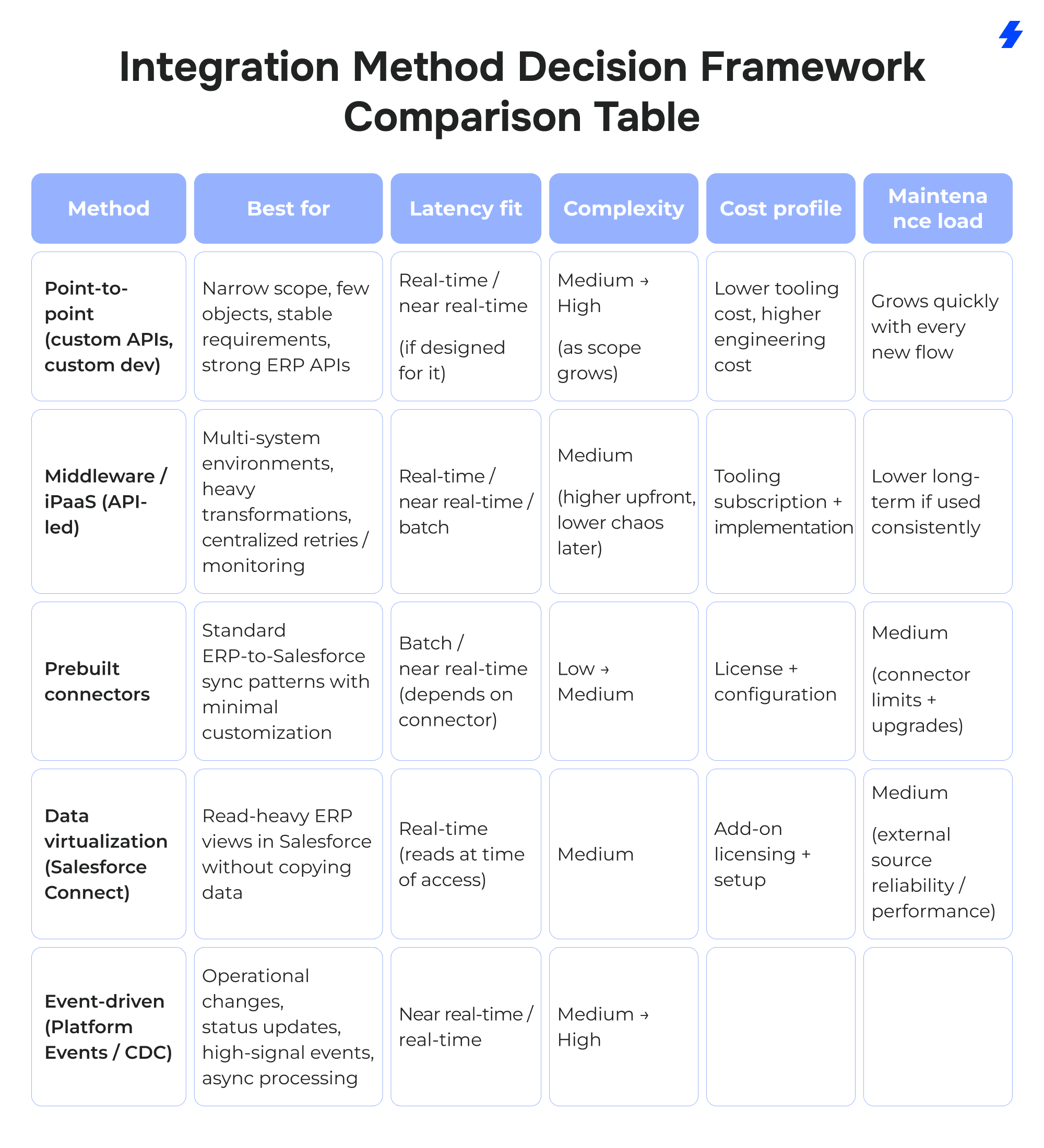
Teams usually choose the integration method based on system constraints, latency requirements, and long-term maintenance needs. The right approach depends on required latency, the volume of data transfers, and whether the business can tolerate delays during peak system load. Some teams need native integration features where available, while others require custom development because their ERP data model, security constraints, or approval paths don’t match what off-the-shelf options support.
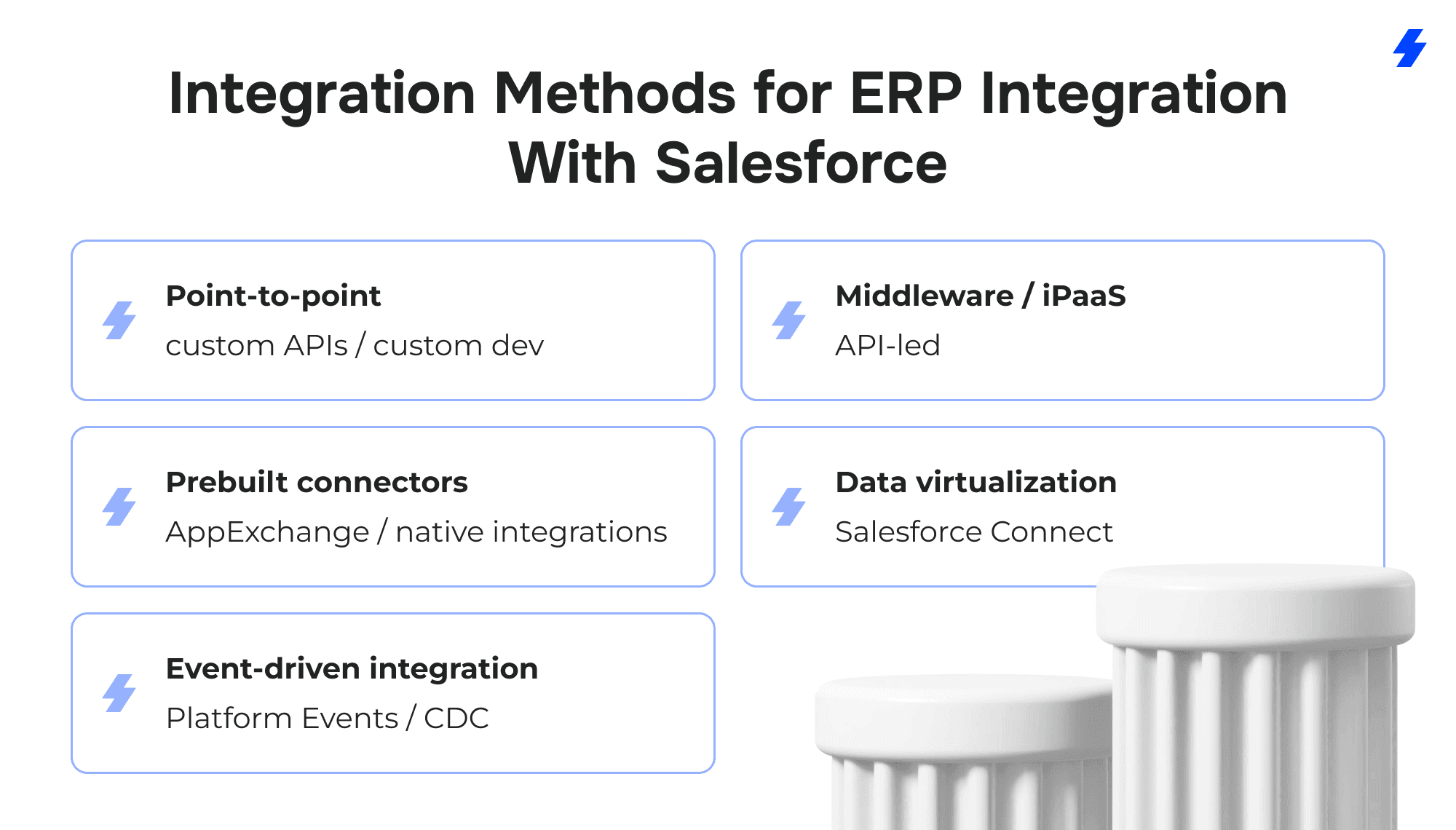
Point-to-point (custom APIs / custom dev)
Point-to-point integration connects Salesforce and the ERP directly through custom API calls and custom development. It fits when the scope is narrow, the ERP has well-supported APIs, and you can keep the integration surface area small. The tradeoff shows up as soon as you add more flows, more objects, or more systems: every change touches code, deployment cycles, and regression testing.
Middleware / iPaaS (API-led)
Middleware (often an iPaaS) sits between Salesforce and the ERP and handles orchestration: routing, transformations, retries, and centralized monitoring. This approach is useful when the integration includes multiple business functions, multiple endpoints, or you expect future systems to join the landscape (WMS, billing, tax engines, eCommerce, data warehouse). It also helps when the ERP is a legacy system and you need an adapter layer that protects Salesforce from ERP constraints.
Prebuilt connectors
Prebuilt connectors accelerate common ERP-to-CRM use cases by packaging authentication, common mappings, and standard flows. They can reduce initial build time, especially for well-supported cloud ERPs. You still need to validate what matters most in production: data ownership rules, edge-case behavior (credits, partial shipments, partial payments), and how failures are handled and logged.
Data virtualization (Salesforce Connect)
Data virtualization keeps certain ERP data outside Salesforce while making it accessible in Salesforce as external objects. Salesforce Connect lets Salesforce access external data (via external objects) without copying it into Salesforce through adapters such as OData. This method is a strong fit for read-heavy scenarios (invoice history lookup, order status views) where duplicating data adds maintenance cost and increases the risk of stale records.
Event-driven integration (Platform Events / CDC)
Event-driven integration is built around publishing and subscribing to events, so systems react to changes as they happen.
- Platform Events are designed for exchanging real-time event data between Salesforce and external apps; Salesforce describes them as secure, scalable messages that contain data.
- Change Data Capture (CDC) publishes change events for record creates/updates/deletes/undeletes, supporting near real-time synchronization with external data stores and systems.
Integration Method Decision Framework (Comparison Table)
Reference Architectures (Choose the right architecture)
Architecture is where ERP integration with Salesforce becomes durable, or turns into a set of fragile sync jobs. The patterns below cover the three setups that hold up most often once volumes grow, new systems join, and teams expect reliable data flow every day.
Hub-and-spoke via middleware (best for multi-system environments)
When to use: Choose this architecture when Salesforce and the ERP are part of a broader ecosystem: eCommerce, WMS, billing, tax engines, data warehouse, or partner portals. It also fits when you expect future integrations and want a consistent way to add them.
What it solves: Middleware becomes the hub that standardizes how data moves: transformations, routing, retries, throttling, and monitoring happen in one place. It reduces tight coupling between systems, so changes in one API don’t force emergency rewrites everywhere else. It also supports a canonical data model approach, which helps when multiple systems represent “customer” or “order” differently.
Common pitfalls
- Building “logic soup” in the hub: too many special cases without shared standards, making changes risky.
- Skipping governance: without system-of-record rules and versioned mappings, middleware becomes a second ERP with no business owner.
- Underestimating throughput and error handling: peak loads and retries can overwhelm the hub if batching, backpressure, and queueing aren’t designed early.
Event-driven for operational changes (orders, inventory changes, status updates)
When to use: Use event-driven architecture for operational flows where timeliness matters and updates happen frequently: order lifecycle changes, inventory adjustments, fulfillment milestones, and return status updates. It fits well when you need near real-time visibility in Salesforce without constant polling.
What it solves: Event-driven integration allows systems to publish changes as events and other systems to react. Salesforce supports event-based patterns through Platform Events and Change Data Capture, which can stream record changes for near real-time synchronization.
This approach improves responsiveness for status-driven work and supports asynchronous processing so spikes don’t immediately translate into failures.
Common pitfalls
- No event contract discipline: inconsistent payloads, missing identifiers, and changing schemas without coordination.
- Duplicate processing without idempotency: the same event can be delivered more than once; without idempotent handlers, you get duplicate orders, duplicated status updates, or incorrect counts.
- Ignoring replay and retention needs: when subscribers go down, you need a clear strategy to recover missed events and reconcile.
Hybrid: Salesforce Connect for read-heavy ERP views + sync transactional data into Salesforce
When to use: Pick the hybrid model when users need frequent access to ERP data in Salesforce, but copying everything into Salesforce creates cost, data freshness issues, or storage overhead. It’s especially useful for invoice history, order history, and status lookups where Salesforce users need visibility more than edit capability.
What it solves: Salesforce Connect supports data virtualization by letting Salesforce access data stored outside Salesforce via external objects and adapters such as OData.
In this architecture, you keep read-heavy ERP datasets virtual (viewed in Salesforce when needed), while syncing only the transactional records Salesforce must act on (orders created in Salesforce, cases tied to RMAs, critical statuses for customer comms).
Common pitfalls
- Treating virtualization like a sync replacement: external objects are great for visibility, not for workflows that require Salesforce automation on every record.
- Performance surprises: if the external ERP endpoint is slow or rate-limited, Salesforce pages and reports can suffer.
- Weak access control alignment: you need a clear model for who can see what when ERP data is surfaced in Salesforce, especially for sensitive financial fields.
ERP Integration Best Practices
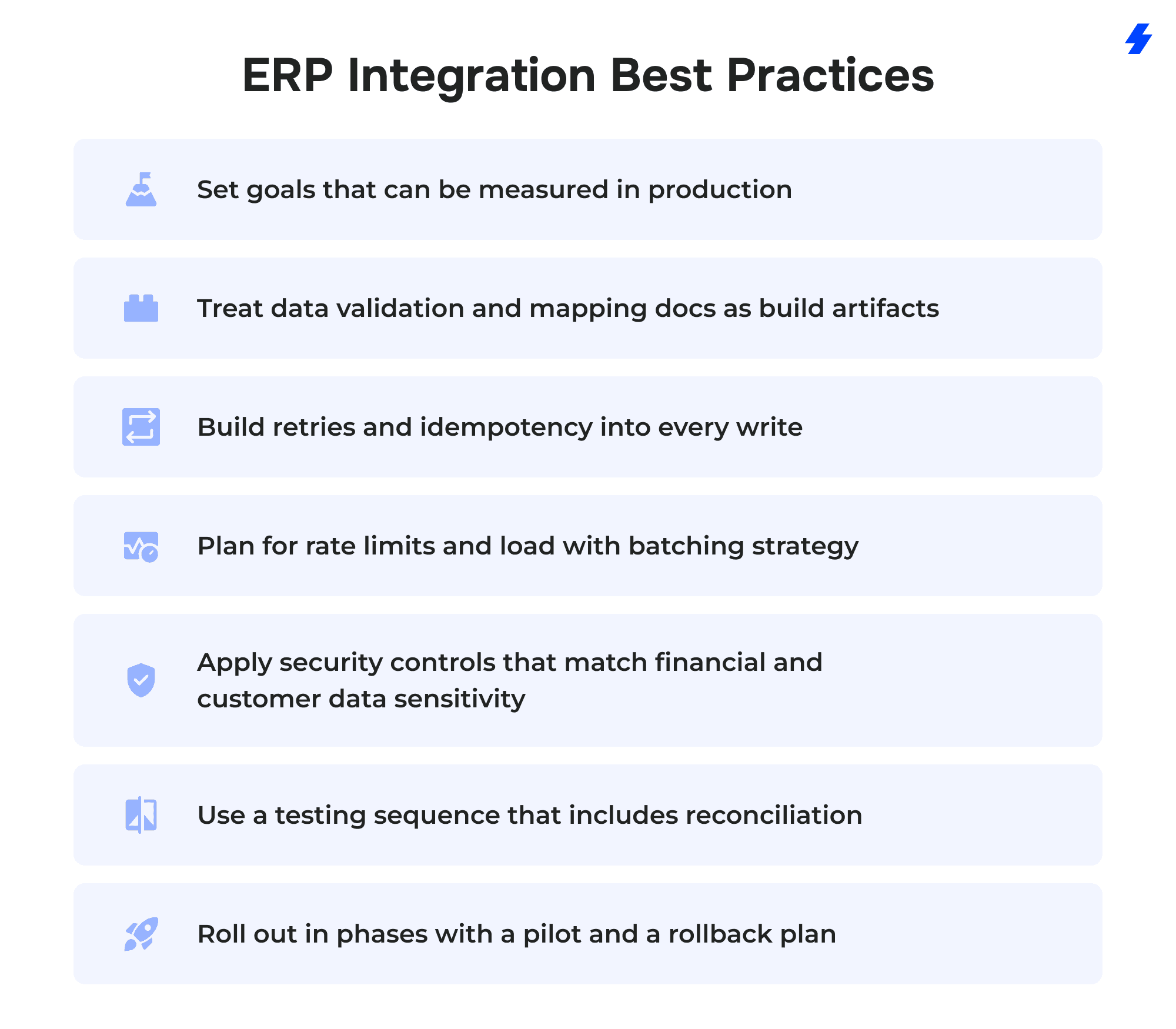
Set goals that can be measured in production
Integration success shows up in operations, not in a “green” deployment. Define KPIs before build so you can prove impact and catch regressions:
- Error rate: percentage of failed sync attempts by flow (orders, invoices, inventory updates).
- Cycle time: time from quote approval to order creation, or from order to shipment confirmation.
- DSO (Days Sales Outstanding): improvements when invoice and payment status are visible and acted on faster.
- Order-to-cash speed: time from order creation to paid invoice, tracked across systems.
Tie each KPI to a specific flow and owner. That avoids situations where teams argue about whether an integration is “working” while customers and finance feel the pain.
Treat data validation and mapping docs as build artifacts
Field mapping “in people’s heads” turns into inconsistent customer data within weeks.
- Create mapping documentation that includes: source field, target field, transformation rules, allowed values, and system-of-record ownership.
- Add validation rules at the right layer: required fields, status transitions, numeric ranges, currency/UOM constraints, and external ID presence.
- Document how you handle exceptions (missing SKU, invalid address, unknown tax ID) so errors go into an actionable queue instead of silently failing or creating partial records.
Build retries and idempotency into every write
Retries happen in real life: network timeouts, ERP maintenance windows, Salesforce API throttling. Retrying without safeguards creates duplicates.
Retry means the integration attempts the same operation again after a failure, usually with backoff.
Idempotency means repeating the same request does not create a second record or a second side effect.
A simple, practical approach:
- Use stable external IDs for upserts so “create order” becomes “create or update order by external key.”
- Store a request/payload ID (or correlation ID) so a repeated message can be recognized and ignored if it was already processed.
- Separate “received” vs “applied” states so you can reconcile what happened during outages.
Plan for rate limits and load with batching strategy
Salesforce APIs and ERPs both have constraints. A strong integration design assumes limits and plans around them.
- Batch large datasets (product catalogs, invoice history) into manageable chunks.
- Use asynchronous processing for peak loads and status-heavy flows.
- Add backpressure controls so spikes in source updates don’t cause cascading failures downstream.
- Define what happens when a system is under load: pause non-critical sync, degrade to batch, or queue until capacity returns.
Apply security controls that match financial and customer data sensitivity
Security failures in integration work are usually about access sprawl and weak credential handling.
- Least privilege: integration users should have only the object/field permissions required for the integration flows, plus only the API scopes they need.
- Encryption in transit: require TLS for all API traffic between systems and any middleware.
- Credential storage approach: keep credentials out of code and logs; store them in a dedicated secrets manager or the platform’s secure credential store, rotate on a schedule, and audit access.
Use a testing sequence that includes reconciliation, not just happy-path UAT
A testing plan that stops at “it works in UAT” misses the failure modes that show up after go-live.
- Unit tests: transformations, mapping logic, validation rules, and status transitions.
- Integration tests: end-to-end flows across Salesforce and the ERP in a controlled environment, including negative cases.
- UAT: role-based testing with real workflows (sales, ops, finance) and realistic data volumes.
- Reconciliation: compare record counts and key totals across systems (orders, invoice totals, payment status) to confirm the systems agree after sync, especially after retries and partial outages.
Roll out in phases with a pilot and a rollback plan
Big-bang releases create uncertainty and make root-cause analysis harder.
- Phased object rollout: start with one or two high-value flows (for example, invoice visibility and order status) before expanding to pricing or two-way account updates.
- Pilot team: pick a sales + ops + finance group that can give fast feedback and tolerate controlled change.
- Rollback plan: define what “rollback” means for each flow (disable a sync job, stop event subscribers, revert endpoint routing) and how you handle in-flight messages or queued updates during the cutover window.
Monitoring, Logs, and Audit Trails
An integration that “works” but can’t be monitored will eventually fail in production—quietly at first, then loudly during month-end close or a peak shipping window. The goal is simple: you should be able to answer what happened, to which record, when, and why, without digging through ad hoc logs or rerunning jobs blindly.
What to log (so every issue is traceable)
At minimum, log in an understood, consistent structure across every integration flow (orders, invoices, inventory, returns):
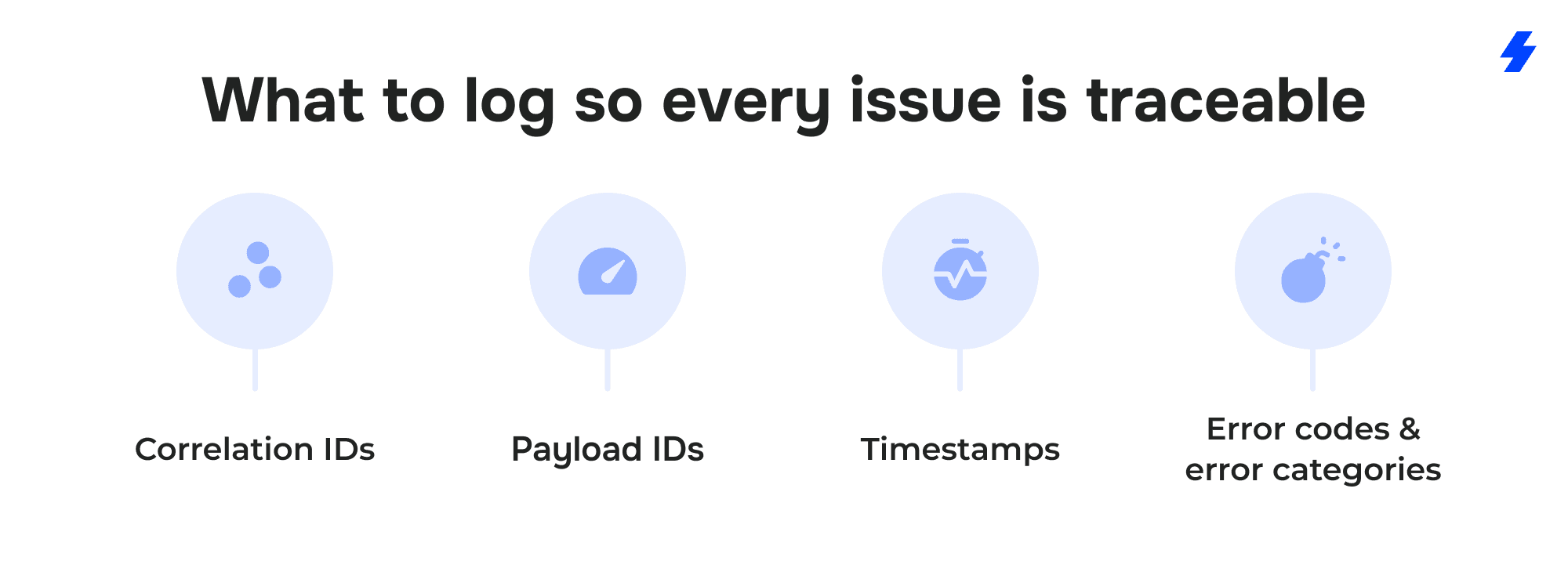
Correlation IDs. One ID that follows a business transaction end-to-end (example: one customer order across Salesforce, middleware, ERP). This is what lets you trace a single issue across systems without guessing.
Payload IDs. A unique identifier for the message/body you sent or received. Payload IDs help you detect duplicates and prove whether the same message was processed more than once.
Timestamps. Capture when the event occurred in the source system, when it was received, when it was processed, and when it was acknowledged by the target system. This is the foundation for measuring sync lag.
Error codes and error categories. Store the raw error code plus a normalized category (auth, validation, mapping, rate limit, upstream outage). Raw codes help with exact diagnosis; categories help with reporting and alerting.
Retry strategy with an error queue (dead-letter approach)
Retries are required because networks fail and systems throttle. The key is to make retries safe and observable.
Retry strategy.
- Retry transient failures (timeouts, temporary unavailability, rate limits) with backoff so you don’t overwhelm the ERP or Salesforce during recovery.
- Stop retrying when the failure is deterministic (validation error, missing required external ID, mapping mismatch). Repeating the same request won’t fix bad data.
Error queue / dead-letter.
- Route failed messages that can’t be auto-resolved into an error queue that stores: correlation ID, payload ID, error code, last attempt time, and the record keys involved.
- Make the queue actionable: a human can fix data, replay the message, or mark it as rejected with a reason.
- Track “age” in the queue. Old errors are risk: they create data drift between Salesforce and the ERP.
Alerting thresholds that catch problems early
Alerts should point to business impact, not just “something failed.”
Sync lag thresholds. Alert when the time between source change and target update exceeds a defined limit per flow (inventory updates vs invoice visibility won’t share the same tolerance).
Failure rate thresholds. Alert on sustained failures (for example, X% failures over Y minutes) rather than single errors. This catches systemic issues like expired credentials or upstream outages.
Queue depth thresholds. Alert when the error queue or processing queue grows beyond normal. Queue depth is often the earliest signal that the integration is falling behind even before users complain.
Security auditing that supports compliance and incident response
Integration work touches sensitive financial data and customer data, so monitoring needs an audit trail that security teams can use.
Salesforce provides Real-Time Event Monitoring to monitor and detect standard events in Salesforce in near real time, and to store event data for auditing or reporting purposes. This is useful when you need visibility into access patterns, API activity, and security-relevant behavior that affects integrated data flows. It also supports building transaction security policies (Availability depends on your Salesforce edition/add-ons, such as Shield/Event Monitoring) and storing/querying event data for compliance workflows.
Operationally, that means your integration runbook shouldn’t stop at “check the middleware logs.” It should also define which Salesforce events you monitor for integration-related risk (unexpected API usage spikes, suspicious access patterns, permission changes), who reviews them, and what triggers an escalation.
Common Challenges in Salesforce ERP Integration (and how to fix each)
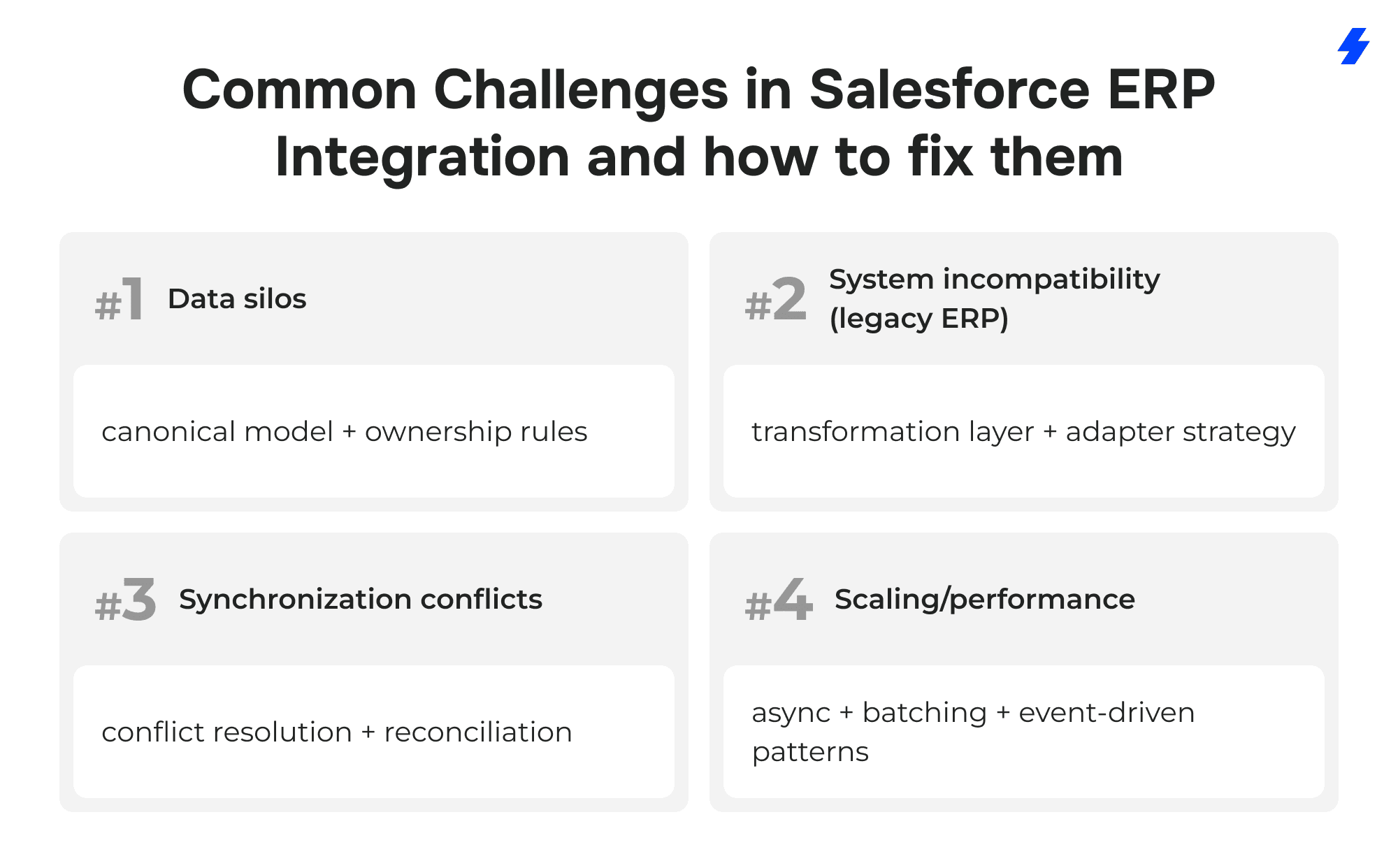
Data silos → canonical model + ownership rules
What it looks like
Salesforce and the ERP store overlapping customer data, product data, and order data with different structures and naming. Teams build separate reports, and nobody trusts cross-system numbers.
Mitigation playbook
- Define a canonical model for shared domains (Customer, Product/Item, Order, Invoice): a clear set of fields, allowed values, and meanings that every integration flow maps to.
- Assign system-of-record ownership per object and per critical field (external IDs, tax fields, credit terms, SKU/item codes). Put the ownership rules in the mapping spec so they are enforced, not “remembered.”
- Standardize identifiers across systems using external IDs and stable keys, then enforce matching rules so new records can’t be created without them.
- Publish a single mapping reference (versioned) that sales ops, finance ops, and integration owners use as the source for changes.
System incompatibility (legacy ERP) → transformation layer + adapter strategy
What it looks like
A legacy ERP has limited APIs, inconsistent response formats, strict processing windows, or performance limits. Integrations become fragile, and each new requirement adds custom workarounds.
Mitigation playbook
- Introduce a transformation layer between Salesforce and the ERP to handle format conversion, field normalization, and validation before data reaches the ERP.
- Use an adapter strategy for the ERP endpoint: one interface that the rest of the integration talks to, even if the ERP changes internally. This contains the blast radius of ERP upgrades or API changes.
- Decouple Salesforce from ERP timing constraints with asynchronous processing and queueing, so Salesforce doesn’t fail user workflows because the ERP is busy or offline.
- Design for partial capability: if the ERP can’t support a real-time call for a given flow, treat it as a queued operation with a clear status and retry policy.
Synchronization conflicts → conflict resolution + reconciliation
What it looks like
Records overwrite each other, duplicates appear, and teams spend time investigating “mysterious” changes. Financial fields diverge between systems, especially after retries or manual edits.
Mitigation playbook
- Apply explicit conflict rules per domain (ERP-wins, timestamp-wins, or manual review queue) and enforce them in the integration logic.
- Use idempotent write patterns with external IDs and payload identifiers so retries don’t create duplicates.
- Run scheduled reconciliation for critical datasets: compare counts and key totals (orders, invoice totals, credit memo totals) and flag differences for review.
- Create an exceptions workflow: when a record fails validation or conflicts, route it into an owned queue with context, not into silent failure or repeated retries.
Scaling/performance → async + batching + event-driven patterns
What it looks like
Integrations slow down during peak load, API limits are hit, and sync lag grows. Users see stale inventory or delayed order status, then work around it manually.
Mitigation playbook
- Move high-volume flows to async processing so spikes don’t block Salesforce users or cause ERP timeouts.
- Batch large data transfers (catalogs, invoice history, bulk updates) with chunking and checkpoints so failures can resume without reprocessing everything.
- Adopt event-driven patterns for operational changes that need timely updates (order status, inventory adjustments, fulfillment updates), reducing polling and improving responsiveness.
- Monitor lag and queue depth as primary health signals and use backpressure controls so the integration degrades predictably instead of failing unpredictably.
Typical Salesforce ERP Integration Project Stages
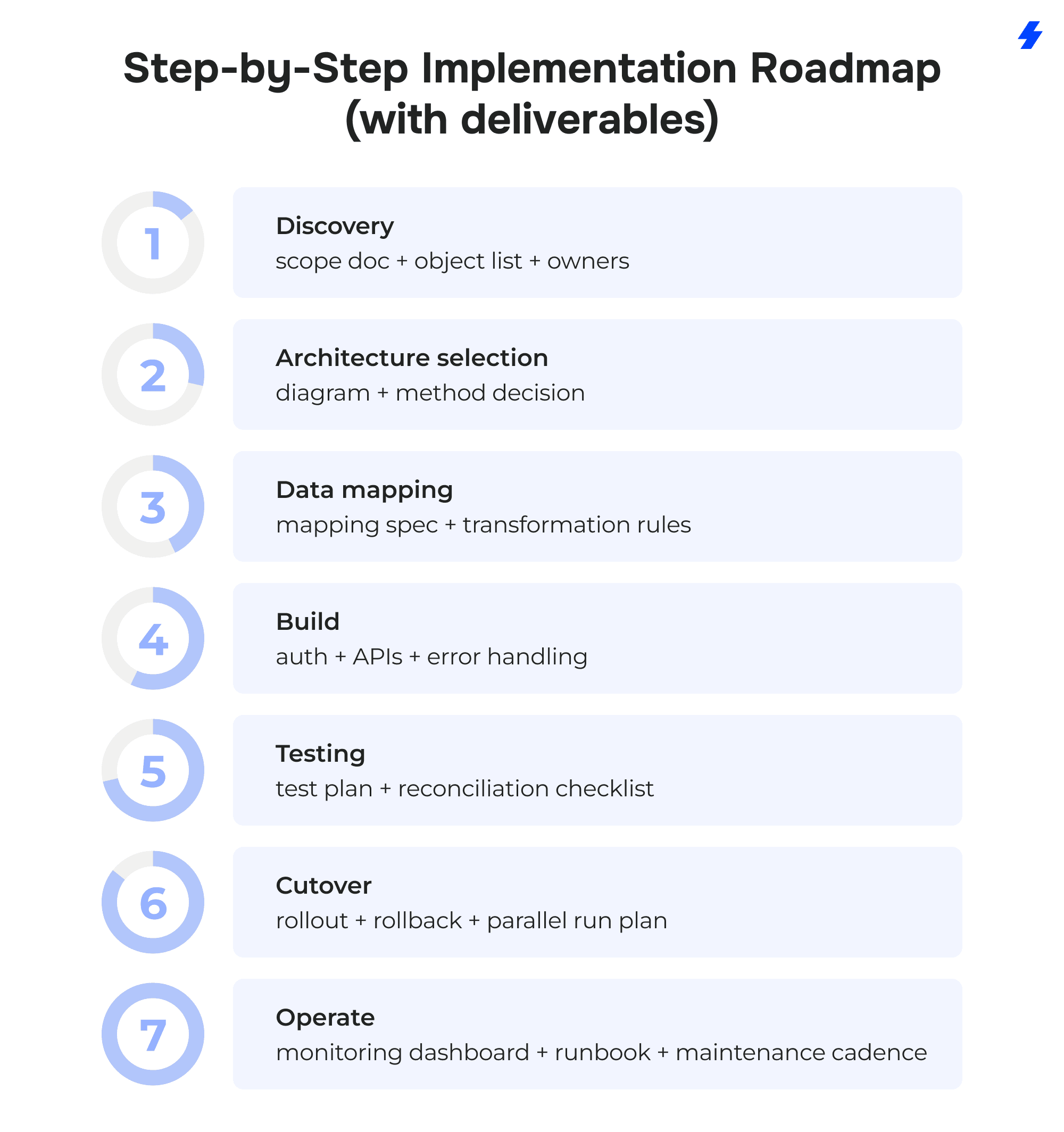
1) Discovery → scope doc + object list + owners
Start by defining what the business needs the integration to do in plain operational terms: which workflows break today, which teams are affected, and what “done” means.
Deliverables: scope document, prioritized use-case list, object list (Salesforce + ERP), system-of-record owners per object, success KPIs (error rate, lag, cycle time, DSO impact where relevant).
2) Architecture selection → diagram + method decision
Choose the reference architecture pattern(s) that fit your landscape and constraints: hub-and-spoke, event-driven, hybrid with virtualization, or a combination.
Deliverables: architecture diagram, integration method decision per domain (master/transactional/operational), integration boundaries (what syncs vs what is virtualized), non-functional requirements (latency targets, volumes, availability, compliance needs).
3) Data mapping → mapping spec + transformation rules
Turn “we need invoices in Salesforce” into a concrete mapping that engineering and stakeholders can review and sign off.
Deliverables: mapping specification (fields, ownership, external IDs, allowed values), transformation rules (currency/UOM, address normalization, timezone/date handling), validation rules, exception scenarios and handling rules.
4) Build → auth + APIs + error handling
Implement the integration flows with production-grade controls from day one: authentication, permissions, retries, idempotency, and an error queue.
Deliverables: auth model (integration users/permissions, credential storage approach), API contracts/endpoints, event subscriptions/publications where used, error handling design (retry policies, dead-letter/error queue), logging standards (correlation IDs, payload IDs).
5) Testing → test plan + reconciliation checklist
Test beyond happy paths so you don’t discover edge cases during month-end or peak shipping windows.
Deliverables: test plan (unit → integration → UAT), test data set, negative test cases (missing keys, invalid values, outages), reconciliation checklist (counts and totals across systems for orders/invoices/payments/credits), go/no-go criteria.
6) Cutover → rollout + rollback + parallel run plan
Move from legacy process to integrated process with control, visibility, and a way back if needed.
Deliverables: rollout plan (phased object rollout + pilot team), rollback plan per flow (how to disable safely, how to handle queued/in-flight messages), parallel run plan (how long, what gets compared, who signs off), cutover checklist and ownership schedule.
7) Operate → monitoring dashboard + runbook + maintenance cadence
Treat the integration as an operational system with ongoing health checks, incident response, and change control.
Deliverables: monitoring dashboard (lag, failure rate, queue depth, throughput), runbook (common failures + steps to resolve, escalation paths, replay procedures), maintenance cadence (credential rotation, release schedule, mapping change process, periodic reconciliation and audit reviews).
Can Salesforce Be Used as an ERP?
Salesforce is built and positioned primarily as a CRM (customer relationship management) platform: it organizes customer relationships and the work around them - sales pipelines, service interactions, and customer-facing processes. ERP (enterprise resource planning) platforms focus on internal operations such as finance, inventory, procurement, and supply chain. Salesforce summarizes this distinction in its ERP vs CRM guidance.
When Salesforce can support ERP-like workflows
Salesforce can handle operational workflows that sit close to customer work, especially when you model them with custom objects, automation, and industry apps. Examples include:
- internal request and approval processes connected to accounts and opportunities
- order capture and status visibility for sales and service teams
- service contracts, warranties, and entitlement-style records that support support operations
- operational dashboards that combine internal and external data for decision-making
This works best when the goal is a consistent working surface for teams already living in Salesforce, while the ERP remains the financial/operational authority.
When you still need an ERP
You still need an ERP when the business requires deep operational and financial capabilities that are core to enterprise resource planning:
- finance/accounting controls (posting rules, ledgers, close processes, audit requirements)
- procurement and vendor management (purchase orders, receiving, approvals tied to finance)
- manufacturing planning (MRP, BOMs, work orders, capacity planning, shop-floor execution)
Popular ERP Systems Integrated With Salesforce
SAP ERP
Integration often centers on customer master data, orders, deliveries, invoices, and credit status. Pay attention to identifier strategy (customer and material numbers), and how you’ll handle high-volume operational updates without creating sync lag.
Microsoft Dynamics 365
Align account/contact structures and product/pricing early, especially if Dynamics is the financial authority and Salesforce is the sales execution layer. Define which system owns customer updates to prevent duplicate accounts and conflicting addresses.
NetSuite
Common flows include quote-to-cash visibility (orders → invoices → payment status) and item/price list sync. Decide what Salesforce users need to act on versus what they only need to view, then design latency targets accordingly.
Infor
Infor ERP integrations often require careful mapping around item masters, inventory, and order status. Plan for transformation and normalization if the ERP data model differs significantly from how Salesforce teams expect to search and report.
Oracle ERP
Typical integration domains include customer master, orders, invoices, payments, and reporting alignment. Security and audit requirements are often front-and-center, so define access controls, logging, and reconciliation routines as part of the core scope.
When to Work with a Salesforce ERP Integration Partner
Many teams choose to work with an implementation partner when the integration involves multiple systems, strict financial controls, or custom business logic that off-the-shelf connectors can't handle. An experienced partner can help define ownership rules, choose the right architecture, and reduce long-term maintenance risk.
Architecture and Method Selection
A partner should evaluate your system landscape and roadmap before recommending patterns, hub-and-spoke for multi-system environments, event-driven for operational changes, or hybrid approaches where virtualization reduces unnecessary replication. Our ERP integration services cover these patterns end-to-end.
Secure Integration Development
The integration approach should match your ERP constraints and latency requirements — custom APIs where direct control is needed, event-driven patterns for operational updates, and connectors where they fit the data model. Security should be a build requirement: least-privilege access, encrypted transport, and controlled credential storage.
Data Mapping, Validation, and Governance
Mapping should go beyond "sync customers and invoices" to include external IDs, transformation rules (currency/UOM, address normalization, timezone/date formats), validation, and clear system-of-record ownership. Governance — who approves changes per object, how conflicts are handled — should be part of the integration scope, not an afterthought.
Monitoring and Ongoing Maintenance
An integration is an operational system. Look for structured logging (correlation IDs, payload IDs, timestamps, error categories), retries with idempotent processing, and an error queue for practical triage. A maintenance cadence (monitoring thresholds, credential rotation, mapping change control, and periodic reconciliation) keeps the team out of reactive firefighting.
Conclusion
When ERP integration with Salesforce is designed around clear data ownership, the right sync latency, and production-grade monitoring, it removes the daily friction that slows teams down. Sales stops working with outdated inventory and invoice visibility. Operations spends less time correcting downstream errors caused by bad handoffs. Finance gets cleaner inputs and fewer reconciliation surprises.
The result is practical: fewer errors, faster order-to-cash, tighter alignment between sales, ops, and finance, and a customer experience that doesn’t depend on internal guesswork.
The right integration design depends on data ownership, latency requirements, and the complexity of your ERP environment. For teams moving from planning to implementation, the next step is usually to evaluate delivery options and define technical scope.
Explore MagicFuse’s ERP integration services here and contact us here.
FAQs
- What is ERP integration with Salesforce?
ERP integration with Salesforce is a Salesforce integration approach that connects Salesforce CRM with ERP systems so customer relationship management and enterprise resource planning share the same operational and financial context. The goal is to reduce manual data entry, improve data consistency, and give teams a shared view of customer information across systems.
- What data should be synced between ERP and Salesforce?
Data mapping should cover what your teams use to run business operations. That usually means customer data and product data that supports sales and service, plus transactional records such as orders, invoices, payment status, and credit memos that influence customer conversations and finance follow-ups. Operational systems data such as inventory management, fulfillment status, and shipping tracking often matters as well, especially when Salesforce and the ERP are both used during order management.
- Which integration method fits different ERP and Salesforce scenarios?
The right integration method depends on scope, risk, and how many systems must be connected over time. Point-to-point integration can fit a narrow custom integration where you control the APIs and the requirements stay stable. Middleware is usually a stronger choice when you must integrate multiple business functions, coordinate data transfers across multiple systems, and standardize monitoring. Pre-built connectors can work when the ERP platform and Salesforce data model match the connector’s assumptions, and you can live with its constraints.
- When should ERP–Salesforce sync be real-time vs batch?
Real-time data should be reserved for updates that change decisions in the moment, such as inventory availability, allocation changes, fulfillment milestones, backorder status, and return status that affects customer interactions. Batch sync is better for heavy data synchronization, such as historical invoices, large product catalogs, and scheduled pricing update,s where some latency does not harm business processes.
- How are duplicate records prevented across ERP and Salesforce?
Duplicates are prevented by a strict external ID strategy and consistent matching rules established in the data mapping documentation. When you integrate Salesforce with ERP systems, record creation should behave like controlled upserts rather than “create whenever uncertain,” and exceptions should be routed for review instead of silently creating new customer information. This is also where data ownership and system-of-record decisions reduce duplicate creation across Salesforce and ERP.
- How are conflicting updates between ERP and Salesforce typically handled?
Conflicting updates are handled through defined data ownership rules and a conflict resolution approach that fits the risk level. In many Salesforce ERP integration programs, ERP-wins is used for financial data, invoices, payments, and inventory truth, while Salesforce CRM owns leads, opportunities, and activity history. For shared customer data, teams may use timestamp rules for low-risk fields and an exception queue for changes that affect tax, billing identity, or account hierarchy.
- How long does ERP–Salesforce integration take?
The timeline depends on the entire integration process, including discovery, data mapping, integration process design, build, testing, and cutover. It also depends on ERP constraints, especially with legacy ERP systems, and on how many flows require custom development versus connector-based delivery. The quickest projects usually focus on a limited set of business processes first, then expand after stabilizing monitoring and reconciliation.
- What are the biggest risks in ERP integration projects?
Common risks include weak data mapping, unclear data ownership, and limited monitoring that hides failures until business operations feel the impact. Another risk is underestimating system load and API limits during peak order management cycles. Risk also increases when teams attempt to centralize everything into Salesforce instead of balancing internal and external data visibility with the right sync strategy.
- How is sensitive financial data typically secured in ERP–Salesforce integrations?
Security starts with least-privilege access, encrypted transport, and controlled credential storage across the Salesforce platform and the ERP platform. Sensitive data handling also requires careful field-level access design in Salesforce CRM and audit-ready logging for integration actions. This matters most where invoice, payment, and credit records influence customer relationships and compliance expectations.
- What does integration monitoring and audit logging typically involve?
Operational monitoring requires you to maintain detailed logs that include correlation identifiers, payload identifiers, timestamps, and error codes so every data flow can be traced end-to-end. Effective monitoring also uses retry controls with an error queue for failed data transfers, plus alerts for sync lag, failure rate, and queue depth. For Salesforce-side security auditing, Real-Time Event Monitoring can support near real-time tracking of relevant events tied to integration activity and compliance needs.
- Can Salesforce be used as an ERP?
Salesforce CRM is designed for customer relationship management rather than full enterprise resource planning. Salesforce can support ERP-like workflows through apps and custom objects on the Salesforce platform, especially when the goal is to manage processes close to customer interactions. You still need ERP systems for core finance, procurement, inventory planning, and manufacturing planning, and most organizations connect Salesforce and the ERP rather than trying to replace the ERP.
- What does ongoing maintenance typically include?
Ongoing maintenance includes monitoring, incident handling, reconciliation, and controlled changes to mappings as business processes evolve. It also includes tuning batching and retry rules to protect system load, updating integration tools or connectors as versions change, and keeping documentation current so teams can streamline operations without breaking data synchronization.