






Customer service teams often operate under pressure: scattered communication channels, manual ticket handling, repetitive tasks, and limited visibility into customer interactions and customer data. These gaps slow down customer service operations, reduce customer satisfaction, and put even experienced customer service teams in constant firefighting mode.
This article gives a practical Salesforce Service Cloud overview, showing how real companies partnered with MagicFuse to modernize customer support operations. You’ll see what wasn’t working, how we approached implementing Salesforce Service Cloud, which Service Cloud features and productivity tools we used to boost agent productivity, and what measurable results followed.
Across all these stories, you’ll see how a structured Service Cloud implementation and thoughtful setup transform service and customer support processes. We cover everything from case management and knowledge articles, create self-service portals, email-to-case, and omnichannel routing across multiple channels and social media platforms.
How Salesforce Service Cloud Transforms Support Operations
Organizations choose Service Cloud when their customer support operations and business processes become too fragmented to manage. The platform acts as a unified place for customer information, cases, channels, and service data, so service teams can manage customer interactions without jumping between tools.
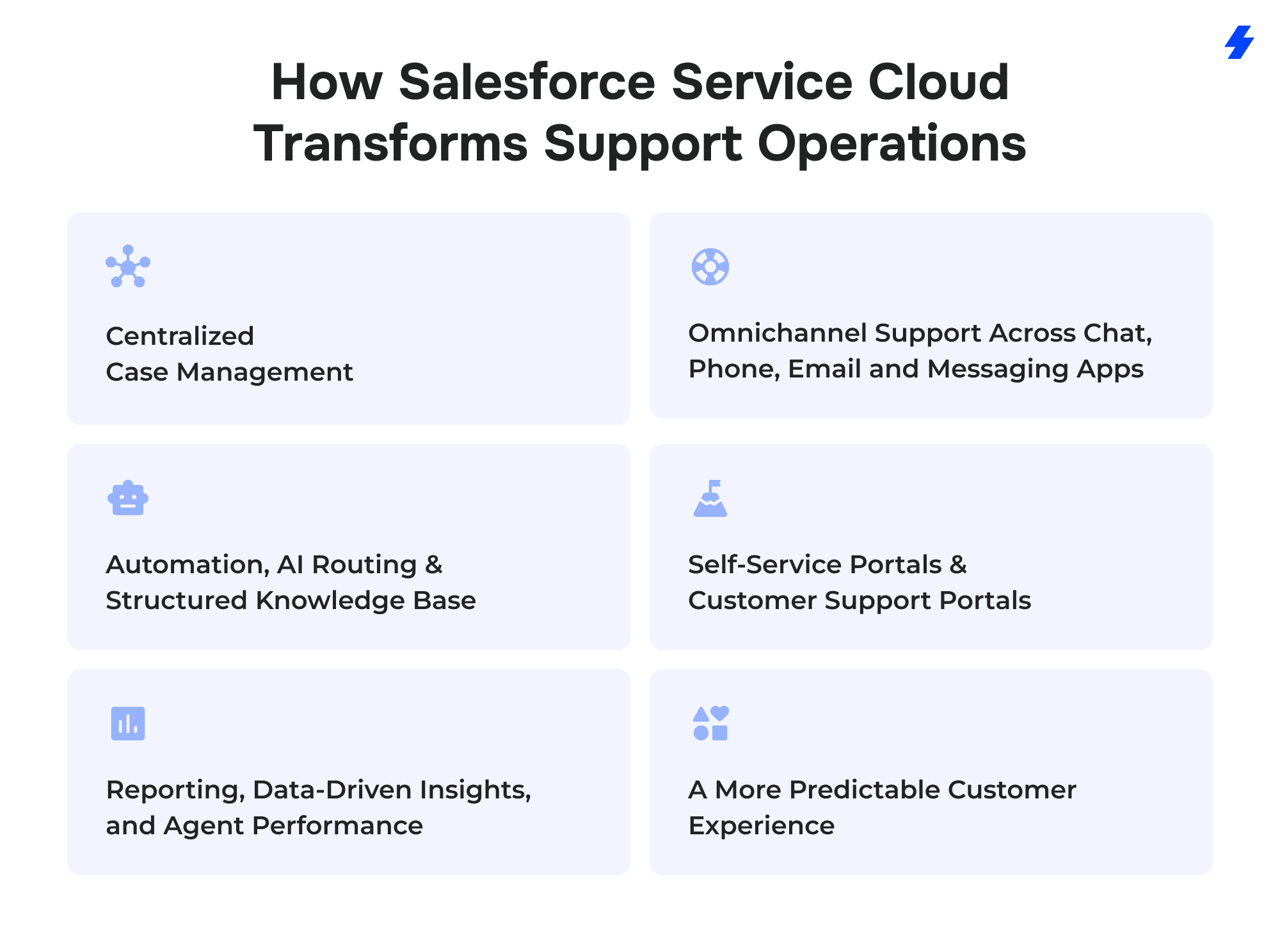
Centralized Case Management
Salesforce Service Cloud consolidates all incoming customer inquiries into a single service console, replacing shared inboxes and disconnected ticketing tools. The support team tracks ownership, related data, and history in one place, which helps service agents and the wider service team resolve customer issues with better context and stronger data integrity.
Omnichannel Support Across Chat, Phone, Email, and Messaging Apps
Customers contact support through multiple channels: live chat, email, phone, WhatsApp, in-app chat, and even social media platforms. With Omni-Channel routing, Service Cloud offers a way to manage customer interactions across multiple channels, so agents don’t lose messages or context while handling parallel conversations.
Automation, AI Routing, and a Structured Knowledge Base
Routine steps, like triaging customer issues, updating statuses, notifying customers, and linking multiple records, no longer need manual work. Automation and AI-driven routing free agents from repetitive tasks so agents focus on higher-value conversations and personalized support. A comprehensive knowledge base with well-structured articles and base management tools helps teams share knowledge articles, power self-service portals, and support features such as Einstein Article Recommendations, which enables agents to find the right content faster.
Self-Service Portals and Customer Support Portals
Experience Cloud enables companies to build branded self-service sites/portals where customers can search knowledge, engage with community content, and submit and track support requests, while Service Cloud is the support “engine” behind the scenes, powering case management, the agent console, and routing + automation (queues/Omni-Channel, assignment rules, flows, SLAs/escalations), so customers get a predictable portal experience and support teams reduce ticket load without sacrificing service quality.
Reporting, Data-Driven Insights, and Agent Performance
Dashboards provide data-driven insights into case volume, agent performance, backlog, and response times. Leaders see which service processes stall, where service efficiency can improve, and how agent productivity changes over time. This visibility guides staffing, training, and process redesign.
A More Predictable Customer Experience
When Service Cloud is configured well, customer service operations shift from ad hoc to reliable. Customers receive a faster, more supportive, and straightforward customer experience, and consistent answers across channels. The result is higher engagement, better customer satisfaction, and more trust in the company’s ability to provide support when it matters most.
Case Study Overview
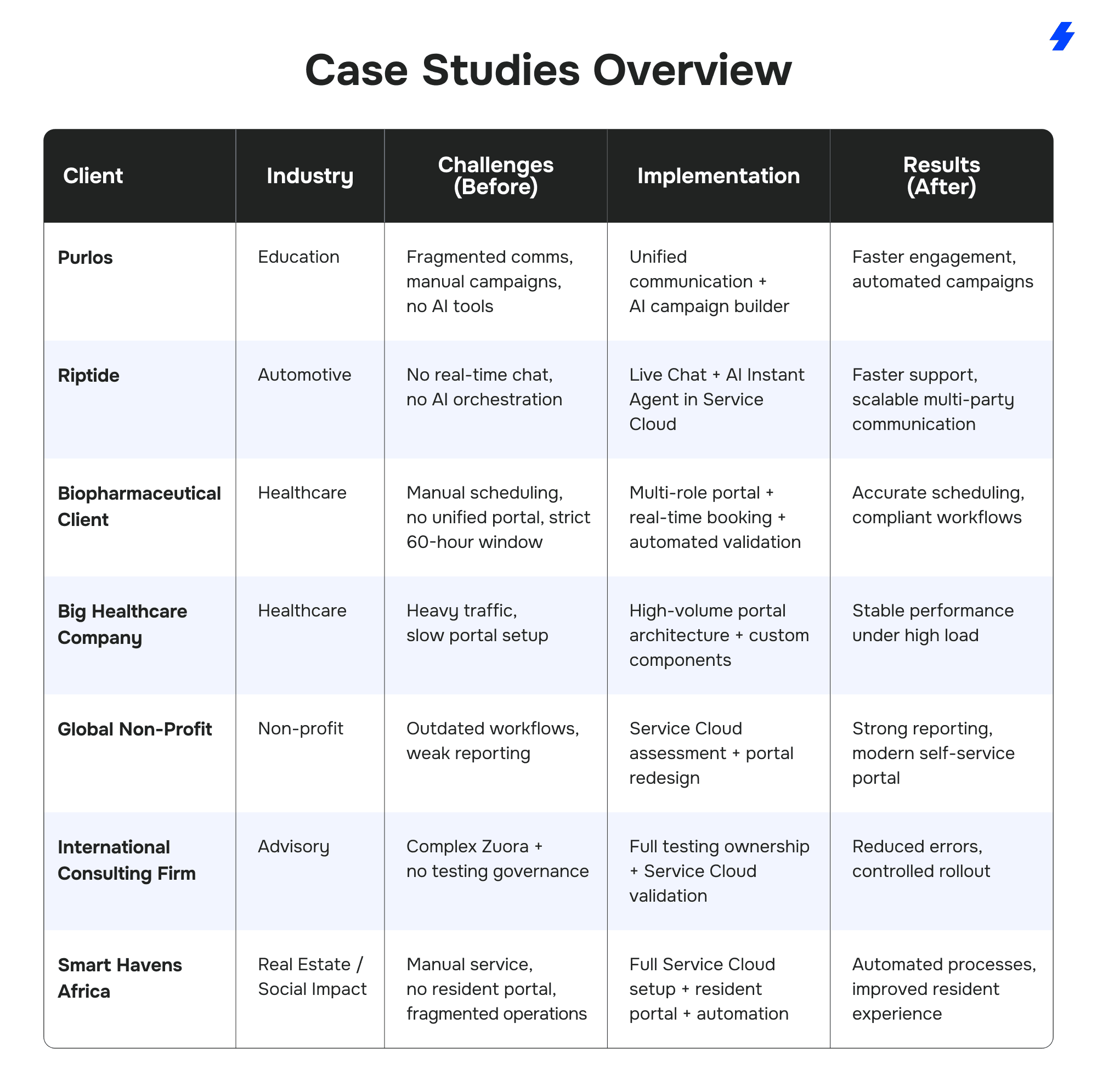
Service Cloud Success Stories
Purlos: Automating Student Engagement and Multi-Channel Communication
 Purlos supports colleges and universities in improving student enrollment and retention. Their platform relied on Salesforce, but several core workflows were still manual, fragmented, or limited by technical constraints. MagicFuse helped the team rebuild their service and communication architecture inside Service Cloud, introducing AI-driven processes and unified messaging across channels.
Before: Operational Gaps Slowing Student Engagement
Purlos faced several barriers that limited their ability to scale:
- Communication with students happened across WhatsApp, email, and SMS, but none of it lived in one system.
- Campaign setup required creating more than 100 related Salesforce records manually for each new outreach flow.
- Managers had no AI-assisted way to generate templates, message variations, or structured campaign content.
- The existing REST API model allowed only a limited amount of data per request, making it hard to store complete course information.
- No automation existed for mapping incoming data from various sources such as SFTP, HubSpot, AWS, or Experience Cloud.
What We Implemented: Multi-Channel Service + AI + Scalable Data Model
MagicFuse rebuilt the communication and data foundation inside Service Cloud:
- A new architecture based on custom metadata hierarchies to map student, course, and application data into Salesforce objects.
- Multiple ingestion paths for technically diverse clients: REST API, SFTP, HubSpot, AWS, and direct upload through Experience Cloud.
- A unified communication layer covering WhatsApp, email, and SMS, all managed from Service Cloud.
- AI components integrated through custom Salesforce connectors, enabling automated template creation,
- AI-guided topic and message generation, and LLM-based support for two-way WhatsApp communication.
- A real-time campaign builder that creates 100+ related Salesforce objects automatically.
- The system was built through several iterations, including detailed research into AI capabilities and Embedded DB limitations.
After: Automated Marketing Campaigns, Unified Messaging, and AI-Assisted Workflows
The new setup reshaped how Purlos operates:
- All communication channels now function inside Service Cloud, giving managers a complete interaction history.
- AI produces messages, letters, and topics on demand, reducing the workload on the content team.
- Campaigns that previously took hours now generate automatically, including the 100+ related records created for each initiative.
- Student engagement cycles move faster, and universities receive timely, structured communication.
- Purlos now has a scalable platform for future AI-led features.
Unique Takeaway
For education platforms, Salesforce Service Cloud implementation with AI creates a communication engine that universities can rely on during high-stakes admission periods.
Riptide: AI-Driven Live Chat and Instant Agent for Automotive Communication
 Riptide connects customers, drivers, and dispatchers through a single messaging stream tailored for the automotive sector. Their team wanted to extend this capability into Salesforce so dealerships and service centers could manage conversations directly inside Service Cloud and Experience Cloud, without losing speed or context.
MagicFuse delivered the integration framework and AI components required to support real-time, high-volume communication across global teams.
Before: Limited Salesforce Connectivity and No AI-Orchestrated Chat
Riptide’s platform had strong communication features but lacked a native Salesforce integration. Their main challenges included:
- No direct way to run Riptide Live Chat inside Salesforce for contact center teams.
- No AI agent to orchestrate conversations or automate multi-step chat flows.
- No scalable framework to support real-time messaging for multiple stakeholders.
- Operational friction caused by development teams working across three time zones.
- A need for ongoing technical support to evolve the integration over time.
Without these capabilities, automotive clients couldn’t manage conversations or escalate service-related tasks from within Salesforce.
What We Implemented: Live Chat + AI Agent + Experience Cloud Integration
MagicFuse delivered a full integration layer designed specifically for automotive communication:
- Riptide Live Chat for Salesforce, embedded directly into Service Cloud and Experience Cloud so contact centers, service providers, and customers communicate in one thread.
- Riptide Instant Agent, a generative AI chat component that automates routing, responses, and orchestration for complex service conversations.
- A secure, scalable architecture built to handle real-time interactions across customers, drivers, and dispatch teams.
- Cross-time-zone collaboration workflows so teams in the US, Australia, and Ukraine could operate as a single unit.
- Continuous technical support and onboarding to refine the solution as client needs expanded.
The project was shaped through a structured 3-week Discovery Phase followed by coordinated development across a team of four Salesforce specialists.
After: Real-Time Communication Inside Salesforce With AI Handling Complexity
The final result gave automotive organizations a unified service experience:
- Live chat now operates fully inside Salesforce, reducing delays between customers and service providers.
- AI handles complex chat scenarios, guiding interactions, summarizing exchanges, and routing tasks without human intervention.
- Dealerships and service centers gain a single workspace for cases, chat, and customer interaction history.
- Riptide’s global teams collaborate smoothly thanks to coordinated time-zone planning.
- The solution continues to evolve through ongoing support as Riptide adds new capabilities.
Unique Takeaway
AI-driven chat orchestration inside Service Cloud gives automotive service centers a faster path to resolving customer questions, coordinating drivers, and managing dispatch workflows—all from one console.
Biopharmaceutical Client: Coordinating Cell Therapy Logistics Under Strict Time Constraints
 This biopharmaceutical organization needed a portal capable of coordinating an entire cell therapy lifecycle within a rigid 60-hour window. Although the workflow goes beyond traditional case management, Service Cloud served as the operational backbone for coordination, validation rules, alerts, and workflow automation, while Experience Cloud provided the user-facing portal.
Before: Fragmented Processes and No Unified System for Therapy Coordination
The client managed critical therapy steps across multiple tools, each owned by a different stakeholder:
- No centralised portal for Treatment Centers, Apheresis Centers, Manufacturing Centers, and internal teams.
- Standard Salesforce UI couldn’t support the required medical workflows, forcing users to rely on spreadsheets and manual communication.
- Booking across multiple locations and time zones often led to scheduling conflicts.
- Medical forms required manual creation, sending, and signing outside Salesforce.
- No automated checks to validate data accuracy, regulatory requirements, or therapy deadlines.
- External slot booking systems couldn’t sync in real time with therapy logistics.
- Onboarding new centers was slow because the process wasn’t standardised.
- Coordinating each case within a 60-hour therapy window required constant manual follow-up.
What We Implemented: A Custom Logistics Portal on Service Cloud & Experience Cloud
MagicFuse built a specialised portal architecture focused on precision, time-sensitive workflows, and strict data governance:
- A personalised multi-role portal, combining Service Cloud data with Experience Cloud interfaces tailored to each center type.
- Custom Lightning components replacing the limitations of standard Salesforce pages to improve clarity and user navigation.
- An advanced calendar and booking engine capable of managing cross-location schedules in multiple time zones.
- Automated document generation, sending, and e-signature features for all required medical paperwork.
- Industry-specific tracking logic, including automated alerts, workflow triggers, and deadline monitoring for every therapy step.
- Real-time REST API integrations with external logistics and slot-booking systems.
- Mobile-ready functionality for coordinators who manage therapies on the go.
- An automated onboarding process for new centers and internal users, reducing setup time.
- Strict validation rules and data checks to guarantee accuracy and compliance.
Technologies used included Apex, Flows, Triggers, SOQL, LWC, Custom Metadata, Custom Settings, REST API, and core Service & Experience Cloud capabilities.
After: A Unified, Time-Sensitive Therapy Management Platform
The new system transformed how the client manages cell therapy logistics:
- One portal links every stakeholder, replacing manual coordination with a structured, traceable workflow.
- Scheduling accuracy improved, with the calendar system preventing double-bookings and handling time-zone logic automatically.
- Therapy timelines stay on track thanks to automated alerts tied to the 60-hour window.
- Medical forms are generated and signed directly inside Salesforce, reducing manual errors.
- Validation rules protect data quality and support regulatory compliance.
- Real-time integrations keep logistics, booking systems, and therapy flows aligned throughout the process.
- Onboarding became faster, raising adoption rates across treatment and apheresis centers.
- The entire therapy pathway now operates inside a scalable, integrated platform.
Unique Takeaway
In cell therapy, every hour matters. A custom Service Cloud and Experience Cloud architecture can turn a high-risk, multi-team workflow into a controlled, predictable process with real-time visibility for every stakeholder, while remaining compliant and medically accurate.
Non-Profit organization: Service Cloud Assessment, Portal Modernization, and Zendesk Migration Planning
 A global non-profit initiative needed clarity on how to transition its support operations into Salesforce Service Cloud while maintaining a user-friendly self-service experience for its worldwide network.
MagicFuse conducted a deep analysis of their existing workflows, reporting needs, and portal structure, laying the foundation for a smooth migration away from Zendesk.
Before: Unstructured Workflows and Limited Visibility Across Service Operations
The organization’s support environment faced several challenges:
- No consolidated view of service workflows within Salesforce.
- Existing setups for layouts, automations, and macros lacked structure and consistency.
- Reporting for Finance and Management teams was fragmented and not adapted to their roles.
- The self-service portal needed modernisation, both visually and functionally.
- The team was unsure whether chatbot adoption would add meaningful value.
- Planning a migration from Zendesk required a clear technical roadmap.
What We Implemented: Full Service Cloud Analysis and Portal Redesign
MagicFuse conducted a multi-phase assessment and redesign effort:
- Stakeholder interviews with end users and department leaders to validate requirements and identify pain points.
- A comprehensive Service Cloud implementation analysis covering page layouts, automations, macro usage, queue structure, and migration readiness.
- Reporting and dashboard prototypes for Finance and Management teams, built in sandboxes for review and adjusted through iterative feedback.
- A modernised Experience Cloud self-service portal with cleaner navigation, a rebuilt frontend, and dynamic search for faster information access.
- A chatbot feasibility study evaluating usage patterns, expected demand, and potential ROI.
After: A Modern Portal and a Clear Migration Path for Service Operations
The organization now has a foundation for scalable, well-structured service processes:
- A refined Service Cloud setup with documented recommendations for the Zendesk migration.
- Role-specific dashboards and reports that give Finance and Management accurate operational insights.
- A modern, intuitive self-service portal that allows global users to find information with fewer steps.
- Data-driven insight into chatbot adoption, supporting leadership’s decision-making.
Unique Takeaway
For large non-profit networks, the biggest value comes not only from new features but from clarity. A structured Service Cloud assessment paired with a modernised portal sets the stage for long-term operational consistency, improvements in customer support processes, and a smoother migration from legacy tools.
Consulting Firm: Structured Testing for Zuora and Service Cloud Rollout
This consulting organization needed a trusted partner to coordinate complex Zuora testing and validate key Service Cloud functionality before deployment. While the primary scope focused on Zuora testing, we also validated key Service Cloud workflows to ensure the rollout supported real support processes.
Before: No Central Owner for Testing and High Risk of System Gaps
The company faced several constraints during implementation:
- A complex Zuora configuration that demanded detailed, coordinated testing.
- No dedicated advisor to manage testing activities or guide the internal team.
- Service Cloud features required structured validation to confirm they supported real workflows.
- Without clear oversight, the risk of launch delays and functional gaps increased.
What We Implemented: End-to-End Testing Leadership
MagicFuse served as the primary testing lead:
- Owned the full Zuora testing cycle, managing scenarios, communication, and execution.
- Provided advisory support to help the internal team understand dependencies and resolve issues.
- Validated Service Cloud functionality against business requirements to confirm readiness for rollout.
After: Lower Implementation Risk and Clear Testing Governance
With defined ownership and advisory support, the organization achieved:
- A reliable and fully documented testing process for Zuora.
- Reduced risk of errors during implementation.
- Service Cloud validated for real use cases, supporting a smoother launch.
Unique Takeaway
Strong testing governance is often the difference between a stable rollout and downstream operational issues, especially when Zuora and Service Cloud intersect.
Smart Havens Africa: Transforming Affordable Housing Operations With a Unified Service Cloud Portal
 Smart Havens Africa supports low-income families by providing durable, eco-friendly housing and community-driven development programs. As the organization expanded, the team needed a centralised system to manage property applications, repairs, financial interactions, and resident communication.
MagicFuse built a comprehensive Service Cloud and Experience Cloud solution that strengthened both operational control and community engagement.
Before: Growing Workflows Without a Central System to Manage Them
Smart Havens Africa’s rapid growth exposed several operational issues:
- Housing applications, repair requests, and property management tasks were managed across multiple tools with no unified structure.
- Residents lacked a single portal for communication, bill management, or service requests.
- Leads and applicants weren’t moving through a consistent qualification process.
- Case handling required a more structured approach, with proper routing, escalation, and tracking.
- Internal teams needed access to a knowledge repository without increasing licensing costs.
- Financial workflows weren’t synchronized with QuickBooks, creating extra manual work.
- Document signing processes were slow and required additional tools outside Salesforce.
- Without automation and a resident-facing portal, daily operations became increasingly complex to scale.
What We Implemented: A Resident-Centric Experience Cloud Portal and Automated Service Workflows
MagicFuse delivered a complete operational overhaul built on Salesforce:
- A central Experience Cloud portal where residents can apply for housing, track bills, request repairs, and communicate through Salesforce Chat.
- A customized Case framework with tailored layouts, validations, record types, and automated case creation from emails and webforms.
- Automated rules for auto-responses, routing, queue assignment, alerts, and escalations, giving the service team a structured workflow.
- A redesigned lead-to-opportunity process with lead scoring and task management, supported by an optimized Service Console and Omni-Channel.
- A knowledge repository built with standard Salesforce features to avoid extra licensing costs.
- A custom feedback component for residents and an integrated telephony setup with PhoneIQ.
- SLA tools and e-signature workflows via Zapier for compliant document handling.
- Custom data models for purchase tracking and project oversight using Apex and declarative tools.
- QuickBooks integration through Zapier to bring financial data into Salesforce automatically.
After: Stronger Community Engagement and Streamlined Property Management
The new environment strengthened operations across the organization:
- Automated property and case management workflows reduced manual effort and improved issue resolution.
- A modern, intuitive Experience Cloud portal provided a better resident experience and stronger community involvement.
- Lead scoring and Omni-Channel routing improved conversion rates and reduced follow-up delays.
- Integrated e-signature and financial workflows removed administrative bottlenecks.
- Consistent, secure data access ensured the right information was available to the right users.
- Comprehensive visibility into purchases, projects, and service activity supported better planning and decision-making.
Unique Takeaway
Improving quality of life starts with reliable systems. By combining Service Cloud, Experience Cloud, and targeted integrations, Smart Havens Africa now runs housing operations, community communication, and financial processes through one unified platform, supporting their mission at scale.
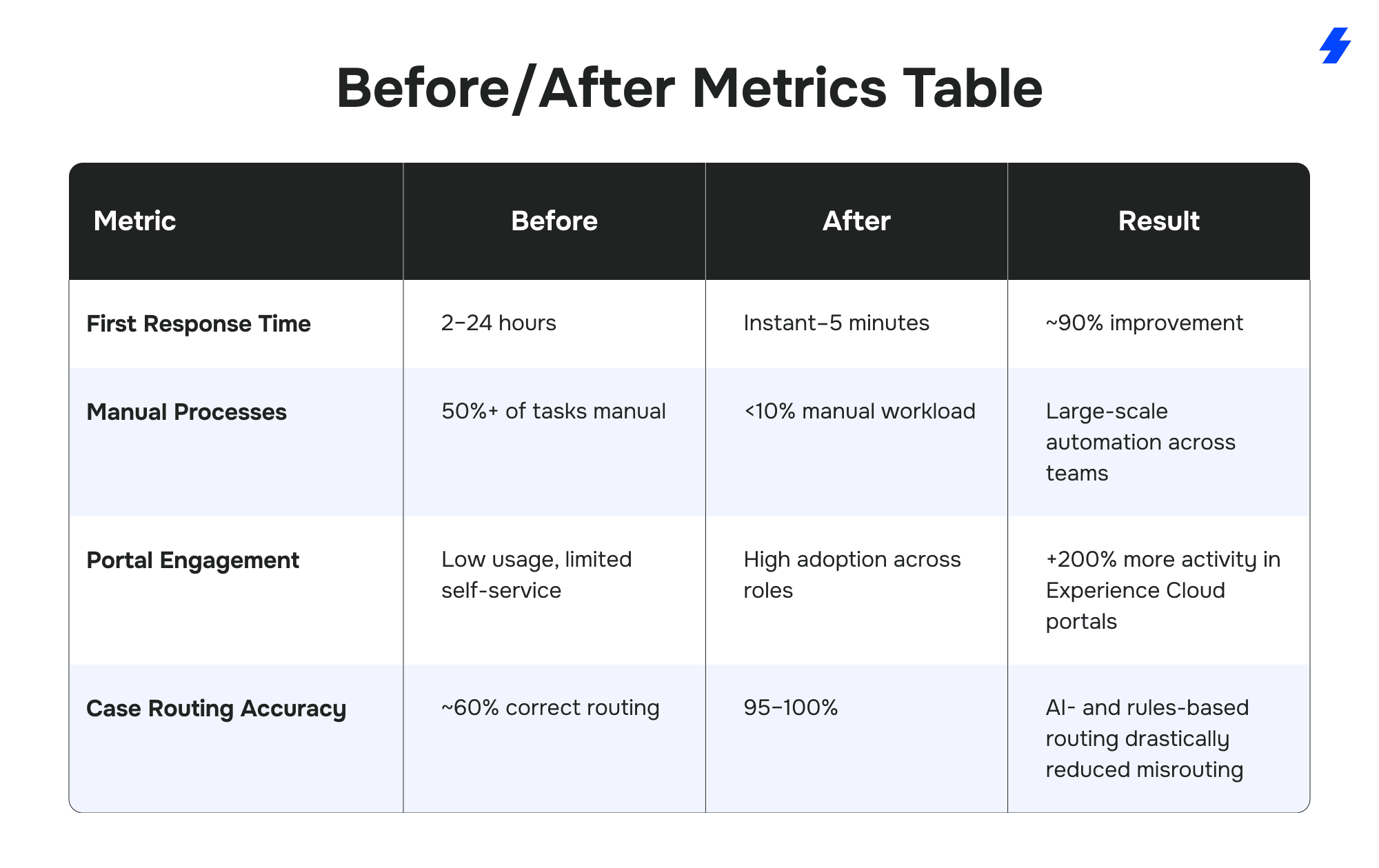
Before/After Metrics Table
Across the projects featured in this article, several measurable patterns emerged. The table below highlights the most consistent before/after shifts achieved through Service Cloud implementations.
Lessons Learned From Real Service Cloud Projects
Delivering Service Cloud solutions across industries has surfaced several best practices that consistently lead to stronger outcomes and increased customer satisfaction.
Integration Strategy
- Prioritize one source of truth for core objects.
- Build integrations with retry logic and clear error handling.
- Use platform events and queues when working with high-volume data flows.
Data Governance
- Validate critical fields early to prevent downstream issues.
- Use Custom Metadata and Custom Settings for scalable rules.
- Maintain naming conventions for flows, automations, and objects.
UX & Portal Design
- Replace standard Experience Cloud pages with custom LWCs when workflows are complex.
- Structure navigation around user goals, not internal terminology.
- Provide contextual help inside the portal to increase adoption.
AI Adoption
- Start with routing, classification, and content generation - these deliver the fastest ROI.
- Use guardrails for medical, financial, or compliance-heavy environments.
- Pair AI with human review for sensitive workflows.
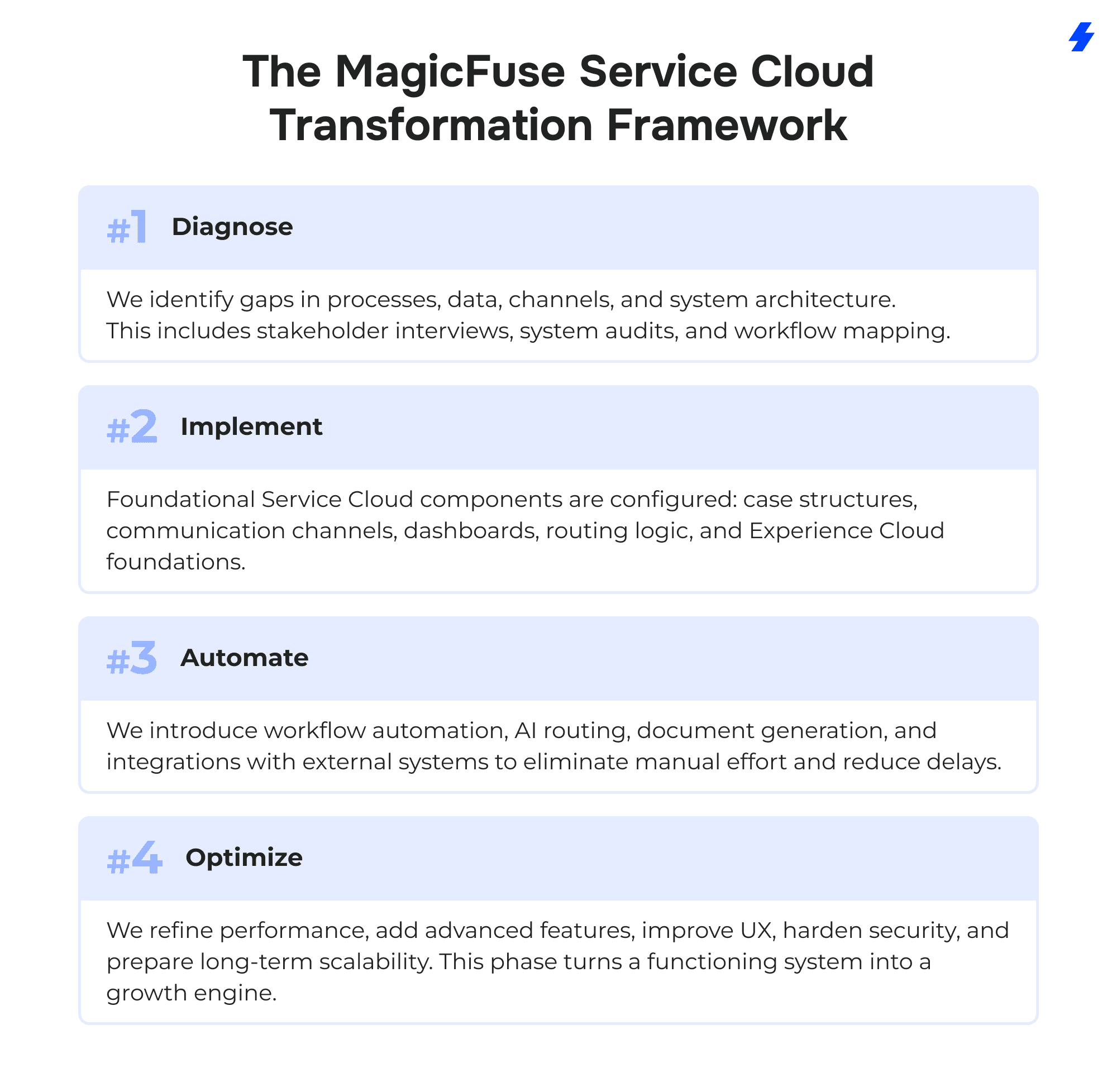
The MagicFuse Service Cloud Transformation Framework
To make Salesforce Service Cloud implementation predictable, MagicFuse follows a repeatable model that works across industries, service teams, and complexity levels. It covers everything from initial cloud implementation and service Cloud setup to system integration, data migration, and ongoing optimization of customer support operations and business processes.
What We See Most Often Before Companies Work With Us
After dozens of Service Cloud and Experience Cloud projects, several recurring issues appear across organizations:
- Support operations run on email, spreadsheets, and shared inboxes, leading to long resolution times.
- Communication channels are disconnected, creating gaps between chat, phone, email, and internal tools.
- Routing rules are inconsistent or outdated, causing lost cases or long waits.
- Experience Cloud portals are underused, usually because the UI is confusing or slow.
- Data structures are mismatched to actual business processes, making reporting unreliable.
- Integrations with external tools lack governance, resulting in sync errors and duplicated records.
- Teams want AI capabilities but don’t know where it fits or how to implement it responsibly.
Why Companies Choose MagicFuse for Service Cloud
Organizations come to MagicFuse when they need more than a basic setup - they need a solution that matches how their business actually operates. The following strengths consistently set MagicFuse apart across all Service Cloud projects.
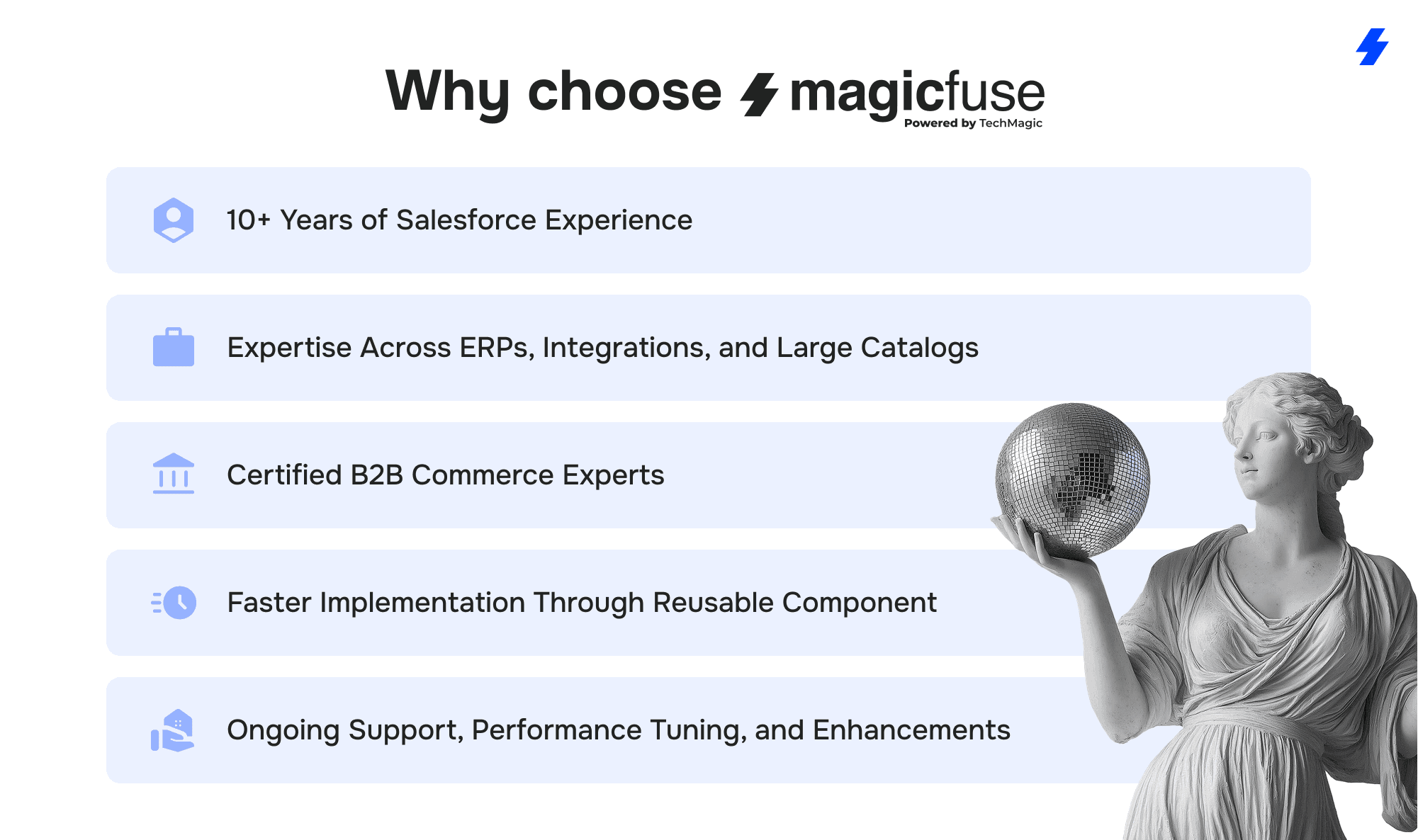
Certified Salesforce Experts
MagicFuse teams combine certified architects, developers, and consultants who specialize in the technical side of Salesforce. This allows us to handle complex data models, integrations, automation logic, and Experience Cloud architectures without compromise.
Strong AI and Automation Capabilities
From AI chat orchestration to automated campaign builders and real-time routing, MagicFuse integrates AI to solve real operational gaps. The focus is always on reducing manual work, strengthening decision-making, and accelerating daily processes.
Deep Industry Experience
Clients across education, healthcare, biopharmaceutical logistics, automotive, consulting, and real estate trust MagicFuse to redesign their support operations. This cross-industry expertise allows us to anticipate constraints, propose practical solutions, and adapt Service Cloud to highly specialized workflows.
Proven Transformations With Measurable Impact
Each project in this article reflects tangible before/after improvements: faster response times, fewer manual steps, higher portal adoption, and more accurate routing. These aren’t generic claims; they are outcomes delivered in real implementations across multiple regions and industries.
If your organization is planning a Service Cloud project or needs help improving an existing setup, our team is ready to support you. Reach out to MagicFuse to discuss your goals and explore the best path forward.
FAQs
- What does a typical Service Cloud implementation include?
Most projects start with a detailed review of current workflows, data structures, and communication channels. From there, we configure case management, routing rules, automation, dashboards, and Experience Cloud portals. Integrations, knowledge bases, and AI-driven tools are added based on the client’s needs and operational goals.
- How long does it take to see measurable improvements?
Clients usually notice improvements within the first weeks after go-live - faster response times, fewer manual steps, cleaner routing, exceptional customer service, and better visibility. Larger, multi-phase programs show progressive gains as automation, AI, and integrations are introduced.
- Can MagicFuse rescue an existing Service Cloud implementation?
Yes. Many companies come to us with an underperforming setup or a system that has grown too complex. We run an audit, outline the gaps, stabilize critical workflows, and rebuild the areas that are slowing teams down.
- How is AI incorporated into Service Cloud projects?
AI is introduced where it delivers practical value: routing, classification, content generation, chat orchestration, and campaign automation. We apply strict guardrails for regulated industries and balance AI output with human oversight when needed.
- Do you offer ongoing support after implementation?
Yes. MagicFuse provides continuous support, optimization, and feature development. This includes monitoring integrations, rolling out new functionality, improving automation, and adjusting the setup as business requirements evolve.