
By Nataliia Matiushenko, Senior Salesforce Developer at MagicFuse
Can an Agentforce Service Agent show a case form in the chat, with the subject and description pre-filled from the conversation? Yes. I built one with Agentforce Custom Lightning Types, Apex, a Lightning Web Component, and a Flow, and it's running in production on Winter '27.
I saw this question recently while watching a Salesforce video session. The Salesforce experts answering it thought it was probably possible, but said there were nuances:
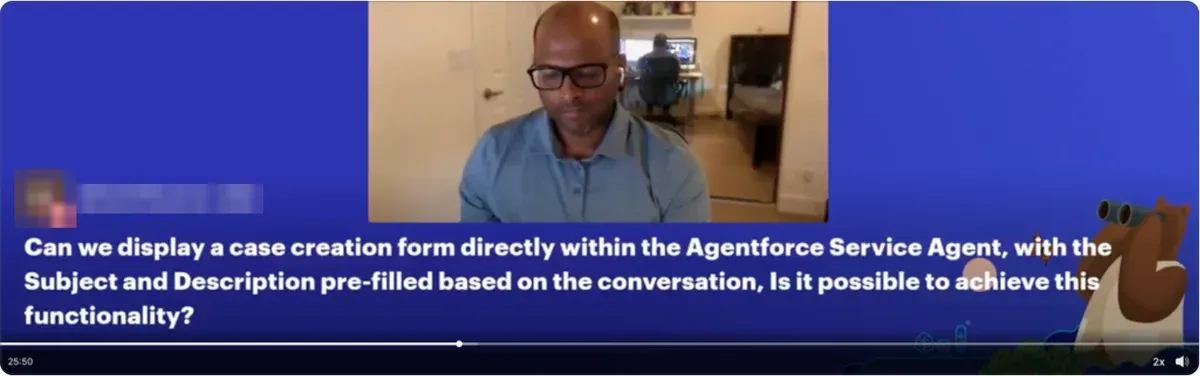
A viewer's question in a Salesforce video session I was watching.
I'm a Senior Salesforce developer at MagicFuse. This article covers those nuances: how the build works, why the LLM never creates the record, and the 5 problems I hit.
Key Takeaways
- Custom Lightning Types bind an Apex class to a Lightning Web Component, so an agent can show a real form in the chat. Service Agents need Enhanced Chat v2.
- The LLM fills only what it can infer: subject, description, and case reason. If it isn't sure, it leaves the field empty.
- Apex validates every value, and the form's submit goes straight to Apex, bypassing the agent.
- On a public site, the guest user never inserts the case. A platform event and a Flow do.
- The agent offers a case only after troubleshooting fails, and opens the form only after a clear "yes."
Why Add Case Creation to an Agentforce Chat?
Because a visitor with a problem shouldn’t have to leave the chat to get help. The idea came from our client, Mphasis Silverline, after we shipped the first version of their Agentforce agent.
Mphasis Silverline is a Salesforce consulting partner with more than a decade of implementation experience. It works with companies in financial services, healthcare and life sciences, and media and entertainment, and it builds CalendarAnything, a calendar app for Salesforce.
Their agent, SAM, runs on the Silverline website. It already answered questions about Silverline’s services and products from grounded information, qualified leads, and booked sales calls. So why send someone with a problem somewhere else?
Now, when a visitor describes a product issue, the agent walks them through troubleshooting first. If that doesn't solve it, the agent offers to open a support case right in the conversation.
Read also: Top Agentforce Use Cases for Streamlining Business Operations
What Does a Pre-Filled Case Form Look Like in Agentforce Chat?
It’s a form card in the chat, styled to match Silverline’s website, with the case reason, subject, and description pre-filled from the conversation. It appears only after troubleshooting fails and the visitor agrees to a case.
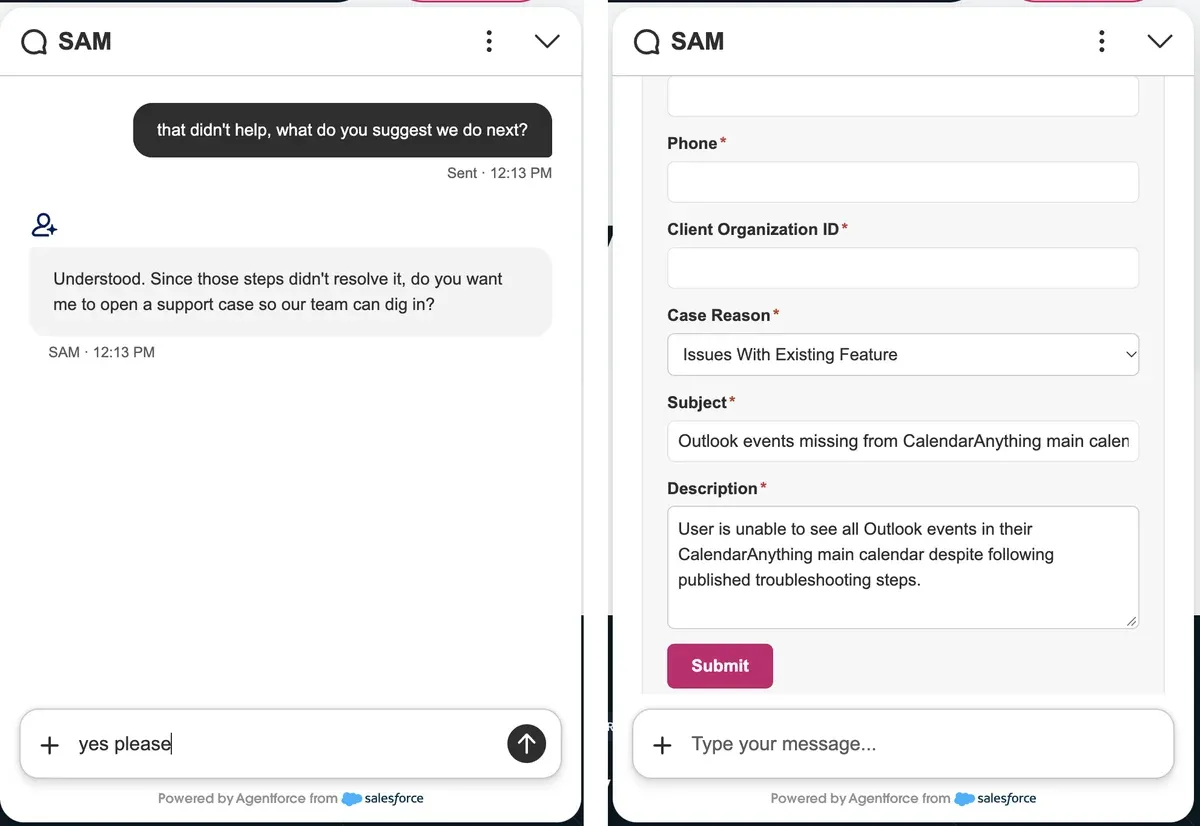 SAM, Mphasis Silverline’s Agentforce agent, on silverlinecrm.com. Left: the advice didn’t help, so SAM asks first. Right: after “yes please,” the card appears, pre-filled by the model. Screenshots shared with Silverline’s permission.
Here, a CalendarAnything user couldn’t see their Outlook events. The visitor never typed that description. The model summarized it from the conversation, and the visitor can still edit any field.
Read also: How Salesforce Agentforce Can Transform Customer Service with AI-Driven Automation
What Are Agentforce Custom Lightning Types?
Custom Lightning Types describe the shape of an agent action's input or output and tell Agentforce which UI to use. Instead of plain text, the agent renders your Lightning Web Component.
What Files Make Up a Custom Lightning Type?
Each custom Lightning type is a LightningTypeBundle (API version 64.0 and later). The required schema.json defines the data and can point to an Apex class. The optional editor.json and renderer.json override the input and output UI.
Where Do Custom Lightning Types Work?
Salesforce lists 3 surfaces for Apex-based types. For a Service Agent on a public website, that means Enhanced Chat v2:
How Do Agent Script, Apex, and LWC Connect?
Salesforce's guide to Custom Lightning Types in Agent Script describes 3 layers. Agent Script declares which parameters need a custom UI, and the type bundle maps them to an Apex class and an LWC.
The names must match across all 3 layers. Otherwise, as the authors warn, "the platform silently falls back to the default text UI with no error message."
Why Use a Pre-Filled Card Instead of Questions or a Web-to-Case Form?
A pre-filled card saves visitors from repeating themselves and keeps them in the chat. Those were my 2 reasons.
Why Not Let the Agent Ask for Each Field?
The conversation has already done most of the work. By the time a case is needed, the agent knows the details, so asking again means making visitors repeat themselves. With the card, they review the values, fix anything wrong, and add contact details.
Why Not Send Visitors to a Web-to-Case Form?
From one chat, visitors can get answers, book a call, or open a case. Sending them to a separate form would break that flow and make them start over somewhere else.
Why Shouldn't the LLM Create the Case Itself?
An LLM is good at summarizing a conversation and unreliable at the parts that must be exact, like identity, picklist values, and consent. So my build follows one rule: the LLM suggests, Apex validates, the visitor confirms, and only then is the record created.
Which Fields Should the LLM Fill?
Only the ones it can infer from the conversation. I split the form into 3 tiers:
-
What we already know. Name and email come from the Lead or Contact recognized in this chat session.
-
What we can infer. The model takes the subject, description, and case reason from the conversation.
-
Everything else. Phone, organization ID, and other details stay blank for the visitor to fill in.
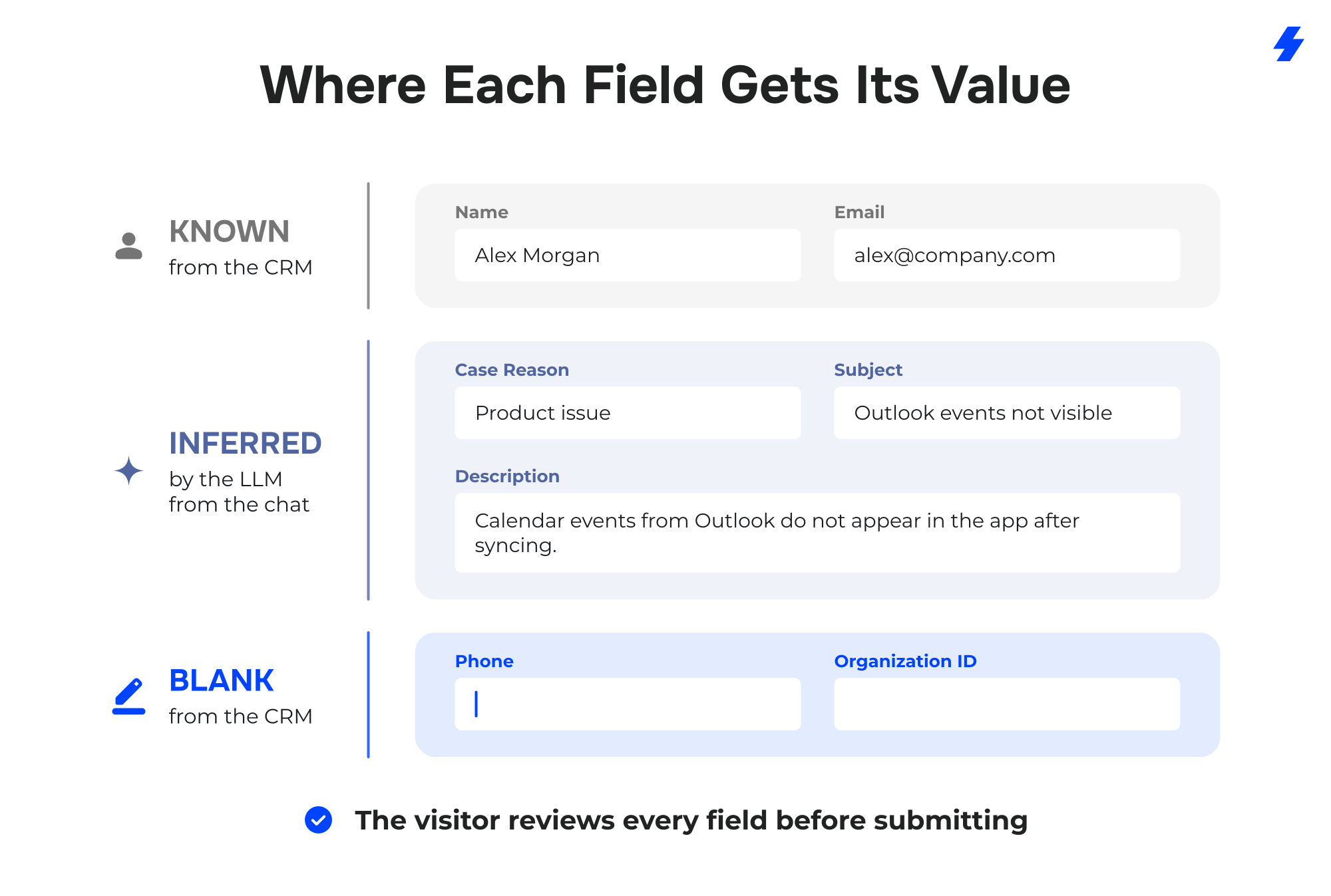
Anything a visitor types into the chat is processed by the agent and written into Salesforce records, so sanitize and validate it before acting on it. Security has to be part of the solution from day one. Nataliia Matiushenko
How Do You Build a Pre-Filled Case Form With Custom Lightning Types?
You need 9 steps across Agent Script, Apex, an LWC, a platform event, and a Flow. The LLM takes part in the first 3 only.
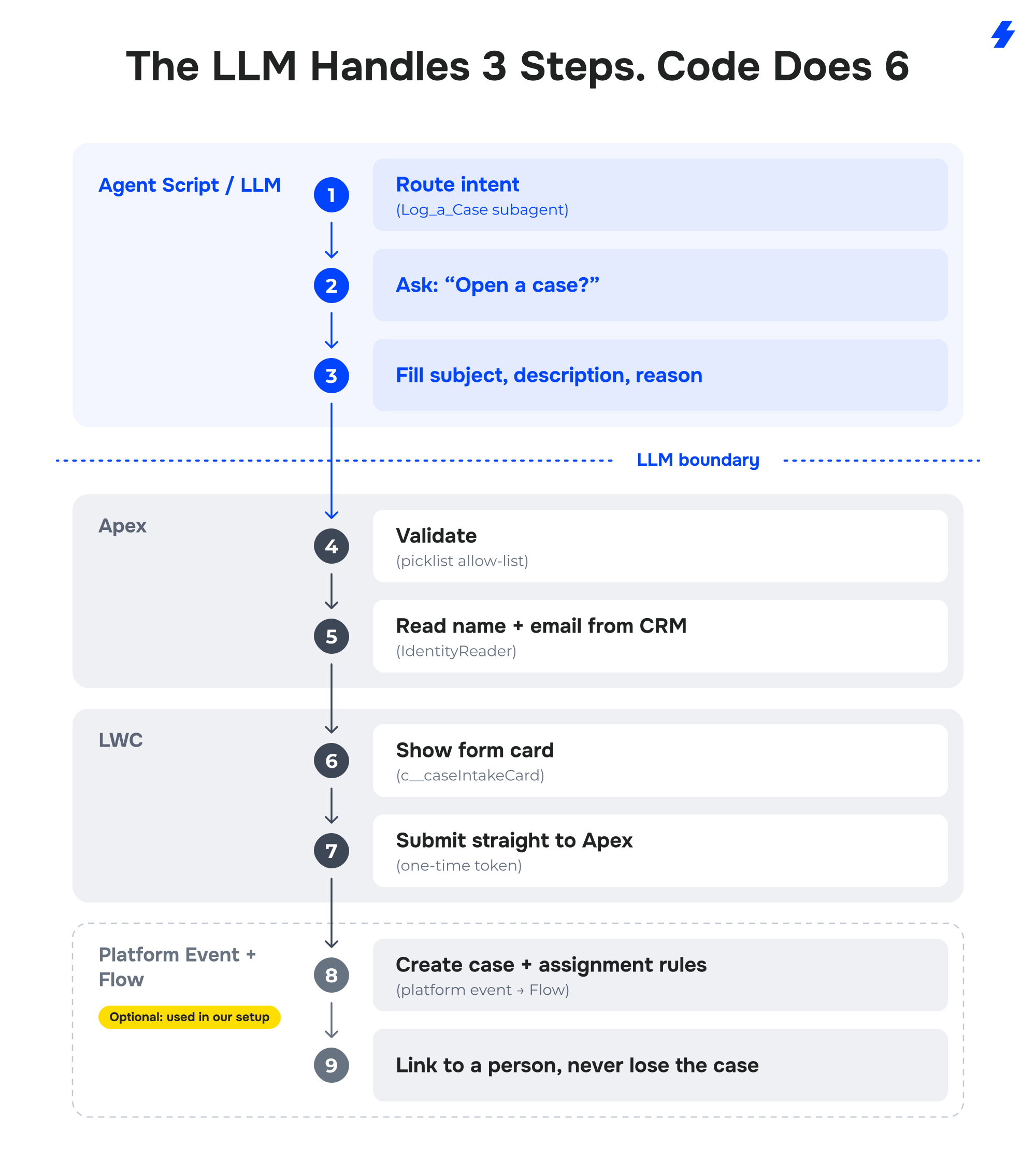
How Do You Route the Intent and Ask for Consent?
The router sends the message to a Log_a_Case subagent, whose description draws the line between support and sales. "My product is broken" is a case, while "help us with our Salesforce" is a consulting request for the sales pipeline.
Many visitors only want to know what to check, so the subagent classifies first and asks "Open a case?" The form appears only on the next message, after an explicit "yes."
How Does the LLM Fill Subject, Description, and Case Reason?
Through Agent Script slot-filling. The inputs subjectGuess, descriptionGuess, and caseReasonGuess are declared in the .agent file as with x = .... That syntax tells the LLM to fill them from the conversation.
The instruction is strict: never ask the visitor, and leave a field empty if anything is unclear. I added that rule after the model guessed on vague descriptions. A fully filled card looks helpful, but a wrong value the visitor misses sends support a case nobody can act on.
What Pitfalls Should You Expect With Agentforce Forms for Guest Users?
Most of them come from the guest user context, and several fail without an error message.
1. Your form runs as 2 different users.
Agent actions run as the agent's bot user. The Custom Lightning Type (CLT) component that renders the form runs as the site guest user. Each one needs its own permission set with Apex class access.
The guest user's permission set assignment is data, not metadata, so a deploy won't carry it. You have to assign it by hand in every org. The component also tends to swallow fetch errors, so a missing grant looks like a half-rendered form, not an error.
2. Typed Apex parameters can arrive empty.
When a guest component passes a typed DTO to an @AuraEnabled method, every field can come through null. To prevent it, declare the DTO's fields with { get; set; }. It looks like a permissions problem but isn't. Another option is to pass a JSON string and deserialize it on the server.
3. Guests can't see records they create.
A direct guest insert can fail with INSUFFICIENT_ACCESS_ON_CROSS_REFERENCE_ENTITY when automation in the same transaction needs read access to the new row. Don't widen guest sharing. Publish a platform event instead, and let a flow running as a system user create the record. The guest needs both create and read on the event.
Note: Cases created by Flow skip assignment rules. This one surprised me. Chatbot cases kept landing with a default user, while the same case from Web-to-Case reached the support queue. The difference was how they were created: by default, Salesforce doesn't run case assignment rules on cases created from a Flow.
A 10-year-old IdeaExchange idea asking for exactly this confirmed it was a platform limitation, not our configuration. My workaround is an invocable Apex class, ApplyCaseAssignmentRules, that the Flow calls after creating the case.
4. The rendering setup is strict and fails silently.
The component's -meta.xml needs the lightning__AgentforceOutput target and a sourceType. If either is missing, nothing renders.
5. The live widget serves stale code.
After a deploy, the embedded web chat can keep serving old components and old agent configuration. If it works in Builder preview but not on the widget, republish the Embedded Service deployment before you look at permissions.
6. Treat guest input as untrusted.
Validate on the server: required fields, formats, regex. When a check fails, ask again. The component is only for presentation.
What If the Agent Offers a Case Too Early?
Early on, the agent sometimes offered a case before the visitor had a real chance to solve the problem. An AI agent should resolve what it can and route to people only what needs them. Otherwise, support drowns in cases that never needed to exist.
The 2-turn pattern from step 2 fixed it. One more rule came from testing: a "yes" to a meeting offer never opens the case form.
What Should You Check Before Going Live?
I'd run through 5 checks before launch. Each one maps to a problem above:
- Type names match across Agent Script, the type bundle, the Apex class, and the LWC.
- The guest user can't insert or read cases directly.
- Everything the visitor or the LLM provides is sanitized and validated on the server.
- New cases land in the right queue, not with a default user.
- Only an explicit "yes" to a case opens the form.
What Do You Need Before You Build a Pre-Filled Form?
You need 5 things in place, and the Salesforce release matters most. Check this list before you start:
- An Agentforce Service Agent
- An Enhanced Chat v2 deployment enabled
- An Experience Cloud site with guest access configured
- Case assignment rules that already work for other channels
- API version 64.0 or later for the
LightningTypeBundlemetadata
Read also: Agentforce Cost in 2026: What You Need to Know
How Does MagicFuse Build Agentforce Agents for Customer Support?
We start from the same idea as this form: the model handles language, and Salesforce handles the data. Support chat is familiar ground for our team. For Riptide, the client says we "deployed the live chat integrated with Service Cloud, Omnichannel, and Riptide's AI" in 80 days.
MagicFuse is a Salesforce Summit Partner with 270+ Salesforce certifications and 11+ years in the ecosystem. We implement, customize, integrate, and build on Salesforce, including Agentforce implementation services for support teams.
FAQs
- Do Custom Lightning Types Work With Agentforce Service Agent in Web Chat?
Yes. Salesforce supports Apex-based Custom Lightning Types for Service agents in Enhanced Chat v2, through the enhancedWebChat channel folder.
- Can Agentforce Pre-Fill a Form From the Conversation?
Yes. Agent Script's ... slot-filling lets the LLM extract values from the chat, and a Custom Lightning Type renders them in an editable form.
- Is It Safe to Let Guest Users Create Cases From an Agentforce Chat?
Yes, if the guest user never inserts the case directly. Validate everything on the server, publish a platform event, and create the case in a Flow.
What's Next for Pre-Filled Forms in Agentforce?
Pre-filled forms in Agentforce work today. Most of the effort goes into consent, identity, validation, guest access, and assignment rules, and that's my answer to the question from that video.
Next, I want to try a pipeline driven entirely by custom metadata and a handoff to a live rep. If you've built something similar, I'd like to hear how you handled guest access.