







B2B buyers are shifting fast - digital channels are no longer optional. According to Digital Commerce 360, global B2B digital sales grew 10% in 2023, reaching $3.36 trillion, up from $3.04 trillion in 2022. In a separate study by Forrester Consulting for Salesforce B2B Commerce, organizations achieved a 289% ROI and a $9.6 million net present value over three years, with a payback in under six months.
Clearly, the opportunity is real. But B2B commerce isn’t just about replicating a B2C experience. It’s built on unique complexities: custom contract pricing, nested account hierarchies, buyer groups, ERP integrations, and specialized ordering workflows. Skipping the planning or data modelling phase often leads to a system that’s hard to scale or maintain.
This guide walks you through an end-to-end implementation of Salesforce B2B Commerce, step by step, from discovery and architecture design, through catalog and storefront setup, integrations, checkout flows, testing, launch, and optimisation. Whether you’re preparing a first rollout or refining an existing one, you’ll get a practical roadmap to keep your project on track and aligned with business goals.
Ready to turn complexity into a clear path forward? Let’s dive into the process.
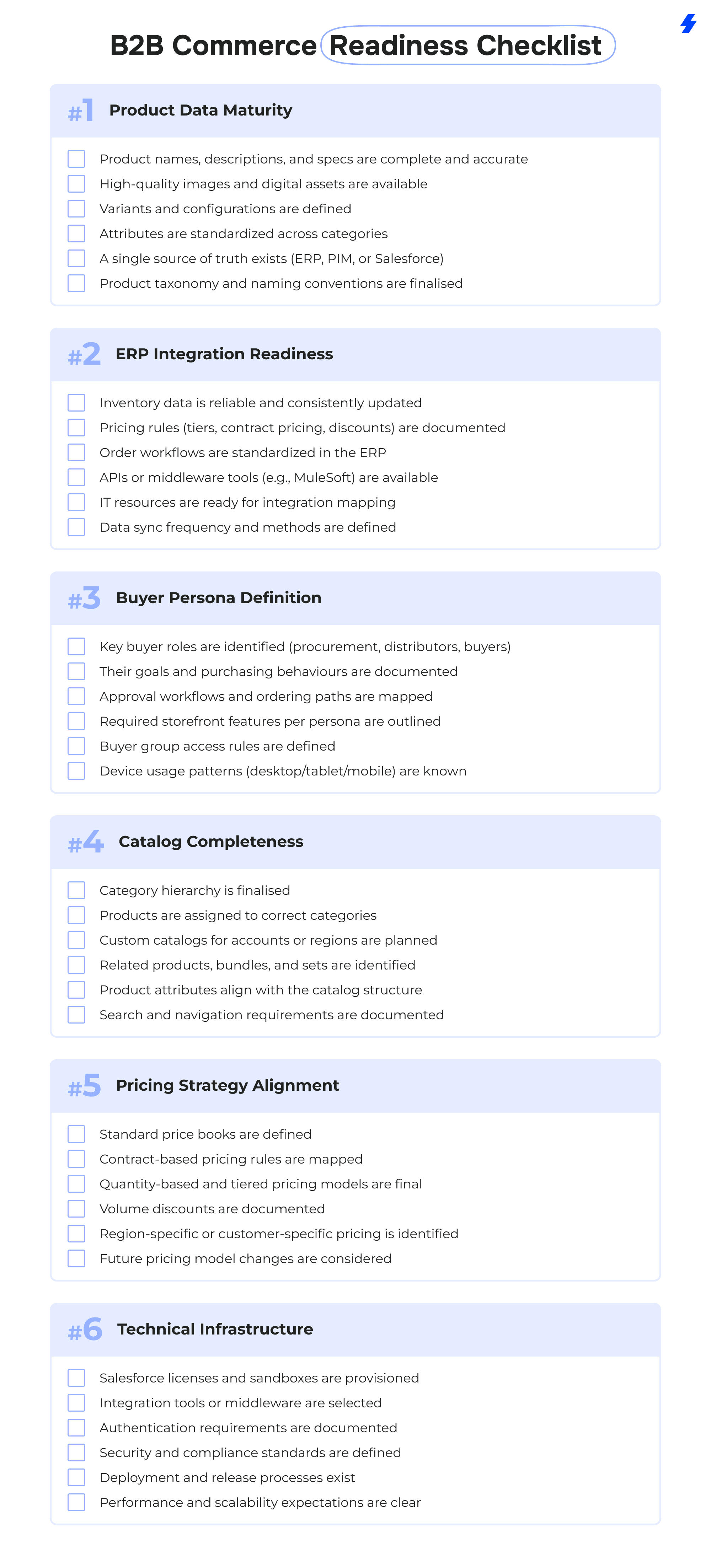
B2B Commerce Readiness Checklist
Before you begin a Salesforce B2B Commerce implementation, it’s important to confirm that your organisation has the foundational elements in place. A strong launch depends on clean data, clear processes, and systems that can support digital buying at scale. Use this checklist to validate your readiness and identify any gaps to address early.
Step-by-Step Salesforce B2B Commerce Implementation Process

Before you touch configuration, code, or integrations, you need a crystal-clear picture of what you’re actually building. That’s what Step 1 is for.
Goal:
Turn high-level “we need Salesforce B2B Commerce” into concrete, documented requirements that everyone agrees on: business, IT, sales, operations, and finance.
1. Understand Buyer Roles & Business Processes
Start with how your customers buy today and how you want them to buy in the future.
Run workshops and interviews with:
- Sales & account managers
- Customer service/support
- Key customers (if possible)
- Operations/supply chain
- Finance/billing
Key questions to answer:
- Who are your buyers? - Procurement managers, plant managers, distributors, resellers, etc.
- What are their typical order scenarios? - New orders, reorders, scheduled orders, bulk orders, sample requests.
- What steps do they take before placing an order? - Quote approvals, internal budget approvals, contract checks.
- Which parts of the process should be self-service vs. handled by sales?
- What does a “successful order” look like for each persona? - Speed, visibility of pricing, ability to reorder, accurate delivery dates, etc.
Document this as current-state process flows and future-state process flows (even simple swimlanes are enough at this stage).
2. Define Catalog Structure
Your catalog structure determines how easy it is for buyers to find what they need.
Gather information on:
- Product families and categories
- Subcategories and how deep the hierarchy goes (e.g., 3–4 levels)
- Cross-sell and upsell relationships (accessories, replacements, bundles)
- Products or categories that should be visible only to specific accounts or regions
- Any regulatory or regional differences that affect catalog content
Decisions to make:
- How many top-level categories you want in the storefront
- How you’ll group products for different personas (e.g., by use case vs. by product type)
- Which products should appear in multiple categories for easier discovery
Document this in the BRD as a proposed catalog hierarchy, plus notes on any account- or region-specific variations.
3. Identify Contract Pricing Rules
B2B commerce lives and dies on pricing accuracy. Get this wrong, and adoption will suffer.
Clarify:
- Which customers use standard price books
- Which customers have contract-specific pricing
- How price breaks work: Volume or quantity tiers; Contract-based discounts; Temporary promotions/campaigns
- Whether there are: Region-based prices; Currency differences; Special pricing for distributors/resellers.
Output:
- A pricing requirements section in the BRD describing: Types of price books; Rules for contract pricing; Examples of real customer pricing scenarios.
- A list of pricing edge cases (e.g., overlapping discounts, promotions on contract products) that must be tested later.
4. Map Workflows for Ordering, Approvals & Fulfillment
Next, turn the business processes into actual workflows Salesforce B2B Commerce must support.
Ordering workflows
- How does a buyer create a cart?
- Are there quick-order or bulk upload needs?
- Can multiple buyers share a cart for the same account?
Approval workflows
- For which order types or thresholds is approval required? - Budget thresholds, certain product types, or risk levels.
- Who approves? - Manager, finance, procurement lead, etc.
- What happens if an order is rejected or modified?
Fulfillment workflows
- How do orders flow to existing systems (ERP, OMS, WMS)?
- Do you support: Partial shipments? Split shipments to multiple locations? Backorders or pre-orders?
5. Identify ERP & Payment System Requirements
This is where you start shaping the integration scope that will be implemented later.
ERP integration requirements:
- Which ERP(s) are in scope? (SAP, Oracle, NetSuite, Microsoft Dynamics, in-house, etc.)
- What needs to sync between ERP and Salesforce B2B Commerce: Product data, inventory levels, pricing/discounts, orders & order status, shipping details, invoices, credits.
- What level of real-time vs. batch sync is needed?
Payment system requirements:
- Which payment options will you support? Credit card; Invoice/purchase order; Credit terms; Local methods (e.g., direct debit, regional payment providers)
- Which payment providers or gateways will you use?
- How will refunds, partial payments, and failed payments be handled?
Document any compliance or security constraints (PCI-DSS, local regulations, etc.) that influence payment and data handling.
6. Build the Business Requirements Document (BRD)
Now that you’ve collected all the inputs, structure them in a way that’s easy to understand and sign off.
A good Salesforce B2B Commerce BRD typically includes:
- Project objectives & success metrics
- Stakeholders & governance model
- Buyer personas & use cases
- Current-state vs. future-state processes
- Catalog & product data requirements
- Pricing & discounting rules
- Ordering, approval, and fulfillment workflows
- Integration requirements (ERP, CRM, OMS, payment)
- Reporting & analytics needs
- Non-functional requirements (performance, security, availability)
7. Draft the Technical Architecture Blueprint (High-Level) Finally, turn the business view into a first-pass technical view. You’ll refine it in Step 2, but you should already have:
- A list of systems in scope (Salesforce B2B Commerce, ERP, CRM, OMS, PIM, payment provider, middleware)
- High-level data flows (what moves where, at a conceptual level)
- Initial view on: Authentication model (SSO, user provisioning); Integration pattern (API, middleware, batch jobs); Environments (dev, test, UAT, prod).

Goal:
Translate the business requirements from Step 1 into a scalable Salesforce B2B Commerce architecture. This is where you define how accounts, catalogs, pricing, products, and integrations will work technically before touching configuration.
1. Set Up Account & Buyer Group Structure
Define how customers and their internal users will be organised in Salesforce.
Decisions to make:
- How accounts map to storefront access
- Whether buyers belong to buyer groups (roles, permissions, catalog visibility)
- Which buyer groups get special pricing, promotions, or checkout flows
- How account hierarchies (parent/child) affect ordering and approvals
2. Price Book & Contract Pricing Mapping
Pricing must match the models captured in Step 1.
You define:
- Number of price books
- Rules for assigning price books to accounts or buyer groups
- When contract pricing (typically stored in the ERP or pricing engine) overrides standard pricing in Salesforce
- How tiered or volume-based pricing will be stored
- Whether real-time pricing comes from the ERP
3. Hierarchical Product Catalog Data Model
Design a scalable, flexible catalog structure.
Key tasks:
- Finalize category hierarchy
- Define product families and attributes
- Map products to one or multiple catalogs
- Plan for region- or customer-specific catalog variations
- Document relationships (bundles, accessories, replacement parts)
4. Inventory & Order Management Data Flow
Decide how inventory and orders will move across systems.
Clarify:
- Source of truth for inventory
- Real-time vs. scheduled inventory sync
- Which system owns order creation (Salesforce or ERP)
- How order confirmations, shipping updates, and invoice data flow back
- Handling of backorders, split shipments, and cancellations
5. Choose Single or Multi-Storefront Architecture
Based on regions, brands, or business units, determine whether you need:
- One storefront with localized experiences
- Multiple storefronts, each with their own catalogs, pricing, and themes
- Shared components or themes across storefronts
- Document governance: who manages which storefront and how changes are deployed.

Goal:
Build a clean, searchable, scalable catalog that aligns with the architecture decisions from Step 2. The catalog is one of the most visible parts of your B2B Commerce storefront, so data quality and structure are critical.
1. Import Product Metadata, Attributes & Variants
Start by loading core product information into Salesforce.
Key actions:
- Import product names, descriptions, specs, images, and documents
- Add product attributes (dimensions, materials, compatibility, certifications, etc.)
- Set up product variants (size, color, pack size, configuration options)
- Standardize attribute naming to improve facet filters and search results
- Confirm SKU consistency between Salesforce and the ERP
A clean, consistent data foundation ensures products display correctly and are easy to filter or compare.
2. Create Catalog(s) and Category Hierarchy
Next, structure the catalog so buyers can easily navigate large product sets.
Tasks include:
- Build the main catalog based on your approved hierarchy
- Create additional catalogs if needed (regional, customer-specific, industry-specific)
- Assign products to their relevant categories, including multi-category placement where appropriate
- Create meaningful category descriptions and images
- Validate that categories support buyer personas and search patterns
A well-organized catalog reduces friction and leads to higher conversion and faster reordering.
3. Implement Product Workspace Best Practices
The Salesforce Product Workspace is where your team will manage product content over time. Set it up correctly from the start.
Best practices:
- Use consistent product naming conventions
- Apply attribute sets to standardize content across product lines
- Leverage bulk editing for large SKU counts
- Use validation rules to prevent incomplete or inconsistent product data
- Enable version control or content staging if required
This ensures long-term catalog maintainability, especially for businesses with thousands of SKUs.
4. Configure Pricing Workspace & Tiers
With the catalog in place, configure product pricing so each buyer sees the correct values.
Key tasks:
- Assign products to the right price books
- Configure pricing tiers (quantity-based breaks, volume discounts)
- Apply contract pricing rules for specific accounts or buyer groups
- Validate pricing alignment with ERP data
- Test edge-case scenarios (e.g., promotions overlapping with contract prices)

Goal:
Translate your catalog, data model, and buyer requirements into a polished, intuitive storefront that makes ordering fast and frictionless for every buyer persona.
1. Configure Storefront Layouts & Themes
Start by shaping the overall look and feel of the storefront.
Key actions:
- Select or customize the base theme to match your brand
- Configure header, footer, homepage banners, and promotional areas
- Create reusable layout components (cards, grids, hero sections)
- Define consistent styling for buttons, typography, and color palettes
- Set up page templates for product listings, category pages, and custom content
The goal is a clean and predictable layout that supports high-volume, high-frequency B2B ordering.
2. Set Up Product Detail Pages, Search Filters & Navigation
This is where the buyer interacts with your catalog - clarity and speed matter.
Product Detail Pages (PDPs)
- Add key product information (attributes, specs, downloadable documents)
- Display real-time inventory or availability messages if integrated
- Include cross-sell/upsell modules (accessories, replacement parts, recommended items)
- Support variant selection (size, configuration, packaging)
Search & Filters
- Configure facet filters based on attributes from Step 3
- Optimize synonym groups to improve search accuracy
- Enable typeahead and predictive search if supported
Navigation
- Build intuitive, multi-level menus based on your category hierarchy
- Add shortcut links for frequent orders, quick-order pages, or custom catalogs
- Include breadcrumbs for easier navigation in deep category structures
3. Enable Mobile Optimization & Responsive UI
Even in B2B, mobile matters - many buyers place quick replenishment orders on phones or tablets.
Checklist:
- Ensure all pages scale cleanly across devices
- Prioritize touch-friendly buttons and simplified menus
- Optimize loading performance for mobile networks
- Test quick ordering, checkout, and account management on mobile
A responsive storefront increases adoption and reduces reliance on customer support.
4. Add Persona-Specific Shopping Experiences
Tailor the storefront to match how different buyers shop.
Examples:
- Procurement managers → contract pricing views, approval workflows
- Warehouse staff → quick reorder lists, bulk upload ordering
- Distributors → custom catalogs and territory-specific pricing
- Technicians → fast search, recommended kits, and replacement parts
Use buyer groups to manage:
- Page visibility
- Catalog access
- Pricing rules
- Custom messages or banners
- Default landing pages after login
Personalization in B2B significantly improves order speed and user satisfaction.
Step 4 Deliverables
By the end of this phase, you should have:
✔ Storefront Design (branded layouts, navigation, PDPs, search, mobile-ready pages)
✔ Custom UX Components (if needed) (quick-order forms, custom PDP modules, guided selling widgets)

Goal:
Connect Salesforce B2B Commerce with the systems that run your business. This ensures buyers always see accurate pricing, inventory, and order updates, and that orders flow into your ERP, OMS, or CRM.
1. Integrate Salesforce B2B Commerce with Your ERP (SAP, Oracle, NetSuite, Dynamics, etc.)
Your ERP is typically the source of truth for inventory, pricing, customer accounts, and order fulfillment. This integration defines how data moves between systems and which system “owns” each data type.
Key tasks:
- Identify which fields and objects need to sync (products, prices, accounts, orders)
- Determine real-time vs. scheduled sync requirements
- Map ERP data formats to Salesforce field structures
- Create integration endpoints and authentication methods
- Align on error-handling rules (e.g., failed order pushes, mismatched SKUs)
Common patterns:
- Real-time inventory → ERP → Commerce
- Contract pricing → ERP/Pricing Engine → Commerce
- Order submission → Commerce → ERP for fulfillment
- Order status updates → ERP → Commerce Buyer Portal
2. Sync Inventory, Pricing, Product Data & Order Status
Now you define how each critical data flow behaves.
Inventory Sync
- Real-time (ERP-integrated) availability for high-volume or complex inventory scenarios, typically enabled via middleware or APIs
- Scheduled (hourly/daily) sync for stable inventory environments
Pricing Sync
- Standard price books vs. contract price tables
- Complex pricing engines may require middleware or custom APIs
Product Data Sync
- ERP/PIM → Salesforce for product metadata
- Ensure SKU and attribute consistency across systems
Order Status Sync
ERP or OMS sends updates back to Salesforce for: Order confirmed; Shipped; Partially shipped; Backordered; Invoiced.
3. Set Up Payment Gateways
Configure your payment providers based on the payment methods you defined earlier.
Typical B2B options:
- Credit card
- Invoice/purchase order
- ACH, bank transfer, or region-specific payment methods
- Hybrid flows (e.g., payment on account + card for certain product types)
Setup includes:
- API configurations with your gateway(s)
- Mapping payment statuses back to Salesforce
- Handling refunds, partial payments, and failed payments
- Validating PCI compliance requirements
4. Use MuleSoft or Middleware for Reliable Syncing
Middleware becomes essential when:
- You have multiple ERPs or systems
- Pricing logic sits outside both ERP and Salesforce
- You need real-time, bi-directional sync
- You’re managing large catalogs or high order volumes
Roles of middleware:
- Transform data formats
- Orchestrate multi-step integrations
- Manage error handling and retries
- Reduce load on Salesforce and ERP
- Enable near real-time sync without custom code
MuleSoft is the most common choice, but Boomi, Jitterbit, Celigo, and custom APIs are also widely used.

Goal:
Build a frictionless checkout experience that supports the complexities of B2B purchasing, from contract pricing to multi-location shipping, while ensuring all orders flow accurately into downstream systems.
1. Configure Checkout Flows
Checkout is where buyers spend the least time but expect the highest accuracy. Configure flows that match your business rules and buying scenarios.
Key actions:
- Choose between standard single-page or multi-step checkout flows, customizing within the allowed B2B Commerce LWR components
- Enable purchase order (PO) entry when applicable
- Configure address books for multiple shipping and billing addresses
- Allow buyers to select shipping methods, delivery windows, and locations
- Add tax calculation logic (via native rules or tax provider integrations)
- Display clear order summaries, including contract pricing and discounts
A well-structured checkout reduces cart abandonment and eliminates back-and-forth with support teams.
2. Set Up Buyer Group Rules
Buyer groups let you tailor the checkout experience to different roles within an account.
Examples:
- Procurement managers see approval options and PO fields
- Warehouse staff see simplified checkout steps
- Distributors see territory-based shipping or pricing rules
- Field technicians see only essential fields for fast ordering
Configuration includes:
- Field visibility
- Payment method eligibility
- Approval workflow triggers
- Checkout restrictions based on account, role, or catalog
3. Implement Contract-Based Purchasing
If your business relies on customer-specific contracts, configure checkout to automatically reflect those terms.
Contract capabilities include:
- Contract-specific pricing (overriding standard price books)
- Contract-based product availability
- Contract ordering limits (monthly, quarterly, or annual)
- Enforced purchasing rules (restricted SKUs, spend caps)
- Auto-application of negotiated discounts
Buyers should never need to apply contract rules manually; Salesforce should do it for them.
4. Integrate Payment Providers
Connect your storefront to the payment methods defined in earlier steps.
Common B2B payment options:
- Credit/debit cards
- Purchase orders
- Invoice/billing on account
- ACH or direct bank transfer
- Region-specific payment methods
Setup tasks:
- Configure gateway APIs (Stripe, Authorize.net, Adyen, etc.)
- Map payment statuses to Salesforce order objects
- Handle partial or failed payments
- Support refunds and credit memos via ERP or gateway sync
5. Enable Order Splits, Partial Fulfillment & Returns
B2B commerce often involves complex logistics. Configure the order engine to support advanced scenarios.
Order splits:
- Allow items to ship from different warehouses or at different times
Partial fulfillment:
- Support partial picks based on inventory availability
- Notify buyers of items that will ship later
Returns & RMA logic:
- Integrate return initiation with ERP or OMS
- Allow buyers to request returns directly from their order history
- Automate return approval workflows when possible

Goal:
Validate that every part of the storefront, from catalog and search to checkout and integrations, works exactly as expected before going live.
1. Functional Testing
Test the core features of the storefront to confirm everything behaves correctly.
Areas to validate:
- Login, account switching, and buyer group permissions
- Catalog browsing, search accuracy, and facet filtering
- Product detail pages (attributes, variants, pricing visibility)
- Cart creation, updates, quick order, and reorders
- Checkout flows (shipping, billing, tax, approvals)
2. Performance & Load Testing
Large B2B catalogs, complex pricing, and heavy ordering patterns can strain performance.
Key actions:
- Test storefront speed across high SKU volumes
- Simulate peak ordering loads (e.g., seasonal spikes or Monday mornings)
- Validate search performance under load
- Measure page rendering times on desktop and mobile
- Performance issues discovered here are far cheaper to fix than after go-live.
3. End-to-End Order Flow Testing
Your order journey must work flawlessly, not just in Salesforce, but across ERP, OMS, CRM, and payment systems.
Test scenarios include:
- Standard orders
- Contract-based orders
- Split shipments
- Backorders
- Failed payments
- Cancellations and returns
- Order status updates from ERP/OMS
4. User Acceptance Testing (UAT)
Bring in real buyers (or internal teams that represent them) to validate the experience.
UAT goals:
- Confirm the storefront supports daily buying habits
- Identify confusing flows or missing information
- Gather feedback on navigation, filters, and quick-order tools
- Validate contract pricing and custom catalogs for accuracy

Goal:
Move your storefront into production, ensure stability, and support buyers through the transition.
1. Deploy Code & Configuration
Move all validated components to the production environment.
Includes:
- Storefront layouts, themes, and components
- Pricing and catalog structures
- Integrations and middleware flows
- Approval and checkout logic
- Access and authentication models
2. Monitor First-Week Usage
The first days of live operation provide the clearest insight into user behavior and system performance.
Monitor:
- Buyer login patterns
- Search usage and zero-result queries
- Cart creation and abandoned carts
- Checkout success rates
- Order volumes and ERP synchronization
3. Support Teams on Standby
Have IT, operations, and customer service teams ready for rapid response.
Support tasks:
- Troubleshoot failed orders or wrong prices
- Adjust search filters or category placements
- Handle missing or mis-synced data
- Answer buyer questions or onboarding issues
A prepared support structure builds trust during launch.
4. Validate Integration Flows
Even with testing, production behavior can differ.
Checklist:
- Confirm that orders are reaching ERP/OMS correctly
- Validate payment confirmations
- Ensure inventory sync timing matches expectations
- Watch for integration errors or latency

Goal:
Use real user behavior to fine-tune the storefront and continuously improve buying efficiency and performance.
1. Review Buyer Analytics
Monitor how customers interact with your storefront.
Insights to gather:
- Search keywords and common refiners
- Most visited categories and high-performing PDPs
- Abandoned cart patterns
- Items frequently reordered or frequently returned
2. Optimize Search Refiners & Synonyms
Search relevance directly impacts conversion in B2B, especially with large catalogs.
Actions:
- Add synonyms for technical or industry-specific terms
- Improve facets and filters based on buyer usage
- Adjust attribute weights to prioritize high-value products
3. Improve Reorder Paths
Make repeat purchasing as fast as possible.
Enhancements may include:
- One-click reorders
- Saved shopping lists
- Personalized recommendations based on past orders
- Bulk upload enhancements
Streamlined reordering increases customer retention and reduces support workloads.
4. Enhance Performance with CDN & Caching
Speed is a major factor in buyer satisfaction.
Implement:
- CDN caching for images, scripts, and static assets
- Most caching is CDN + client-side + LWR caching layer
- Optimization of large images or files on PDPs
5. Add AI-Powered Personalization
Once the storefront stabilizes, you can introduce advanced personalization:
- AI-driven product recommendations
- Personalized search ranking
- Predictive reordering suggestions
- Tailored content blocks for different buyer groups
Industry-Specific Implementation Variations
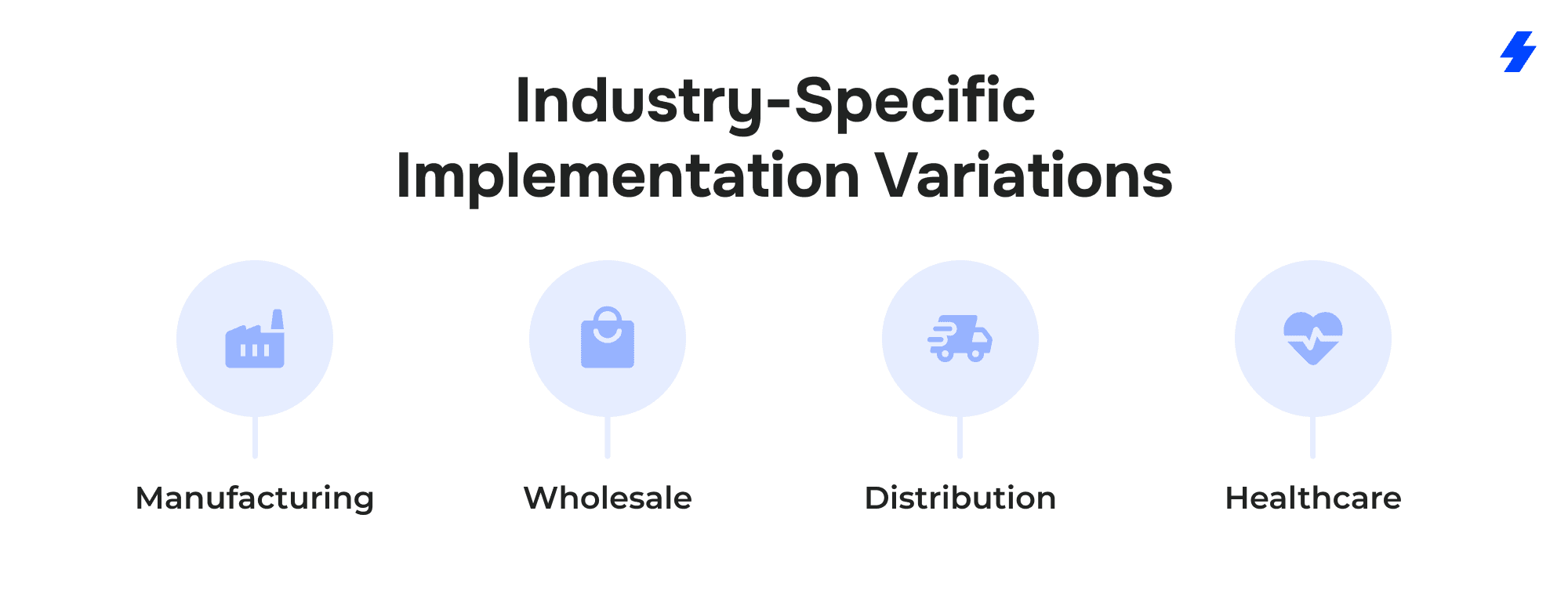
A successful Salesforce B2B Commerce implementation guide must consider how different industries function, how they manage product data, and how their buyers interact with online storefronts.
Although Salesforce Commerce Cloud offers powerful capabilities, such as account-specific pricing, order management, self-service tools, and integration with Sales Cloud, Service Cloud, and existing systems, each vertical brings unique requirements that shape the implementation process. Tailoring your approach ensures accuracy, improves customer satisfaction, and supports long-term growth.
Manufacturing
Picture Anna, a procurement engineer at a global manufacturing company. Her job depends on quickly finding precise components, sometimes using a part number, sometimes a specification, sometimes nothing more than a technical attribute. She doesn’t have time to scroll through endless product catalogs.
For manufacturers like Anna’s company, implementing Salesforce B2B Commerce (Lightning Experience) means prioritizing structured product data, optimized search engines, and high-quality images. They need attribute-driven filtering, accurate variant data, and mobile-friendly storefronts that let engineers verify product quality and availability on the go.
Integration with ERP ensures inventory management is accurate, while strong data migration practices ensure product data remains consistent. The result is a storefront where buyers can trust the information they see, leading to fewer support cases, more sales, and faster decision-making.
Wholesale
Wholesale buyers place large, repeat orders under tight time constraints. Their priority is speed, not browsing or discovery, and many are ordering from mobile devices in warehouses or out in the field.
Wholesale Salesforce Commerce Cloud implementations emphasize quick-order tools, bulk ordering workflows, CSV uploads, and easy access to purchase history. They also require strong integration with ERP, Sales Cloud, and Service Cloud to maintain accurate pricing, consistent account management, and reliable order confirmations, supported by account-specific catalogs and personalized experiences. As a result, buyers complete orders faster and with fewer errors, which increases sales and strengthens long-term customer relationships.
Distribution
Priya manages purchasing for a distribution network that operates across multiple regions. Her biggest challenge? Inventory variability. A product might be in stock in Warehouse A but out of stock everywhere else, and her team needs real-time visibility to avoid downtime.
For distributors, implementing Salesforce B2B Commerce Cloud means enabling dynamic inventory availability, currency support for cross-border purchasing, and real-time order status updates through Salesforce Order Management. Integrating with existing systems ensures order confirmations, fulfillment, and delivery estimates remain accurate.
This industry benefits from artificial intelligence for smarter recommendations, consolidated product data across regions, and data-driven decisions that support continuous improvement as the business grows.
Healthcare
Healthcare buyers operate in a highly regulated environment where compliance, controlled access, and secure account management tools are essential. Many products require restricted visibility, approval workflows, or license verification before purchase. When businesses implement Salesforce B2B Commerce for healthcare, the storefront must include secure login flows, multi-factor authentication, and strict buyer group configurations.
Healthcare-specific implementations often rely on account management to determine who can access certain categories or sensitive product information. Integration with Service Cloud enhances case management for returns, recalls, or product quality issues, while Marketing Cloud supports targeted communication tailored to the buyer’s role or certification level. These capabilities ensure accuracy, improve the customer experience, and allow healthcare organizations to stay ahead of regulatory expectations.
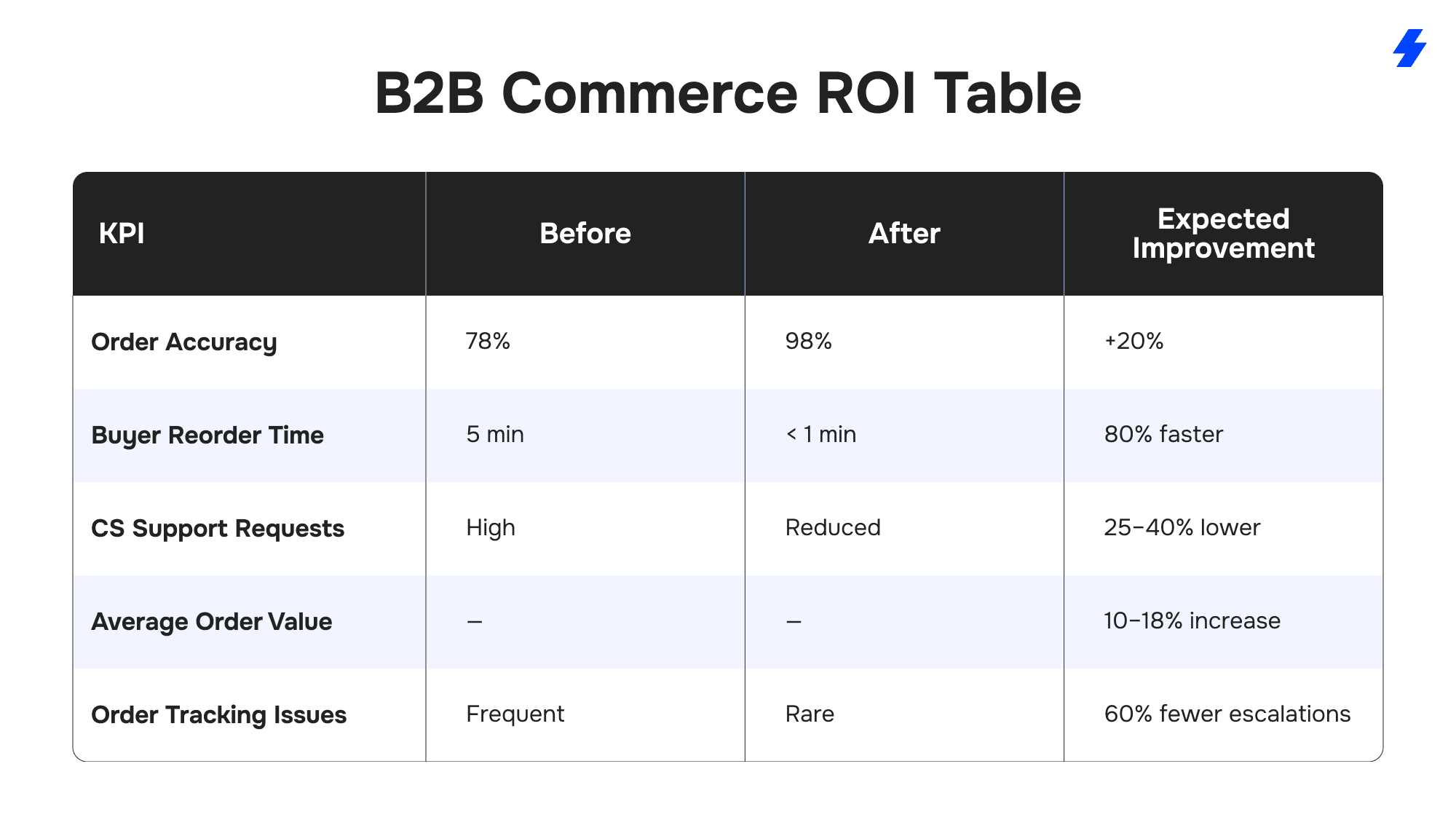
B2B Commerce ROI Table
The table below shows the measurable impact organizations typically see after implementing Salesforce B2B Commerce Cloud, supported by accurate product data, integration with existing systems, and improved self-service capabilities.
Best Practices for a Successful Launch
A high-performing Salesforce B2B Commerce implementation requires more than completing the technical steps. These best practices help ensure long-term scalability, accuracy, and buyer adoption as your business grows.
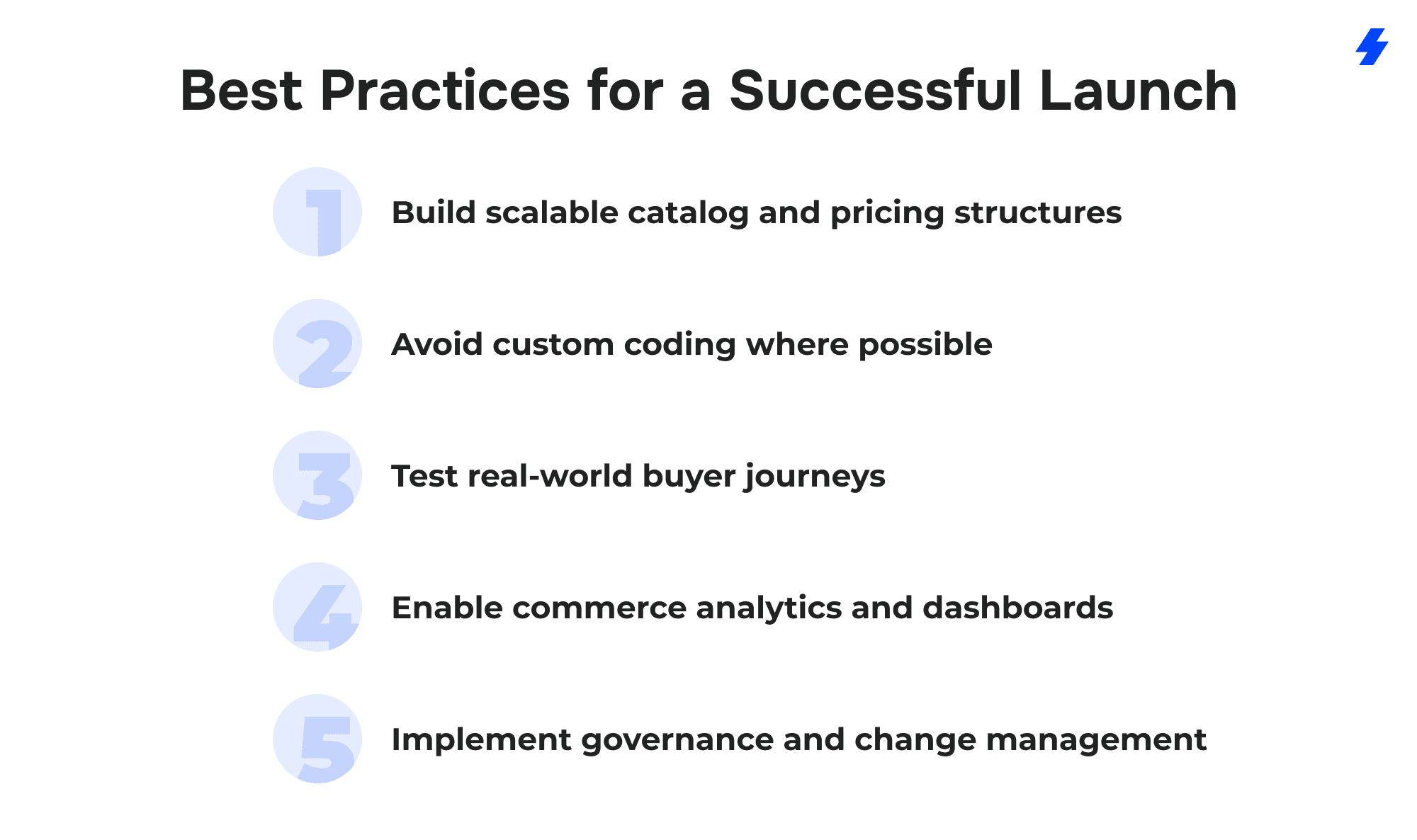
Build scalable catalog and pricing structures
Start with clean, consistent product data and a catalog hierarchy that can grow without constant restructuring. Use standardized attributes, clear naming conventions, and a pricing model that supports account-specific pricing, volume tiers, and regional variations. A scalable foundation reduces rework, simplifies future enhancements, and improves search and navigation accuracy.
Avoid custom coding where possible
Leverage out-of-the-box capabilities in Salesforce Commerce Cloud and Experience Builder before introducing customization. Native features for search, buyer groups, pricing, and checkout are built for stability and upgrade-friendliness. Minimizing custom code lowers maintenance costs, ensures smoother deployments, and keeps your storefront compatible with Salesforce releases.
Test real-world buyer journeys
Test the storefront the way actual customers use it. Validate common paths such as reorders, contract-based purchases, multi-address shipping, and quick-order scenarios. Include representatives from different buyer personas to ensure the storefront supports various business processes without friction. Real-world testing reduces surprises during go-live and increases customer satisfaction.
Enable commerce analytics and dashboards
Configure dashboards to track search behavior, top products, abandoned carts, popular reorder items, and performance metrics. Monitoring these insights in real-time helps teams identify areas for improvement, adjust sales strategies, and make data-driven decisions. Integrating Commerce Cloud analytics with Sales Cloud, Service Cloud, or Marketing Cloud provides a unified view of customer behavior and long-term engagement.
Implement governance and change management
Establish clear ownership for catalog updates, pricing changes, product data accuracy, and content management. Define roles, workflows, and approval processes to maintain consistency across your Salesforce org. Prepare internal teams with training, documentation, and ongoing support so they can manage the storefront confidently and ensure continuous improvement after launch.
Common Pitfalls to Avoid (and How to Fix Them)
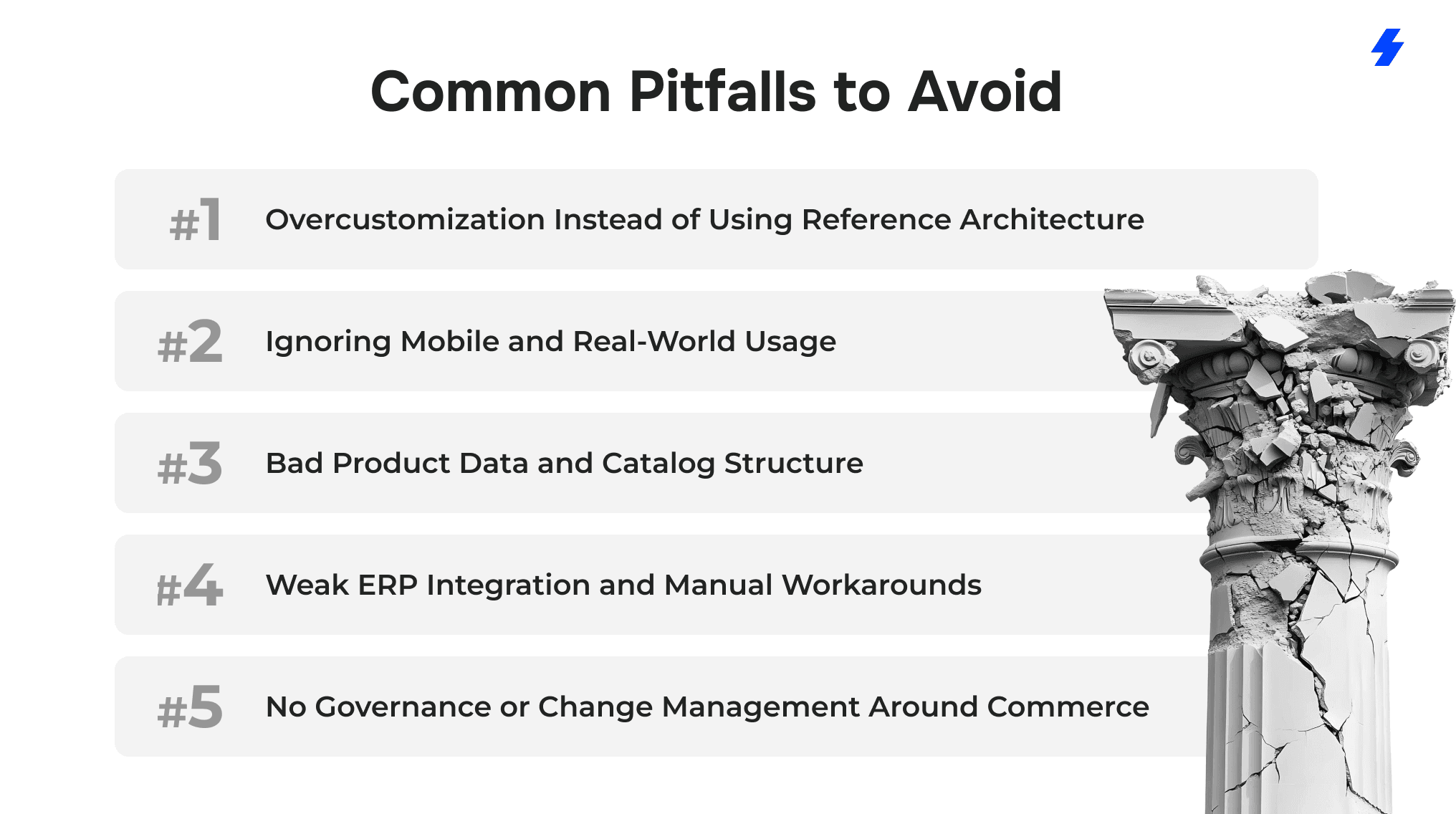
1. Overcustomization Instead of Using Reference Architecture
The pitfall
Teams jump straight into custom code for checkout, pricing, or account management when Salesforce Commerce Cloud already covers those use cases. Over time, the storefront becomes hard to maintain, upgrade, or extend. Small changes require developers, and every Salesforce release feels risky.
How to fix it
- Start from Salesforce reference architectures and accelerator patterns for B2B Commerce, not a blank page.
- Use standard objects and flows for product catalogs, account-specific pricing, order management, and self-service capabilities.
- Limit custom code to true differentiators (e.g., a unique quoting workflow), not basic features like search or cart behavior.
- Document every customization and tie it to a clear business case and owner in your Salesforce org governance.
2. Ignoring Mobile and Real-World Usage
The pitfall
The storefront looks fine on a desktop demo, but breaks down on mobile devices or in real buyer scenarios. Warehouse leads, field reps, and approvers struggle with slow pages, tiny buttons, and complex forms and fall back to email or phone orders.
How to fix it
- Treat a mobile-friendly storefront as a must-have, not a nice-to-have.
- Use responsive templates in Experience Builder and test every key flow (login, search, quick order, checkout, order tracking) on phones and tablets.
- Simplify forms and steps for common B2B actions like reorders, bulk ordering, and approval reviews.
- Monitor performance and behaviour by device type; if mobile conversion lags, prioritize UI and performance fixes before adding new features.
3. Bad Product Data and Catalog Structure
The pitfall
Data migration is rushed; product data comes from multiple sources; attributes are inconsistent; high quality images are missing; product catalogs are organized around internal structures instead of the target audience. Buyers struggle to find the right item and question product quality or accuracy.
How to fix it
- Run a product data cleansing phase before you import into Salesforce B2B Commerce: normalize attributes, naming, units, and taxonomy.
- Agree on a single source of truth (ERP, PIM, or Data Cloud) and design the data model around it.
- Build product catalogs around how customers search and buy, not around internal org charts.
- Include mandatory fields and validation rules to keep product data clean as the business grows.
- Use high quality images, spec sheets, and consistent attribute sets to improve the buyer experience and search relevance.
4. Weak ERP Integration and Manual Workarounds
The pitfall
Inventory, pricing, and order status live in the ERP, but the integration to Salesforce Commerce Cloud is half-done or batch-only. Buyers see wrong prices, outdated inventory, or missing order status. Internal teams compensate with manual intervention and custom reports.
How to fix it
- Map all key flows up front: inventory, pricing, product data, account data, order creation, order status, and invoices.
- Use MuleSoft or another middleware to handle complex transformations, retries, and orchestration instead of embedding logic directly in Salesforce.
- Decide what must be real-time (e.g., pricing for certain customers, inventory for critical SKUs) vs. what can be near-real-time or batch.
- Implement monitoring and alerting on integration failures so issues are fixed before they impact customer experience.
- Keep integration logic as configuration-driven as possible so changes in ERP or business processes don’t trigger large refactors.
5. No Governance or Change Management Around Commerce
The pitfall
Once the online store is live, changes to pricing, product data, storefront layouts, and sales strategies are made ad hoc. Different teams edit different parts of the Salesforce org with no clear ownership. Over time, performance drops, data diverges from existing systems, and no one is sure which dashboards to trust.
How to fix it
- Define a commerce governance model: who owns product data, pricing rules, promotions, Experience Builder pages, and order management settings.
- Introduce a simple release process with sandboxes, testing, and approvals for high-impact changes.
- Align B2B commerce changes with Sales Cloud, Service Cloud, and Marketing Cloud so all channels share a unified view of the customer.
- Review KPIs regularly (conversion, average order value, order accuracy, support cases) to identify areas for continuous improvement.
Sample Implementation Timeline (12–16 Weeks)
Weeks 1–2: Discovery & Requirements
During the first two weeks, teams finalize business requirements, document buyer journeys, review existing systems, and define the technical scope. Workshops focus on catalog structure, pricing models, account management, integrations, and any data migration considerations. By the end of Week 2, the BRD and high-level architecture are approved.
Weeks 3–4: Solution & Data Architecture
With requirements locked, architects define the Salesforce Commerce Cloud data model, buyer groups, product catalogs, pricing strategy, and integration blueprint. Decisions are made around single vs. multi-storefront setup, currency support, security, and order management flows. Technical diagrams and detailed data mappings are completed.
Weeks 5–7: Catalog Build & Storefront Configuration
The middle phase focuses on building the foundation of the online store. Product data is imported, categories are created, attributes are standardized, and pricing structures are configured. Experience Builder is used to create storefront layouts, PDPs, navigation, and mobile optimization. Persona-based experiences are added based on buyer group rules.
Weeks 8–10: Integrations & Checkout Setup
This phase connects Salesforce Commerce Cloud with the ERP, OMS, CRM, payment gateways, and any middleware such as MuleSoft. Teams configure order management, dynamic pricing, real-time inventory, tax and shipping services, and checkout logic. All systems begin exchanging data in a controlled test environment.
Weeks 11–12: Testing & UAT
Functional testing, performance testing, and full end-to-end order flow validation begin. Real-world buyer journeys are tested across devices to ensure accuracy. User Acceptance Testing (UAT) is performed with selected customers or internal teams representing key buyer personas. All issues, gaps, or data mismatches are fixed before go-live.
Weeks 13–14: Launch Preparation
Final content updates, data refreshes, and storefront polishing are completed. Support teams receive training on account management, order tracking, and resolving customer inquiries. Integrations are monitored in a pre-launch environment to ensure stability.
Weeks 15–16: Go-Live & Stabilization
The storefront is activated and monitored closely. Teams track order volume, search behaviour, inventory synchronization, and any performance concerns. Support remains on standby while analytics dashboards begin collecting data for optimization. Minor adjustments and enhancements are often made during this stabilization window.
Why Choose MagicFuse for Salesforce B2B Commerce Implementation?
Choosing the right partner is just as important as choosing the right platform. MagicFuse combines deep Salesforce expertise with a practical, scalable approach to implementation, helping you launch faster, operate more efficiently, and deliver a standout buyer experience.
10+ Years of Salesforce Experience
MagicFuse has spent more than a decade building and optimizing solutions across the Salesforce ecosystem. Our team understands the full landscape, Commerce Cloud, Sales Cloud, Service Cloud, Experience Cloud, and integrations, which means your B2B storefront is designed to work with the rest of your Salesforce org.
Expertise Across ERPs, Integrations, and Large Catalogs
Integrating Salesforce B2B Commerce with ERP systems such as SAP, Oracle, NetSuite, or Microsoft Dynamics is one of our core strengths. We handle complex data flows, multi-location inventory, account-specific pricing, and large-scale product catalogs without compromising performance or accuracy. This ensures your storefront reflects real-time product data, pricing rules, and order status from day one.
Certified B2B Commerce Experts
Our team includes certified B2B Commerce professionals specializing in LWR-based Experience Builder storefronts, data modeling, checkout flows, and order management. They follow Salesforce reference architecture, reducing technical debt while ensuring your solution is both scalable and upgrade-friendly.
Faster Implementation Through Reusable Components
MagicFuse accelerates delivery by using a library of reusable components and pre-built integrations that cover quick-order tools, PDP enhancements, checkout modules, and common ERP connectors. This shortens timelines, minimizes risk, and ensures consistent quality across all implementations.
Ongoing Support, Performance Tuning, and Enhancements
A successful launch is only the beginning. MagicFuse provides continuous support to monitor performance, optimize search, adjust pricing structures, refine user experiences, and implement new capabilities as your business grows. Whether you need data cleanup, new integrations, or AI-driven personalization, we stay with you long after go-live.
Get in touch with MagicFuse today to discuss your project, review your business needs, and receive expert guidance on the next steps.
We’re here to help you implement Salesforce B2B Commerce the right way - efficiently, securely, and aligned with your growth goals.
FAQs
- How long does a Salesforce B2B Commerce implementation take?
Most implementations take 12–16 weeks, depending on catalog size, data quality, ERP complexity, and the number of storefronts. Complex pricing rules, multi-region setups, or large-scale data migration can extend the timeline, while businesses with clean data and clear requirements often launch faster.
- What integrations are essential for a successful launch?
At minimum, you should integrate Salesforce B2B Commerce with your ERP for pricing, inventory, and order management. Many businesses also connect Sales Cloud, Service Cloud, Marketing Cloud, payment gateways, tax and shipping services, and Salesforce Order Management. Strong integration ensures accurate product data, real-time order status, and a unified view of the customer.
- What is the most complex part of a B2B Commerce implementation?
The most challenging areas are typically pricing, product data, and ERP integration. B2B catalogs often involve account-specific pricing, tiered pricing, contract rules, and large volumes of SKUs. Ensuring this data stays accurate across systems, while matching real-world business processes, is the part that requires the most planning and testing.
- Do I need MuleSoft for integration?
Not always, but MuleSoft (or similar middleware) is highly recommended for businesses with multiple ERPs, complex pricing engines, multi-location inventory, or real-time data requirements. It reduces custom code, centralizes integration logic, and improves reliability. For simpler setups, native APIs or lightweight middleware can be enough.
- Can MagicFuse rescue a failed or incomplete B2B Commerce implementation?
Yes. MagicFuse regularly steps in to fix underperforming or stalled Salesforce B2B Commerce projects. We can audit your architecture, resolve data issues, rebuild broken integrations, improve storefront performance, and realign the solution with Salesforce best practices. Whether you need a full rescue or targeted enhancements, we can get your implementation back on track.