





Before a Salesforce Agentforce implementation, most teams check their data. Far fewer check the org itself, though AI uses it in 2 ways. Business agents like Agentforce act on its records, flows, and permissions. AI coding assistants read its flows, Apex, and fields as context. If much of that setup describes processes the business dropped, both learn a business that no longer exists.
A Salesforce AI readiness assessment finds those gaps before your agents do. This guide is for CIOs, CTOs, COOs, and heads of IT and sales ops planning Salesforce AI projects. You'll get a 6-pillar framework, a 21-item checklist, a 5-step process, and the arguments that get cleanup funded.
Key Takeaways
- An AI readiness assessment shows whether your strategy, data, systems, governance, and people can support AI.
- Salesforce orgs need their own check: business agents act on the org, and coding assistants learn from it.
- Stale data and logic lead Agentforce to wrong answers, and obsolete metadata misleads coding assistants.
- Cleanup gets funded when leaders see it fixes problems they already live with.
- Start with a health check of the data, access, and metadata your first use case touches.
What Is an AI Readiness Assessment?
An AI readiness assessment is a structured review of whether an organization's strategy, data, systems, governance, and people can support AI in daily work. It ends with a score for each area and a prioritized roadmap. For Salesforce customers, it also has to cover the org that AI agents will work in.
So what is AI readiness in practice? It's the point where you can switch on an AI use case and trust what it does with real records. Few companies are there. In Cisco's 2025 readiness research, only about 13% of organizations made the most prepared group, a share that hasn't moved in 3 years. Yet 83% planned to deploy AI agents within a year.
Why a Generic AI Readiness Assessment Misses Your CRM
Most frameworks, including Salesforce's own readiness guidance, cover data, governance, systems, and people. They don't open the org, where an Agentforce agent calls your flows and Apex as actions and follows your permission model. A business AI readiness review that skips the org leaves that unchecked.
What Are the 6 Pillars of an AI Readiness Assessment Framework for Salesforce?
An AI readiness assessment framework for Salesforce covers 6 pillars. Most AI readiness framework models stop at 5: strategy, data, integrations, governance, and people. Salesforce teams need a 6th, org and metadata health, because the org is where AI agents actually work.
Strategy and Business Value
Tie each agent to a number leadership already tracks, such as handle time or win rate. With Agentforce for sales, an agent that drafts follow-ups from call notes is measured in rep hours saved. Without that link, your AI strategy produces pilots no one can judge, and AI initiatives lose funding.
Data Readiness: CRM Data Quality and Salesforce Data Cloud
AI data readiness starts with Salesforce data quality: duplicates, missing values, and outdated contacts. Then find the data silos. Salesforce Data Cloud (now called Data 360) can unify outside data for agents, but a first use case may not need Data Cloud: data readiness for AI only covers what that use case reads.
Org and Metadata Health
Look for flows that overlap on 1 object, Apex with no owner, and custom fields no one fills in. Salesforce ended support for Process Builder and Workflow Rules on December 31, 2025, but active ones keep running. All of this is technical debt in Salesforce that AI can mistake for current logic.
Integrations and Data Infrastructure
Agents can only act on systems they can reach, with data fresh enough for the task. Salesforce AI integration often starts with replacing old point-to-point links, which is core Salesforce integration services work.
Governance, Security, and Access Control
Every Agentforce agent works with someone's permissions. Salesforce documents that employee agents run as the logged-in user and service agents usually as a dedicated agent user, so broad profiles become the agent's access. Tight access control through permission sets is a standard Salesforce governance best practice, and with agents it's AI governance and responsible AI in practice. Coding assistants are a separate question: decide which code, metadata, tools, and environments they get.
People and Adoption
Organizational AI readiness comes down to ownership and trust. Each agent needs a business owner who reviews its answers. AI adoption follows trust in the CRM: Salesforce agentic AI tools adoption is hard where people already work around Salesforce.
Why Is Salesforce Technical Debt the Biggest AI Readiness Risk?
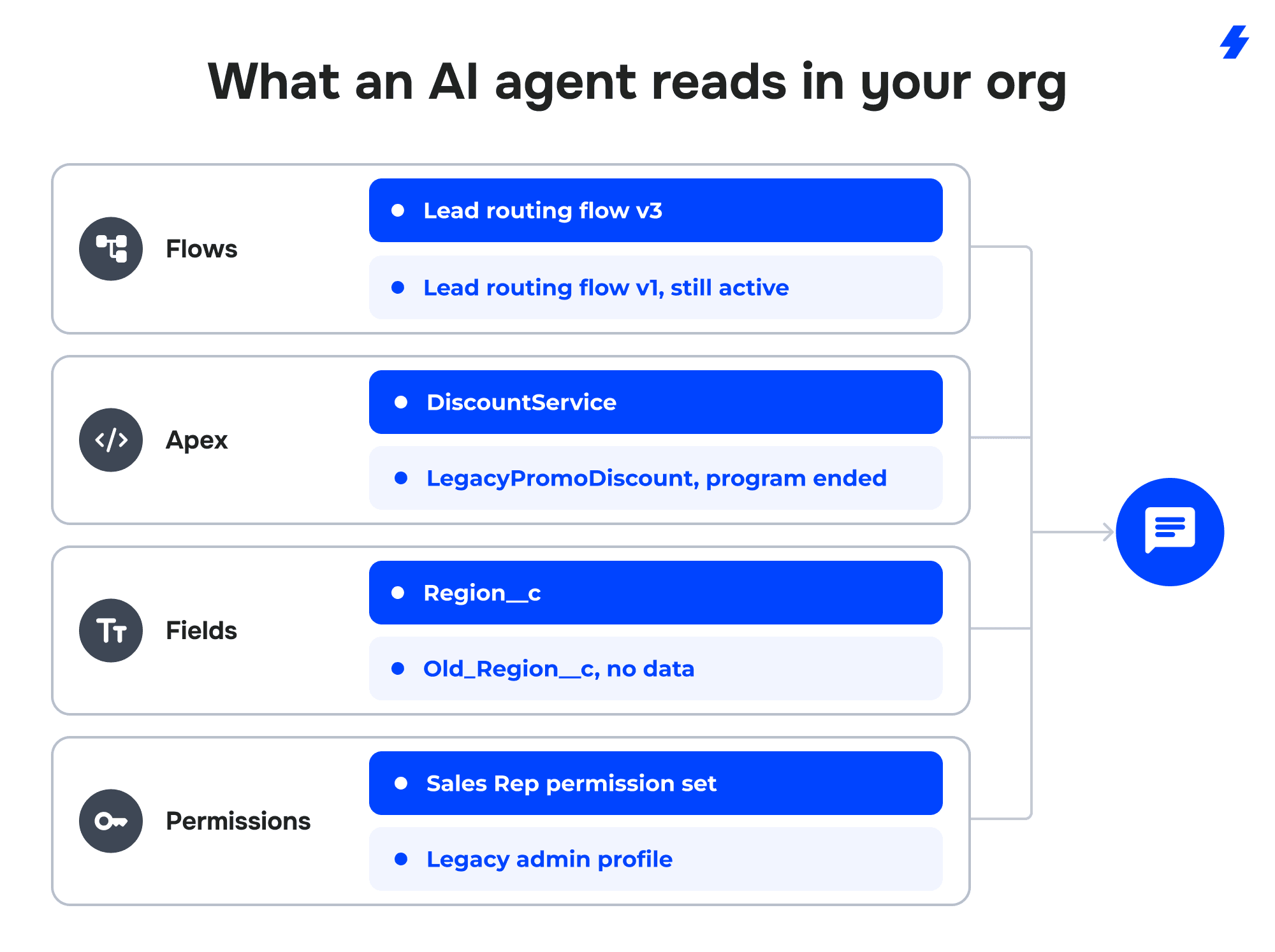
Technical debt is the biggest readiness risk in Salesforce because obsolete metadata looks current to AI. Coding assistants read old flows, Apex, and fields as context and may build on dropped processes. Business agents such as Agentforce may retrieve wrong information or run automation that no longer fits how you work.
"Old flows, Apex code, fields, and other metadata are often replaced or switched off but remain in the org. This creates problems both for coding AI agents, which may use outdated metadata as context and suggest solutions based on obsolete processes, and for AI integrations such as Agentforce, which may retrieve incorrect information or interact with processes the business no longer uses." Taras Kuliievych
What AI Agents Learn From Your Org
The 2 kinds of AI learn from the org differently, so assess them separately. Agentforce agents run flows, Apex, and prompt templates as custom actions. Coding assistants copy patterns from the metadata a developer pulls into a project. Neither can see intent.
On one project, a marketing managed package was still installed even though the business no longer used it. It included fields for mailing-list subscription preferences and a lot of related logic. A coding AI agent sometimes confused those leftover fields and processes with the functionality the business actually used, which made development more complicated.
Active but Unreachable: Metadata That Misleads AI Agents
The most misleading metadata still looks alive. Watch for 5 patterns:
- A Salesforce Flow that a newer flow replaced, still active.
- Logic with no entry point, like a screen flow no button launches.
- Process Builder processes and Workflow Rules still running after the end of support.
- Custom fields empty for years, with names that still sound important.
- Orphaned Apex classes from integrations or programs that ended.
Don't expect a reliable average share to benchmark against. Some orgs carry years of flows admins never removed, others unused managed packages. Dozens of unnecessary fields on a heavily used object are common, but counts don't show how hard the cleanup is. Sometimes the problem is one enormous flow or Apex trigger that still syncs with a third-party system the business dropped. So assess dependencies and complexity, not just quantities.
Hidden Dependencies Make Cleanup Risky
Some cleanup is simple: a field with no data, references, or reports can usually go. Other elements look unused but may still support a less visible process.
Salesforce blocks some deletions when a component has dependencies, but that isn't a full check. Where is this used? lists the flows, Apex, layouts, and reports that reference a field. It doesn't show references inside managed packages or external systems that read the field through the API.
Following references often reveals a bigger chain: an unused field can lead you to a flow that's no longer needed. Retiring a component may also mean moving its data first. On one project, we migrated data between fields and related objects, then removed the old components. Tangled parts need refactoring, which is Salesforce custom development work.
AI Agent Readiness: What Does Your Org Need Before Agentforce Implementation?
Your org is ready for Salesforce Agentforce when 4 conditions hold. The logic agents can call is current, the data they read is trusted, permissions limit what they can see and change, and each agent has a defined use case. If one is missing, fix it before launch.
Clean, Reachable Logic
Every flow and Apex class an agent can call should match a process the business runs today.
Trusted Data
The records in each use case's scope should be accurate, filled in, and current. Populated but wrong fields hurt as much as empty ones.
Clear Permissions
Give each agent user only the objects, fields, and actions its use case needs, and verify it can't go beyond them.
Defined Agent Use Cases
Start with 1 or 2 Agentforce use cases that have an owner, a baseline metric, and test scenarios. An Agentforce implementation partner can help you pick the ones your org is ready for now.
What Belongs on an AI Readiness Checklist for Salesforce?
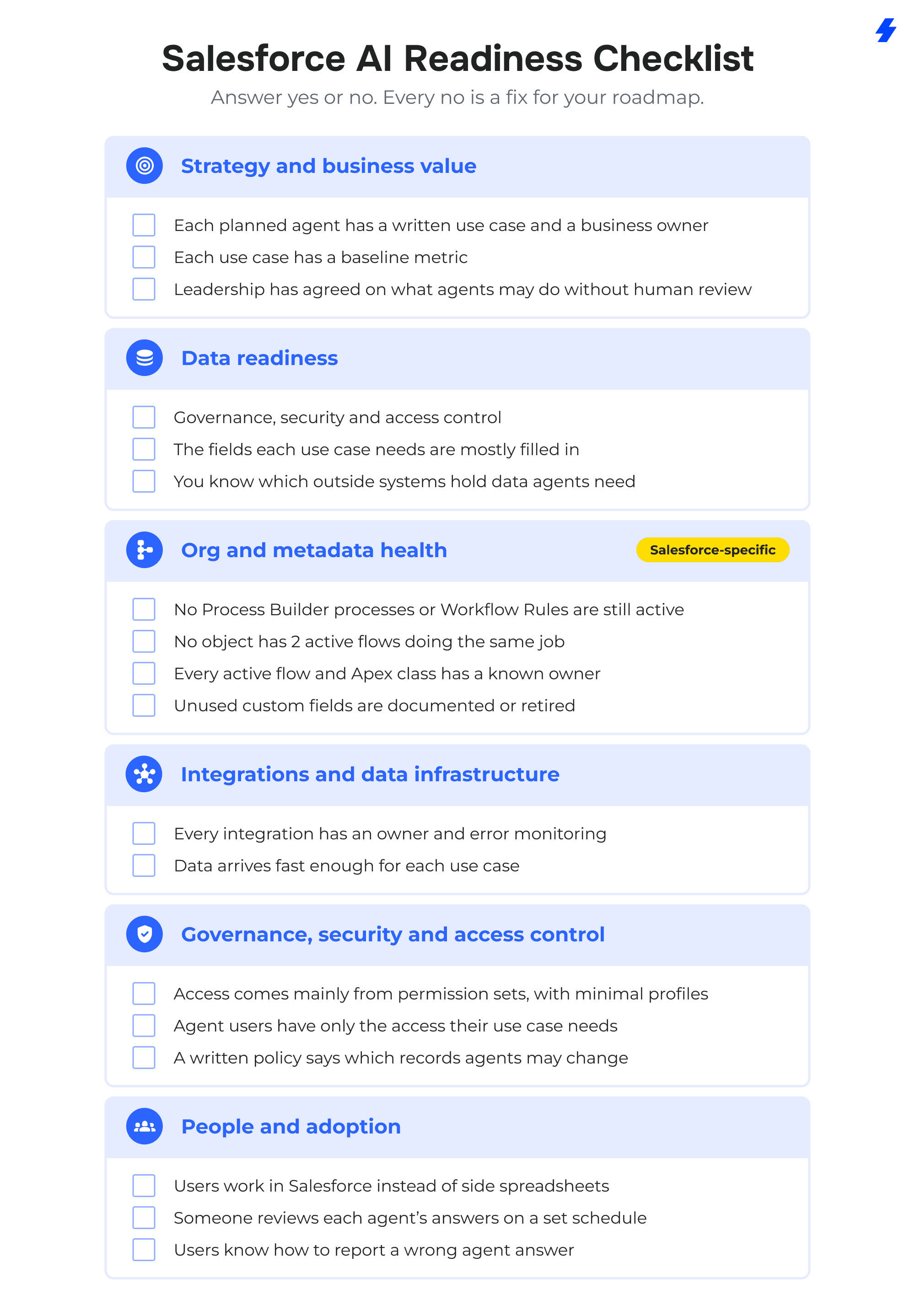
A good checklist covers all 6 pillars with yes/no questions you can answer from Setup, reports, and short interviews with process owners. Every "no" is a fix for your roadmap, and these 21 items are the short version of a full assessment.
Strategy and business value
- ☐ Each planned agent has a written use case and a business owner.
- ☐ Each use case has a baseline metric.
- ☐ Leadership has agreed on what agents may do without human review.
- ☐ Before launch, the agent is tested on representative and difficult scenarios, including incomplete or wrong data, against clear success criteria.
Data readiness
- ☐ Duplicate and matching rules are active on Accounts, Contacts, and Leads.
- ☐ The fields each use case needs are mostly filled in.
- ☐ You know which outside systems hold data agents need.
Org and metadata health
- ☐ Process Builder processes and Workflow Rules are inactive or covered by a documented plan to migrate them to Salesforce Flow.
- ☐ No object has 2 active flows doing the same job.
- ☐ Every active flow and Apex class has a known owner.
- ☐ Unused custom fields are documented or retired.
Integrations and data infrastructure
- ☐ Every integration has an owner and error monitoring.
- ☐ Data arrives fast enough for each use case.
Governance, security, and access control
- ☐ Access comes mainly from permission sets, with minimal profiles.
- ☐ Agent users have only the access their use case needs.
- ☐ A written policy says which records agents may change.
- ☐ Tests confirm the agent can't perform prohibited operations or bypass the permissions that apply to its work.
- ☐ There's a plan to switch off the agent or single actions and to fix or recover from wrong changes.
People and adoption
- ☐ Users work in Salesforce instead of side spreadsheets.
- ☐ Someone reviews each agent's answers on a set schedule.
- ☐ Users know how to report a wrong agent answer.
How Do You Conduct a Salesforce AI Readiness Assessment in 5 Steps?
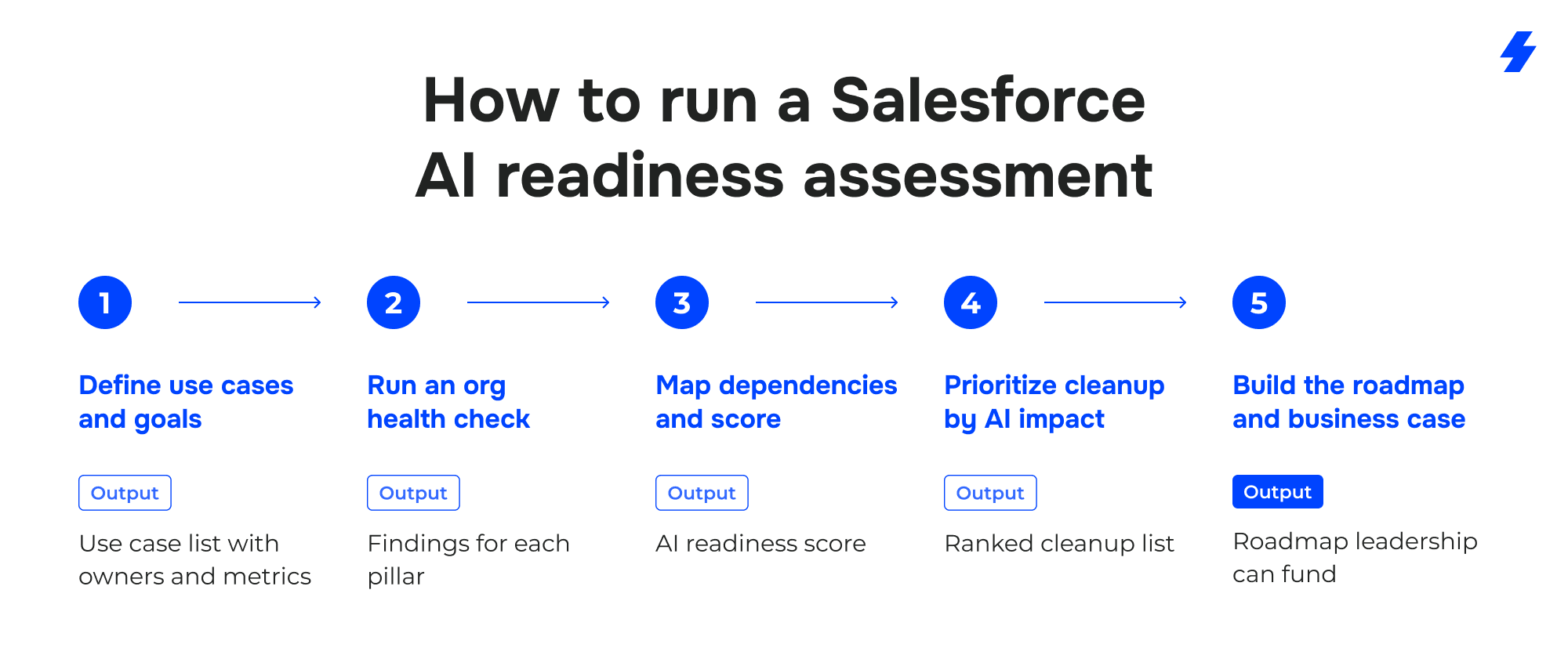
Conduct a Salesforce AI readiness assessment in 5 steps: define use cases, run an org health check, map dependencies and score each pillar, prioritize cleanup, and build the roadmap with a business case. Each step should end with an output leadership can review and approve.
1. Define AI Use Cases and Business Goals
Pick 2 or 3 use cases and the metric each should move. Then check that an agent is the right tool. If it can only send article links or pass almost every request to a person, your case form, FAQ, or Experience Cloud site may work better, and customers won't struggle to reach a human. Output: use cases with owners, baselines, and the useful work each agent can do.
2. Run a Salesforce Org Health Check
In our assessments, a Salesforce org health check starts with the data each agent will need, the data architecture, and the access model: permission sets, profiles, and sharing settings. It also covers the flows, Apex, and fields your use cases touch. Larger orgs have more data and automation, so the scope grows.
Free tools help. Salesforce's built-in Health Check scores security settings, and Org Check, a free Salesforce Labs app, finds unused metadata. Output: findings for each pillar, measured against Salesforce best practices.
3. Map Dependencies and Score Each Pillar
For every cleanup item, find what depends on it. Then score each pillar from 1 to 4 against the maturity levels below to get your AI readiness score. Judge it against the use case: the lowest pillar shows where to start.
4. Prioritize Cleanup by AI Impact
Identify before you remove. The first useful steps are finding unused fields and inactive automation, reviewing the permissions the agent would use, and fixing obvious data quality problems. Even simple changes need a dependency check, so a quick win doesn't break something else. Refactoring shared Apex or core flows comes later, with tests and a rollback plan.
5. Build the Roadmap and the Business Case
Turn the ranked list into a phased AI implementation plan with owners and effort estimates, then attach the business case from the next section.
How Do You Get Leadership to Fund AI Readiness Work?
Present the cleanup as preventive investment: it reduces ambiguity, removes accidental dependencies, and gives AI and future development a reliable base. Then match the argument to each executive, because a CFO and a head of sales fund the same cleanup for different reasons.
In my experience, getting business support is often harder than the technical work, because cleanup ships nothing a user can see. The arguments that worked were concrete. In one client's org, legacy functionality had already made everyday work difficult, so cleanup meant making the org usable before adding AI. Another client knew it had granted too much access, and plans for Agentforce made that harder to ignore.
These problems predate AI, and teams often work around them for years. AI raises the bar for data quality and access control, which makes them visible.
Waiting costs money too. In a 2023 McKinsey survey, CIOs estimated tech debt at 20 to 40% of the value of their entire technology estate. About 30% said over 20% of their budget for new products goes to tech debt issues instead.
How Do You Measure AI Readiness?
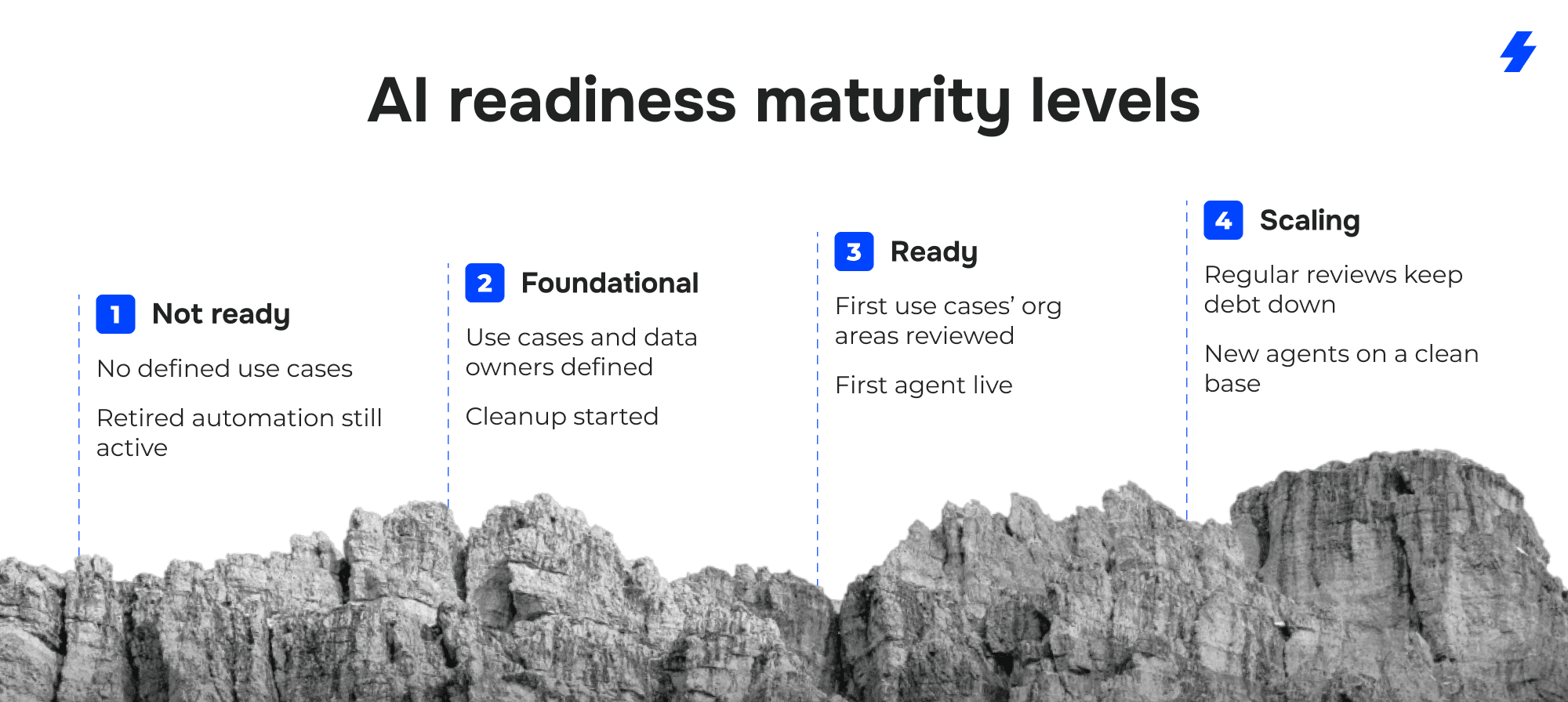
Measure AI readiness against each use case: a 4-level maturity model for the org, plus readiness criteria for every agent. There's no universal pass mark, such as a share of unused custom fields. The real test is whether the agent can do its intended work safely and usefully with your current data and access.
The 4 AI maturity levels:
- Not ready: no defined use cases, retired automation still active, broad access.
- Foundational: use cases defined, data owners named, cleanup started.
- Ready: the first use cases' logic, data, and permissions are reviewed, and the first agent is live.
- Scaling: regular reviews keep debt down, and new agents launch on a clean base.
A use case is ready when:
- The data it needs is complete enough. If half the relevant contacts have key fields empty, the agent fails in a large share of cases.
- That data is accurate.
- Access controls protect it, so a customer on your support site can't get another customer's information through the agent.
- Nothing blocks practical use. Settle this before any score.
- The agent passes tests on its intended scenarios against a target agreed for that use case.
Keeping the org there is ongoing work, and it's what Salesforce managed services cover.
Should You Use AI Readiness Assessment Tools or an Expert Assessment?
Use free AI readiness assessment tools to start the conversation, then bring in experts to inspect the org. Self-tests score strategy, culture, and skills from survey answers. They can't see your flows, Apex, dependencies, or permissions, where the Salesforce-specific risks sit.
An AI readiness assessment tool still helps: it shows where leaders' views differ. For an enterprise AI readiness assessment, add an expert AI readiness audit, with a Salesforce consultant working in the org. It should end with a report, a dependency map, and a roadmap. When you compare AI readiness assessment services or AI readiness consulting, look for Salesforce consulting services or a Salesforce implementation partner with Agentforce consulting and Salesforce AI consulting experience.
Delta Dental wanted that kind of outside view. Our Delta Dental org audit of its Sales Cloud and Marketing Cloud orgs confirmed strong data management in Sales Cloud and flagged licensing, governance, and security risks.
Where Should Your Salesforce AI Readiness Assessment Start?
Start with the part of the org your first agent will touch. A Salesforce AI readiness assessment shows what that part will teach the agent. Most fixes are unglamorous: deactivating a replaced flow, retiring a field, trimming a permission set. Each one makes the next agent cheaper to build and safer to run, which is the business value leadership asked for.
Book a Salesforce AI readiness assessment
FAQs
- What Is an AI Readiness Assessment?
An AI readiness assessment is a structured review of whether an organization's strategy, data, systems, governance, and people can support AI. For Salesforce customers, it also checks the automation, metadata, and permissions that AI agents such as Agentforce rely on. It ends with a readiness score and a roadmap.
- What Are the Pillars of AI Readiness?
Most AI readiness frameworks use 5 pillars: strategy, data, technology and integrations, governance and security, and people. Salesforce customers should add a 6th pillar, org and metadata health, because outdated flows, Apex code, and unused fields shape what AI agents learn and do.
- How Do You Conduct an AI Readiness Assessment?
Conduct an AI readiness assessment in 5 steps: define AI use cases and goals, run a Salesforce org health check, map dependencies and score each pillar, prioritize cleanup by AI impact, and build a roadmap with a business case. Each step should end with an output leadership can approve.
- How Long Does an AI Readiness Assessment Take?
An AI readiness assessment takes a few days for an initial review and about 2 to 4 weeks for a full assessment with detailed planning. The initial review, usually under a week, finds the biggest problems. For a Salesforce org, scope grows with its data, automation, and integrations.
- Is My Salesforce Org Ready for Agentforce?
A Salesforce org is ready for Salesforce Agentforce when its data is accurate, its automation reflects current processes, permissions are tight, and agent use cases are defined and tested. Warning signs include duplicate records, overlapping flows, and Apex no one owns.
- Does Salesforce Technical Debt Affect Agentforce?
Yes. Salesforce technical debt affects Agentforce because agents run flows and Apex as actions and answer from org data, so outdated logic leads to wrong answers or retired processes. AI coding tools are affected too: they read obsolete metadata as context and build on it.
- What Should We Fix Before Agentforce Implementation?
Before Agentforce implementation, retire obsolete flows, Apex, and unused metadata after checking dependencies. Clean duplicate and incomplete data, tighten permissions so agents only reach what they should, and define measurable use cases. Start with low-risk cleanup, then refactor the complex parts.
- Can We Run an AI Readiness Assessment Ourselves?
Companies can start an AI readiness assessment themselves with free self-assessment tools that score strategy, culture, and skills. These tools don't inspect the Salesforce org, so they miss technical debt, hidden dependencies, and permission risks. Pair them with an expert Salesforce health check.
- Where Should Your Salesforce AI Readiness Assessment Start?
Start with the part of the org your first agent will touch. A Salesforce AI readiness assessment shows what that part will teach the agent. Most fixes are unglamorous: deactivating a replaced flow, retiring a field, trimming a permission set. Each one makes the next agent cheaper to build and safer to run.