






A managed package fails the Salesforce security review. Six weeks of waiting, a list of critical vulnerabilities, and the launch date quietly disappears from the roadmap.
It's a scenario we've seen play out dozens of times with ISVs who come to MagicFuse after their first attempt stalls. The pattern is almost always the same: the app idea is strong, the code works in a sandbox, but somewhere between "it runs" and "it's listed on AppExchange" things fall apart, because AppExchange development isn't just about writing code. It's about architecture decisions, packaging strategy, compliance standards, and go-to-market thinking, all working together from day one.
This guide walks you through the full Salesforce AppExchange app development process: how to plan an app that addresses real business needs, which tech stack to choose, how to pass security review, how to optimize your listing, and how to find a development partner who's done it before. Whether you're an ISV founder bringing a product to AppExchange or a Salesforce team exploring custom applications for internal use, this guide covers what you need to know — though internal apps typically skip the listing and security review steps required for external distribution.
Our MagicFuse experts have more than a decade of experience in custom Salesforce development. They have shared their knowledge, which we have compiled into a step-by-step guide. Let’s explore.
What Is Salesforce AppExchange?
AppExchange is Salesforce's enterprise marketplace for cloud applications, components, and consulting services designed to be packaged, distributed, and installed across multiple customer orgs.
As of late 2025, it hosts over 6,200 listed apps built by more than 3,600 developers, with over 10 million total installs since its launch in 2006. More than 91% of Salesforce customers use AppExchange apps to extend their CRM — from automation tools and analytics dashboards to industry-specific AppExchange solutions for healthcare, finance, and real estate.
For ISVs, it's a direct channel to 150,000+ active Salesforce organizations already looking for tools to improve their workflows. Not every Salesforce customization belongs here — org-specific configurations and internal tools don't need to go through AppExchange — but if your solution is built to serve multiple organizations, this is the distribution channel.
Why Building an AppExchange App Is Worth the Investment
The Salesforce AppExchange tools market is estimated at $3.31 billion in 2026 and projected to reach $11.85 billion by 2035, growing at a 15.2% CAGR. That growth reflects how deeply embedded AppExchange is in how businesses buy and deploy software.
Here's why it matters for you:
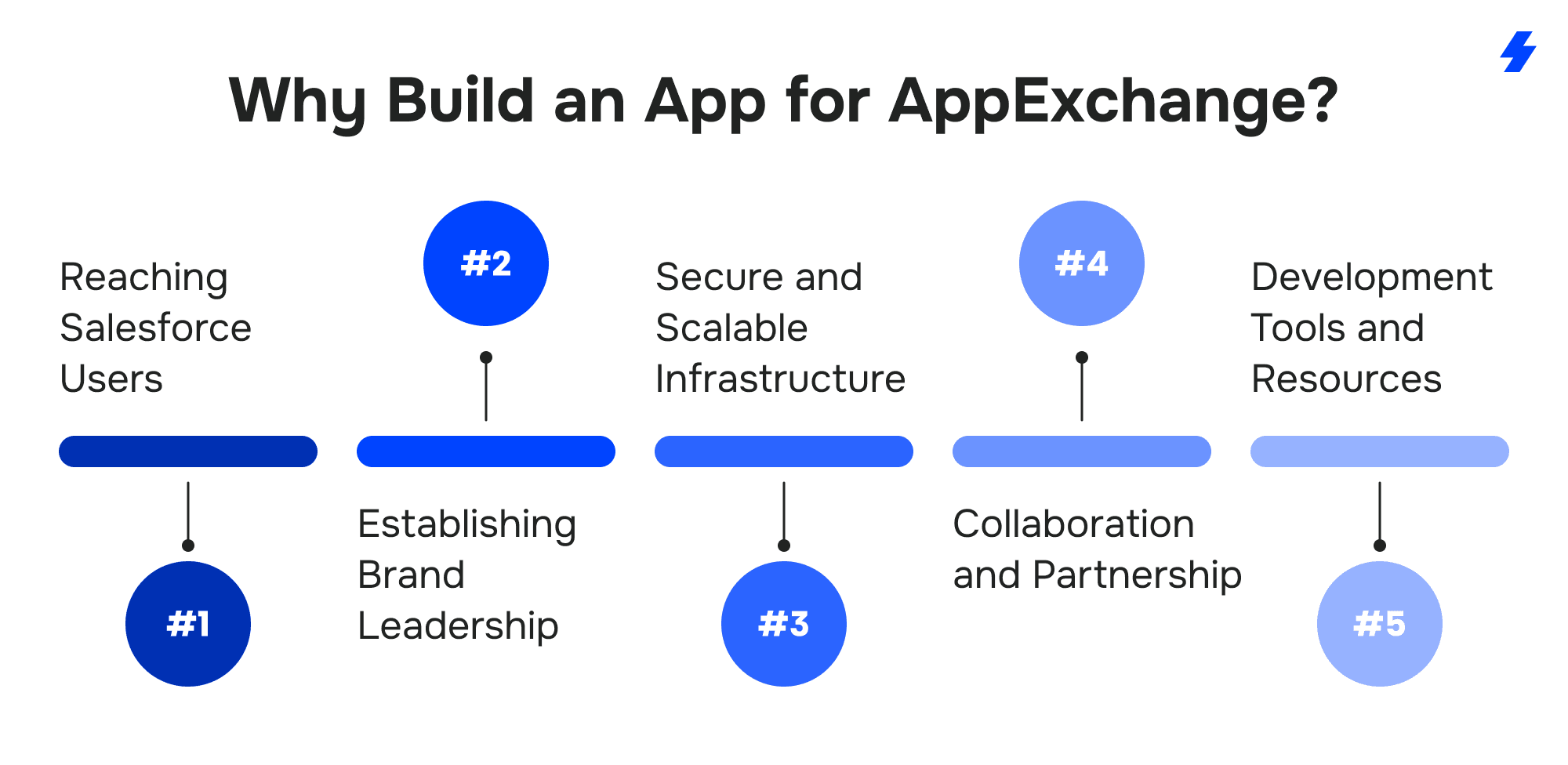
Direct access to Salesforce's customer base. You're not competing for attention from scratch. AppExchange connects you with users who are already invested in Salesforce and actively searching for solutions — Sales Cloud users who need better reporting, Service Cloud teams looking for smarter case routing, or admins wanting to automate business processes that are still manual. And the audience is massive: 90% of the Fortune 500 use AppExchange solutions.
Your infrastructure is handled. Salesforce provides enterprise-grade security, scalability, and uptime for apps built natively on the platform. If your solution relies on external services, middleware, or third-party APIs, you're responsible for ensuring those components meet the same standards. You focus on building features and solving problems, not managing servers or patching operating systems at 2 AM. This also means cost efficiency — you skip the overhead of maintaining your own cloud infrastructure, which for most startups can represent 20–30% of their engineering budget.
A path to credibility. Passing Salesforce's security review and getting listed on AppExchange signals to buyers that your app meets compliance standards. It's the kind of third-party validation that's hard to get any other way, especially for younger companies. We've seen this firsthand with ISV clients like Atamis and ID-Pal — their AppExchange listing became a key trust factor in enterprise sales conversations.
Partnership and community. To publish on AppExchange, you join the Salesforce Partner Community — which gives you instant access to development resources, co-marketing programs, technical support, and a network of other ISVs and consultants. Being a Salesforce AppExchange partner opens doors that are hard to access otherwise. Beyond the tools, AppExchange offers a built-in distribution channel: your app is discoverable by every Salesforce org looking for Salesforce AppExchange solutions that fit their use case.
How to Plan an AppExchange App That Solves Real Problems
Every successful AppExchange app starts with a clear answer to one question: what specific problem does this solve, and for whom?
Define your audience and their pain points
Start by identifying your target users. Are you building for Salesforce administrators who need better org management? Sales teams struggling with pipeline visibility? Or maybe a specific industry — healthcare providers managing patient data, or real estate firms tracking property portfolios?
Dig into Salesforce community forums, Trailblazer groups, and platforms like Reddit and the Salesforce Stack Exchange. Look for recurring complaints, feature requests that Salesforce's native tools don't address, and workarounds that users have built themselves. Those workarounds are your market signal — they mean someone already needs what you're building.
Map out your core functionality
Define what your app does and — just as importantly — what it doesn't. AppExchange apps that try to do everything tend to do nothing well. Focus on 3–5 core features that deliver real business value for your users.
For example: if you're building a lead management tool, your core features might be automated lead scoring, assignment rules based on custom criteria, and a reporting dashboard. Don't add email marketing, social media tracking, and AI forecasting in version one. Ship what matters, validate it with real users, then iterate.
Research the competition
Search AppExchange for apps in your category. Study their features, pricing models, reviews (especially the negative ones), and listing quality. Identify gaps — functionality users are asking for but not getting. That gap is your differentiation.
Choosing the Right Tech Stack for Salesforce App Development
Your tech stack depends on what your app does and how complex it is. The Salesforce platform provides a rich set of native technologies for building applications — here are the core ones you'll work with:
Backend: Apex
Apex is Salesforce's server-side programming language, similar to Java. You use it for custom business logic, data processing, triggers, and API callouts. If your app does anything beyond simple configuration — complex calculations, conditional workflows, external integrations — Apex is essential.
Frontend: Lightning Web Components and Lightning Components
Lightning Web Components (LWC) is Salesforce's modern frontend framework for building fast, responsive user interfaces. It uses standard web technologies (HTML, JavaScript, CSS), which means developers with general web experience can ramp up quickly.
You may also encounter Aura components in older codebases. Aura was the predecessor to LWC and is still supported, but LWC is the clear choice for new AppExchange development — it's faster, lighter, and better aligned with Salesforce's platform direction.
Automation: Flow
Salesforce Flow lets you build complex automation without writing code — conditional logic, record creation, approval processes, scheduled actions, and more. For AppExchange apps, Flow solutions can handle business processes that don't require Apex, reducing code complexity and making your app easier to maintain.
Integration: Salesforce APIs
If your app needs to connect with external systems — ERPs, payment gateways, identity providers, analytics platforms — your app must integrate seamlessly without breaking the user's existing Salesforce setup. Salesforce offers several APIs for this:
- REST API — The standard choice for web and mobile integrations. Lightweight, stateless, widely supported.
- SOAP API — Best for enterprise integrations that require strict contracts and high security.
- Bulk API — Designed for large-scale data operations (importing, exporting, or updating thousands of records).
- Streaming API — For real-time data updates and event-driven architectures.
Development environment and tools
Before writing any code, you'll need:
- Dev Hub — The central org that manages your scratch orgs and namespace. Enable it in your Partner Business Org.
- Partner Business Org (PBO) — Your main org for managing licenses, listings, and the AppExchange publishing process.
- Packaging org / namespace org — Where you register your namespace prefix and create managed packages.
- Scratch orgs — Disposable, source-driven environments for feature development and testing.
- Salesforce CLI — Command-line tools for creating scratch orgs, pushing source, and running tests.
- Salesforce DX — The development framework that supports source-driven development, version control with Git, and CI/CD pipelines.
- Git-based CI/CD — Automate builds, run tests, and validate deployments on every commit using tools like GitHub Actions, Bitbucket Pipelines, or GitLab CI.
- Beta managed package versions — Pre-release versions for testing your managed package before publishing. Use these to validate in subscriber-like environments.
- Subscriber test orgs — Orgs that simulate how customers will install and experience your app, essential for catching issues before release.
- Sandbox environments — For testing in environments that mirror production.
1GP vs 2GP: Choosing the Right Managed Package Model
Every AppExchange app is distributed as a managed package — a container that bundles your code, components, and metadata into an installable unit. Salesforce offers two packaging models, and your choice affects how you develop, test, and release your app for years to come.
Think of it like building a house. With 1GP, your entire team shares one workbench in one room — it works when the team is small, but gets cramped fast. With 2GP, every developer gets their own workshop, and you assemble the final product from well-defined, independently tested pieces.
First-Generation Managed Packages (1GP)
1GP is the original packaging model. Development happens inside a single "packaging org," which serves as both your development environment and your source of truth. It's straightforward to set up and has full feature support, but it creates a bottleneck: everything lives in one org, making parallel development and team collaboration harder as your product grows.
Second-Generation Managed Packages (2GP)
2GP is Salesforce's modern, source-driven packaging model. Instead of a single packaging org, your source code lives in a version control system like Git. You create packages through Salesforce CLI, use scratch orgs for isolated development, and can build modular packages with explicit dependencies.
2GP aligns with modern DevOps practices — branching, automated testing, CI/CD pipelines — and scales much better for growing teams. However, it still has some feature gaps compared to 1GP (for example, push upgrades are still catching up).
Which one should you pick?
For most new AppExchange apps in 2026, 2GP is the recommended path. It supports the kind of development workflow that scales — version control, automation, and modularity. If you're maintaining a legacy 1GP package, migration is possible but requires careful planning.
MagicFuse has published a detailed 2GP developer guide that covers the technical details of setting up and working with second-generation packages.
How to Pass the Salesforce Security Review
The security review is the single biggest gate between "app is built" and "app is on AppExchange." It's also where many ISVs get stuck. The review process typically takes 4-6 weeks, and a failed first attempt can push your launch back by months.
What Salesforce is checking for
Every AppExchange app must demonstrate that it protects customer data and follows secure coding practices. Here's what trips up most ISVs:
- CRUD and Field-Level Security (FLS) enforcement — Your app must respect object-level and field-level permissions. You can't bypass a user's security settings. Missing CRUD/FLS checks are one of the most common reasons for rejection.
- Insecure sharing model — Overusing without sharing on Apex classes can expose records that users shouldn't have access to. Every use of without sharing should be intentional, scoped narrowly, and documented with a false-positive explanation if flagged by the scanner.
- SOQL injection prevention — All dynamic queries must be parameterized or properly escaped.
- Cross-site scripting (XSS) and CSRF protection — Frontend components must sanitize user input and protect against request forgery.
- Secure authentication and endpoints — If your app connects to external services, it must use OAuth or equivalent secure protocols. No hardcoded credentials or secrets — including API keys stored in plain text in custom settings or code. All external endpoints must use HTTPS with strong TLS (1.2+).
- Outdated JavaScript libraries — Third-party JS libraries with known vulnerabilities will get flagged. Audit and update your dependencies before submission.
- Encrypted data storage — Sensitive data must be stored using Salesforce's encryption capabilities.
Beyond the code itself, incomplete submissions are a frequent cause of delays. Make sure you provide working test credentials, complete documentation for any external integrations, and clear false-positive explanations for any scanner findings you've intentionally addressed. Reviewers can't approve what they can't test.
How to prepare
Salesforce requires at least 75% Apex code coverage, but aim higher — 85%+ gives you a safety margin and catches edge cases. Write test classes that cover positive scenarios, negative scenarios, bulk operations, and permission edge cases.
Run Salesforce's static code analysis tools early and often. Don't wait until submission to discover issues. Also consider internal penetration testing to catch vulnerabilities that automated scanners miss.
Before submitting, review the official Salesforce security review guidelines and walk through every checklist item. Our detailed article on how to pass the Salesforce AppExchange security review covers the latest updates and practical tips from ISVs who've been through the process.
The review process step by step
If issues are flagged, you fix them and resubmit. Each resubmission goes back into the queue, so getting it right the first time saves significant time.
What we've learned from experience
When MagicFuse started working with Atamis, a procurement software ISV, the product had been built by someone without deep Salesforce experience. The codebase was mostly Visualforce with minimal Lightning adoption, and it hadn't been structured with the security review in mind. Our team did a full architecture review, optimized the codebase, established a release workflow, and prepared the app for security review — resulting in successful approval and strong AppExchange reviews afterward.
That pattern — inheriting a codebase that works but isn't built for AppExchange compliance — is one we see regularly. The earlier you build with the security review in mind, the less rework you'll face later.
Optimizing Your AppExchange Listing for Maximum Visibility
A great app with a poor listing is invisible. AppExchange has its own search algorithm, and how you present your app directly affects whether potential customers find it and decide to install it.
AppExchange SEO
Your listing's title, tagline, and description should include the keywords your target users actually search for. Use tools like Ahrefs, Semrush, or Surfer SEO to identify high-intent terms — phrases like "Salesforce lead automation," "CRM workflow automation," or industry-specific terms relevant to your app.
Place your primary keyword in the title and tagline. Distribute secondary keywords naturally throughout the description. Update them regularly based on search trends and competitor analysis — what worked six months ago may not reflect how users search today.
Visuals that convert
High-quality screenshots are table stakes. Show your app in action — dashboards, key workflows, integration points, mobile views. Don't just show the UI; show the outcome the UI delivers.
Pair screenshots with a 1–2 minute demo video. Keep it focused: one clear use case, one clear before-and-after. Tools like Loom or Camtasia work well for this. The goal is to show users how your app solves their specific problem in a real Salesforce environment.
Reviews and social proof
Customer reviews directly affect your listing's credibility and ranking. After installation, follow up with users — a simple email or in-app prompt asking for feedback goes a long way. Be specific: "If our app helped you cut reporting time, we'd appreciate a quick review on AppExchange."
Feature measurable results wherever possible. "Reduced manual data entry by 40%" is more convincing than "improved efficiency." Highlight client testimonials and case studies on your listing page and website. Respond to every review — positive and negative. It shows you're actively engaged and committed to improving the product.
Free trials and test drives
Apps with trials see significantly higher engagement. Salesforce supports two models:
- Free Trial — Users install your app in their own Salesforce org and explore it with their real data.
- Test Drive — Users access a pre-configured demo org with sample data, no installation required.
Both reduce the risk for potential buyers. If your app is complex, a test drive with guided scenarios helps users experience the value before committing.
How to Find the Right AppExchange Development Partner
Not every team has the in-house Salesforce expertise to build, package, and launch an AppExchange application. That's where a development partner comes in — and choosing the right partner matters more than most ISVs realize. Finding the right fit early is one of the biggest factors in AppExchange success, because developing a managed package requires skills that go far beyond standard Salesforce implementation.
What to look for
AppExchange-specific experience. Building a managed package for AppExchange is fundamentally different from implementing Sales Cloud for a single org. Your partner should have a proven track record of shipping apps that passed security review — not just general Salesforce development experience.
Packaging and architecture expertise. For most new AppExchange products, 2GP is the right default because it supports source-driven development, scratch orgs, modular packaging, and CI/CD. But packaging decisions are long-lived, so validate metadata coverage, dependency handling, namespace strategy, and upgrade requirements before committing.
Security review readiness. A good partner doesn't just write code — they build with security review requirements baked in from sprint one. Ask how many apps they've helped pass security review and what their first-attempt success rate looks like.
Post-launch support. AppExchange development doesn't end at listing approval. Salesforce releases 3 major platform updates per year, and your app needs to stay compatible. Look for a partner who offers long-term support, not just project-based engagements.
Why ISVs choose MagicFuse
MagicFuse is a Salesforce AppExchange development company with 11+ years in the ecosystem, 270+ Salesforce certifications, and a portfolio of 11 ISV/AppExchange clients — including Elements.cloud (our longest partnership, going back to 2014), Limio, ID-Pal, Ascent Solutions, and Purlos.
What sets us apart is depth of ISV experience. We've built managed packages from scratch, inherited and refactored legacy codebases, navigated dozens of security reviews, and provided ongoing development for products that have been live on AppExchange for years. For Elements.cloud, we grew from a small engagement to a peak team of 70 developers — building a complex managed package that syncs millions of Salesforce records to an external application while passing every security review along the way.
We also offer Salesforce integration services for seamless integration with external systems, security review preparation, and managed services for post-launch support. Whether you need custom solutions built from scratch or help refactoring a legacy product into something scalable, our development services cover the full lifecycle.
If you're evaluating partners, our roundup of top Salesforce AppExchange development companies compares the leading firms in the space.
Promoting Your AppExchange App
Building a great app gets you listed. Promoting it gets you installed. A mix of paid advertising, content marketing, and Salesforce-native programs drives the most consistent results.
Paid advertising
Google Ads targeting high-intent keywords (e.g., "Salesforce automation tool," "Salesforce reporting app") can drive qualified traffic directly to your AppExchange listing. Set up retargeting campaigns to re-engage visitors who viewed your listing but didn't install — retargeting typically converts 3–5x better than cold ads for niche B2B products like AppExchange apps.
LinkedIn is especially effective for B2B AppExchange promotion. Its targeting lets you reach Salesforce admins, CRM managers, and IT decision-makers by job title, industry, and company size. One approach that works well: run Sponsored Content ads pointing to a gated case study or free trial, then retarget everyone who engaged but didn't convert.
AppExchange Marketing Program (AMP)
Salesforce's AMP is a paid co-marketing program for ISVs. It offers co-branded content, virtual Demo Jams, and sponsored placements that boost your listing's visibility across Salesforce's own channels. If your budget allows, AMP provides reach that's difficult to get through third-party advertising alone.
Content marketing
Create SEO-optimized blog posts, guides, and case studies around topics your target users search for. Publish on your own website and guest-post on Salesforce-related sites. Engage in the Trailblazer Community and LinkedIn groups — not to sell, but to share expertise and build authority.
The goal is long-term visibility. Paid ads stop working when you stop paying. Content keeps driving traffic for months and years.
Post-Launch: Long-Term Support and Iteration
Getting listed on AppExchange isn't the finish line — it's the starting point of your product's lifecycle.
Stay compatible with Salesforce releases
Salesforce ships 3 major platform releases per year (Spring, Summer, Winter). Each one can introduce Salesforce platform changes that affect your app's functionality. You need a process for reviewing release notes, testing your app against pre-release environments, and pushing updates before changes go live.
Track performance and iterate
Salesforce's Marketplace Analytics and your own reporting dashboards help you monitor installs, trial conversions, page views, and engagement metrics. Analyze this data to guide product decisions:
Update your listing regularly
Refresh your description, screenshots, and demo video whenever you ship new features. Update keywords based on evolving search trends. Add new testimonials and case study references. A stale listing signals an unmaintained product.
Plan for growth
As your user base grows, you'll face new challenges: multi-currency support, localization, accessibility compliance, enterprise-scale performance, and integration with more Salesforce clouds (Sales Cloud, Service Cloud, Experience Cloud, and beyond). Build your architecture with this growth in mind from the start.
What AppExchange Development Costs and How Long It Takes
Every ISV asks this question, and the honest answer is: it depends on complexity. But we can give you realistic ranges based on 150+ delivered projects.
Simple apps (a single Lightning component, basic Apex logic, limited integration) can take 2–4 months and cost $30,000–$70,000. Think: a focused utility tool or a single-purpose widget.
Mid-complexity apps (multiple LWC components, complex business logic, external API integrations, Flow solutions) typically take 4–8 months and run $70,000–$200,000. This covers most AppExchange apps we see.
Enterprise-grade apps (large-scale data processing, multiple managed packages, complex permission models, multi-cloud support) can take 8–18 months and cost $200,000+.
Add 6–8 weeks for the security review process on top of development time. Budget for post-launch maintenance from day one — ongoing support, platform compatibility updates, and feature development are not optional costs.
These ranges reflect MagicFuse's project history and typical market rates for experienced Salesforce development teams. Your actual costs may vary based on team location, scope changes, and how well-defined your requirements are at the start. The more clarity you bring to the planning phase, the tighter the estimate.
Build an AppExchange App That Lasts
AppExchange development is a journey with a lot of moving parts — from the first architecture decision to the day your 1,000th customer installs the app. The ISVs that succeed are the ones who treat it as a product lifecycle, not a one-time project.
Plan around specific business needs, not features for the sake of features. Choose a tech stack that supports long-term maintainability. Build security into every sprint, not as an afterthought. Optimize your listing like it's a product page — because it is. And find a development partner who's shipped AppExchange apps before, not just Salesforce implementations.
MagicFuse has been doing this for 11+ years. We've built, launched, and maintained AppExchange products across healthcare, fintech, procurement, real estate, identity verification, and subscription commerce. With 270+ Salesforce certifications, 80+ certified specialists, and a 4.9/5 AppExchange rating, we bring the kind of depth that comes from working inside this ecosystem every day.
FAQs
- How long does it take to develop a Salesforce AppExchange app?
Anywhere from 2–4 months for a simple app to 12–18 months for an enterprise-grade product, plus 6–8 weeks for the security review.
- What's the most common reason AppExchange apps fail the security review?
Insufficient CRUD and field-level security enforcement. Apps that bypass object or field permissions, use hardcoded credentials, or have unparameterized SOQL queries will be flagged. Running Salesforce's code scanners early in development catches most of these before submission.
- Should I choose 1GP or 2GP for my managed package?
For new apps in 2026, 2GP is generally the better choice — it supports source-driven development, Git integration, and CI/CD automation. 1GP is still viable for simpler apps or legacy packages. Our 2GP developer guide covers the details.
- Do I need a Salesforce Partner designation to list on AppExchange?
Yes. You must join the Salesforce Partner Community and register as an ISV (Independent Software Vendor). This involves submitting an application, completing a due diligence questionnaire, and passing a business and compliance review. Once approved, you get access to development resources, a Partner Business Org, and the tools needed to submit your app.
- Can I list a free app on AppExchange?
Absolutely. Many successful AppExchange apps use a freemium model — a free version with limited features, and a paid tier for advanced functionality. Free apps can be a strong acquisition strategy, building a user base before upselling. You'll still need to pass the full security review regardless of pricing.
- Can MagicFuse help with AppExchange development?
Yes. MagicFuse is a Salesforce app development company with 11 ISV/AppExchange clients, 270+ certifications, and experience across every stage — from architecture to security review preparation and long-term managed services.